
- Product Types
- Prices Types
- Adding Products
- One Time Pricing
- Subscription Pricing
- Subscription Trials Setup
- Installment Pricing
- Donation / Pay What You Want
- Inventory Management
- Product Variants
- Variant Images
- Digital Downloads
- Change Product Availability
- Product Collections
- First-Time Payment Discounts
- Manage Product Access
- Create Product With Free Trials
- Charge Set Up Fee on Trials
- Product List
- Product Pages
- Product Content
- Custom Buy Links
- Product SEO
- Change Permalinks
- Custom Fields
- Related Products
- Price Boost
- Product Bundle
- Product Reviews
- Product review shortcodes
- Test Mode/Payments
- Edit & Customize Form
- Change Form Template
- Delete SureCart Forms
- Add Checkout Form
- Checkout Form With Gutenberg
- Checkout Form in Elementor
- Custom Thank You Page
- Create Donation Form
- Customize Confirmation Popup
- Include Coupons in URLs
- Pre-Fill Checkout Fields
- Change Checkout Texts
- Password Field in Checkout
- Default Country Code
- Add Terms to Checkout
- Conditional Block Checkouts
- Remove Coupon Field
- Hide Quantity Option
- Disable Quantity Editing
- Disable Item Removal
- Country Specific Purchases
- Update Store Details
- Dark Mode
- Orders & Receipts
- Manage Slide-out Cart
- Customers Section Overview
- Create Customer
- Delete Customer
- Update Customer Details
- Edit Invoice Details
- Create Shipping Profiles
- Manage Shipping
- Disable Payment Processor
- Manage Store Notifications
- Manage PayPal Branding
- Transfer Store
- How to Download SureCart Purchase Invoice
- Vault – Redeem & Manage Your SureCart Pro Plan
- Enhance Performance Settings
- Invite Team Members
- Enable Spam Protection
- Sync WP Users
- User Roles & Permissions
- Export Data
- Clear Test Data
- Manage Email Notifications
- Remove User Roles
- Remove Plugin Data
- Delete Store
- Delete Business & User Account
- Guest checkout
- Switching Store Currency
- Fix View Order Button
- Fix Express Payment Buttons
- How To Stop Sending WooCommerce Notifications via SureCart?
- Fix PayPal Test Connection
- Fix Sign-In Loop
- Fix Order Confirmation Redirect
- Fix Divi Bullet Point Issue
- Fix Customer Dashboard
- Fix JSON Response Error
- Failed Payment Behavior
- Fix Stripe Zip Code Error
- Fix "Product Can’t Be Blank"
- Troubleshooting Guide
- PayPal IPN Warning Emails
- Caching Configuration for SureCart
- Why iDEAL Might Not Appear in Your Checkout
- Compatibility Guide
- Troubleshooting Stripe Payment
- Fix – SureCart store disconnected
- Configuring LiteSpeed Cache for SureCart
- Webhook Troubleshooting
Managing Affiliates in SureCart
This document explains how to manage affiliates in SureCart after the initial setup. It covers reviewing affiliate requests, monitoring activity, processing payouts, and understanding the affiliate portal.
Requirements
- WordPress admin access
- SureCart installed and activated
- An active affiliate program
Affiliate Management Overview
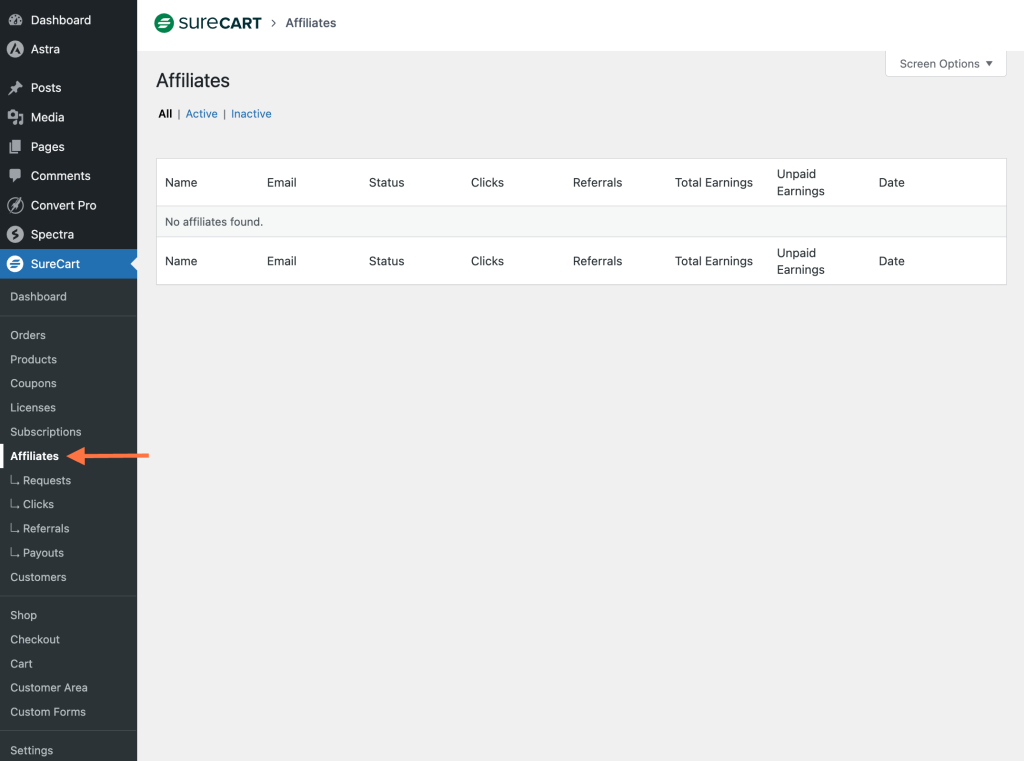
Affiliate management in SureCart is handled from the Affiliates section in the WordPress dashboard. The main areas available are:
- Requests
- Clicks
- Referrals
- Payouts
Navigate to WordPress Dashboard → SureCart → Affiliates to access these sections.
Review and Approve Affiliate Requests
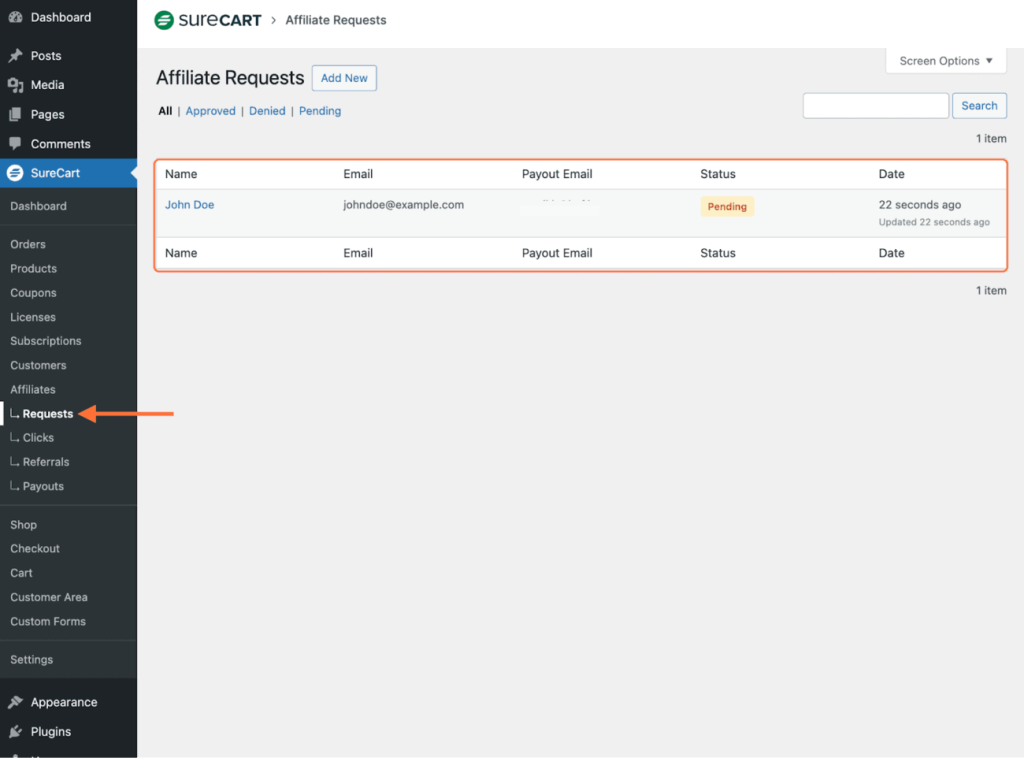
When affiliates sign up using the affiliate registration form, their requests appear in the Requests section.
- Go to SureCart → Affiliates → Requests.
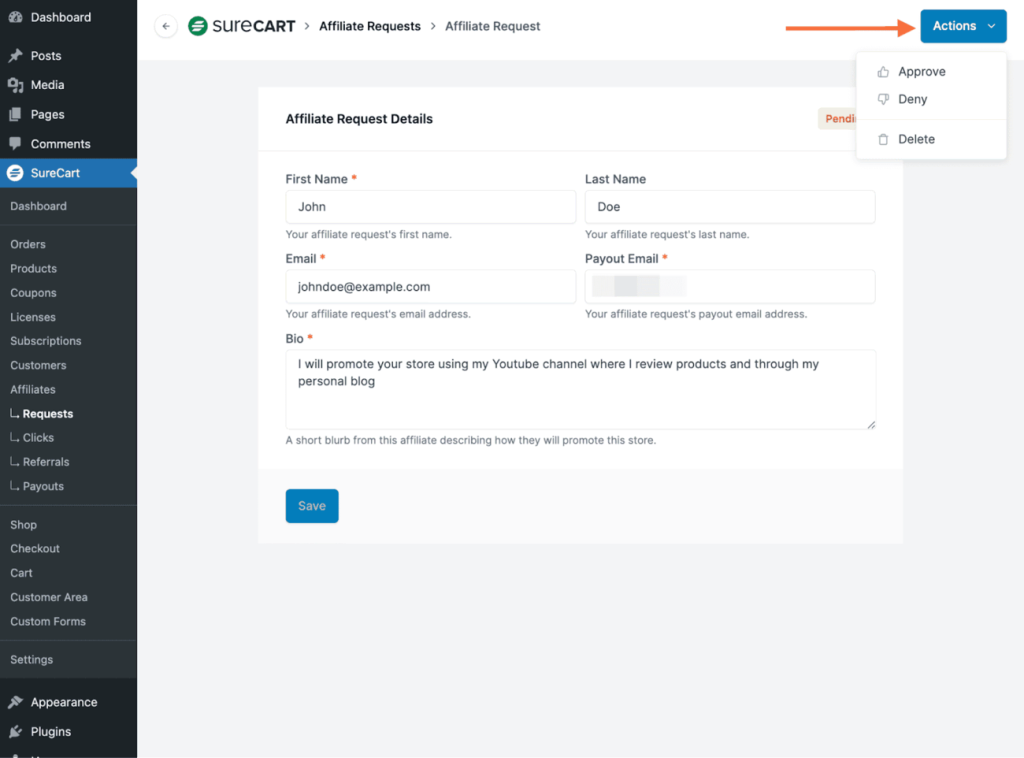
- Click an affiliate name to view the request details.
- Use the Actions menu to approve, deny, or delete the request.
Once approved, the affiliate receives an email notification with instructions to access the affiliate portal.
To complete access, the affiliate must:
- Click Go to Affiliate Portal in the email.
- Verify their email address using the provided verification code.
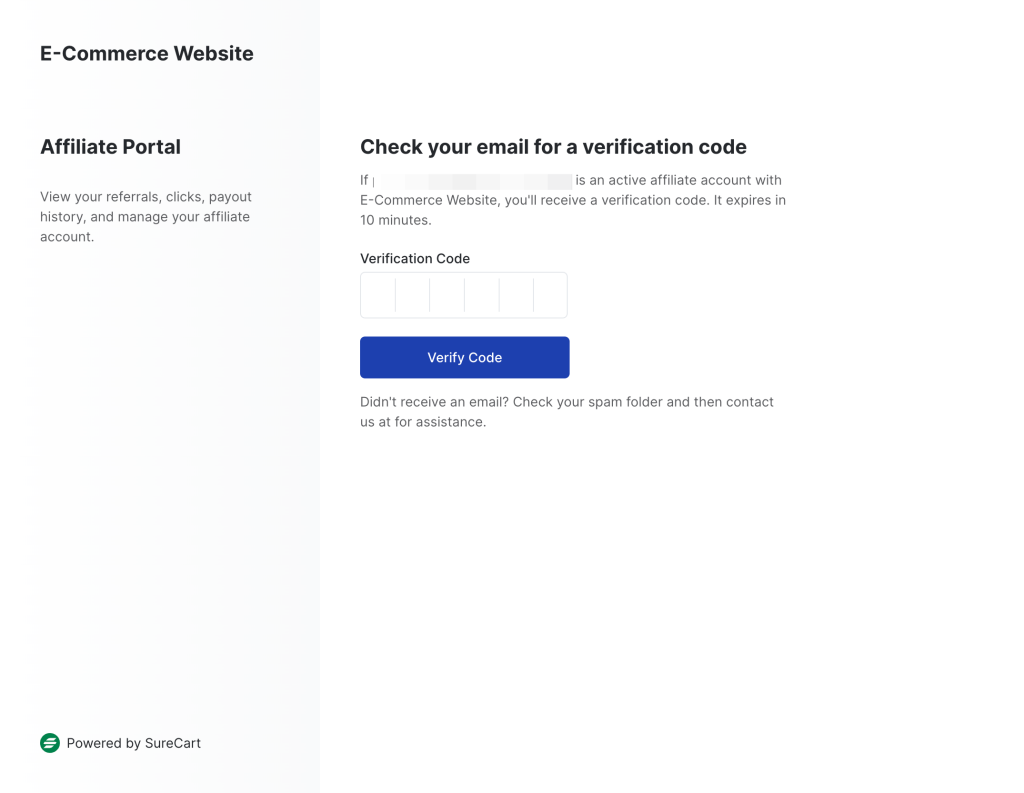
After verification, the affiliate is logged into the affiliate portal at:
https://your-store-id.surecart.com/affiliatesMonitor Affiliate Clicks
The Clicks section displays activity generated from affiliate referral links.
- Go to SureCart → Affiliates → Clicks.
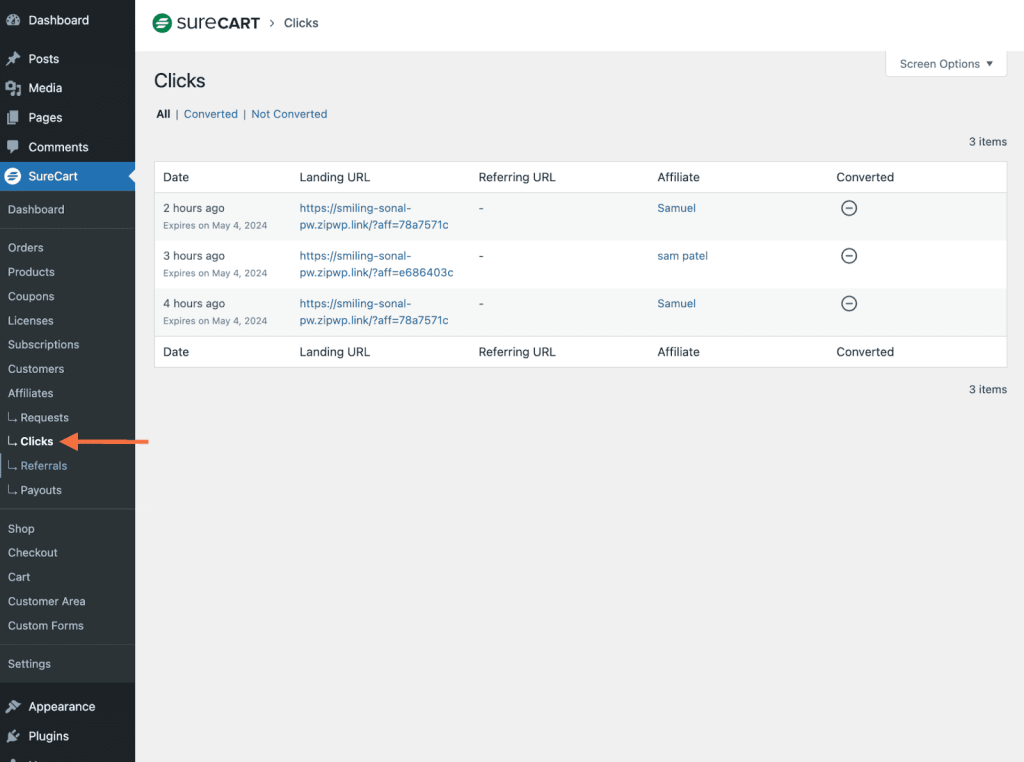
This section shows:
- Affiliate name
- Referral URL
- Click status
You can filter clicks using the following tabs:
- All
- Converted
- Not Converted
This helps identify which affiliates are generating traffic and conversions.
Manage Referrals
A referral is recorded when a customer clicks an affiliate link and completes a purchase.
- Go to SureCart → Affiliates → Referrals.
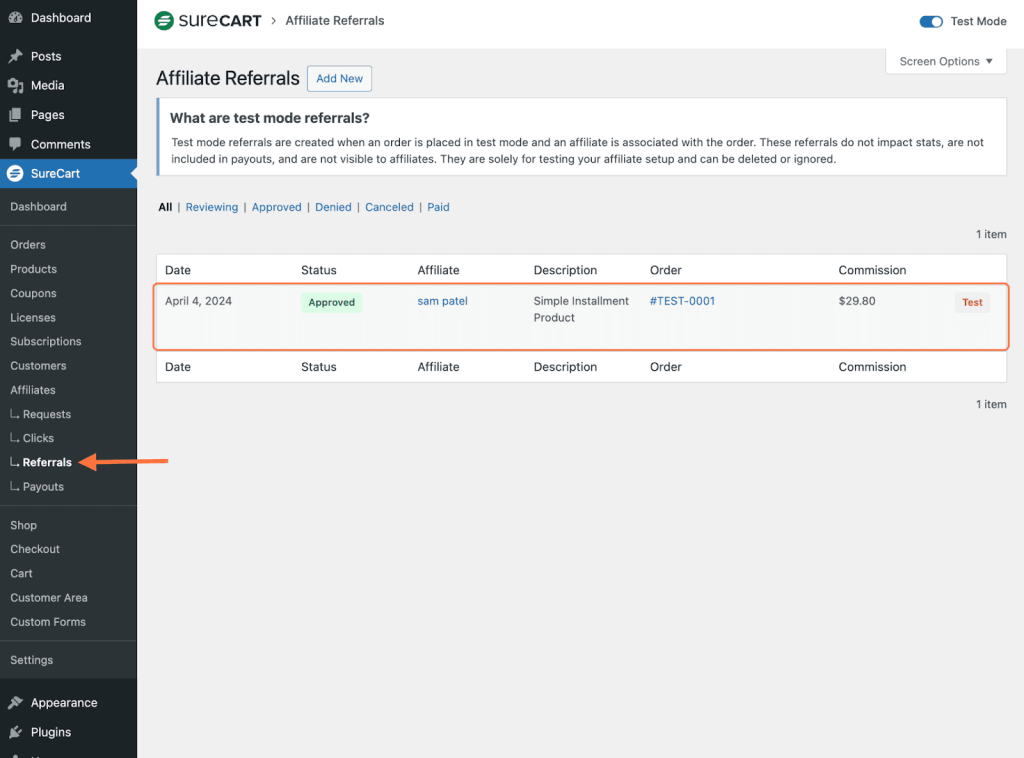
From this screen, you can:
- Approve referrals
- Deny referrals
- Edit referrals
- Delete referrals
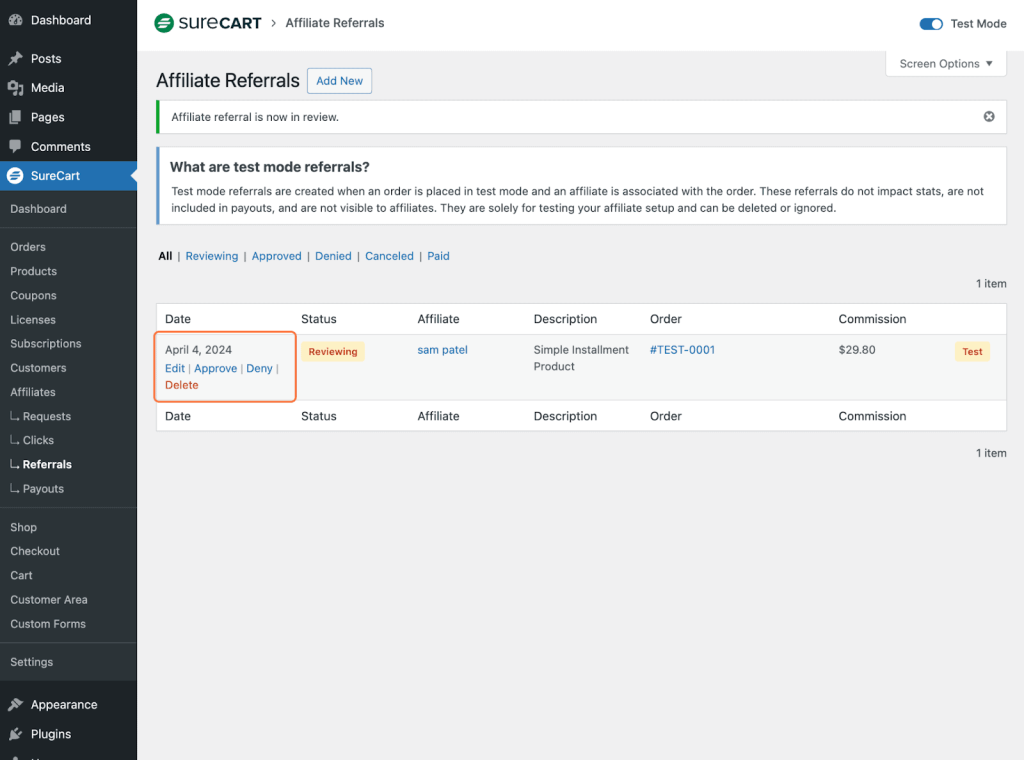
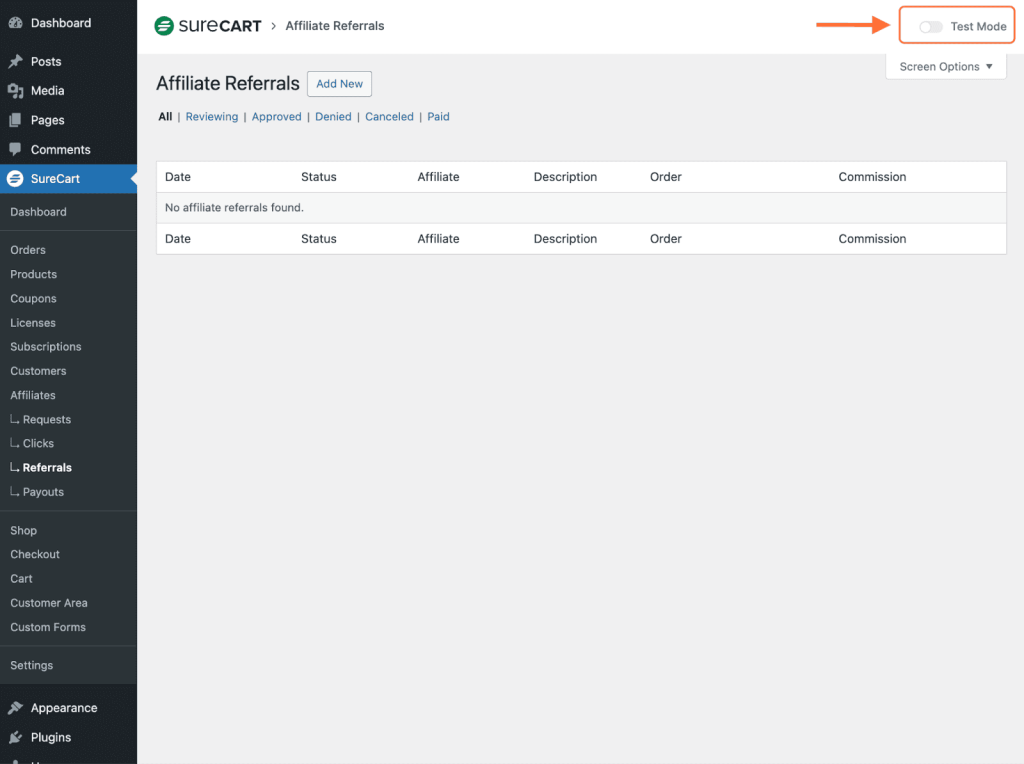
An optional test mode is available to track referrals without affecting live data. This can be useful when validating affiliate workflows before launch.
Pay Affiliates Individually
Approved referrals generate commissions that can be paid through the Payouts section.
- Go to SureCart → Payouts.
- Click Add New.
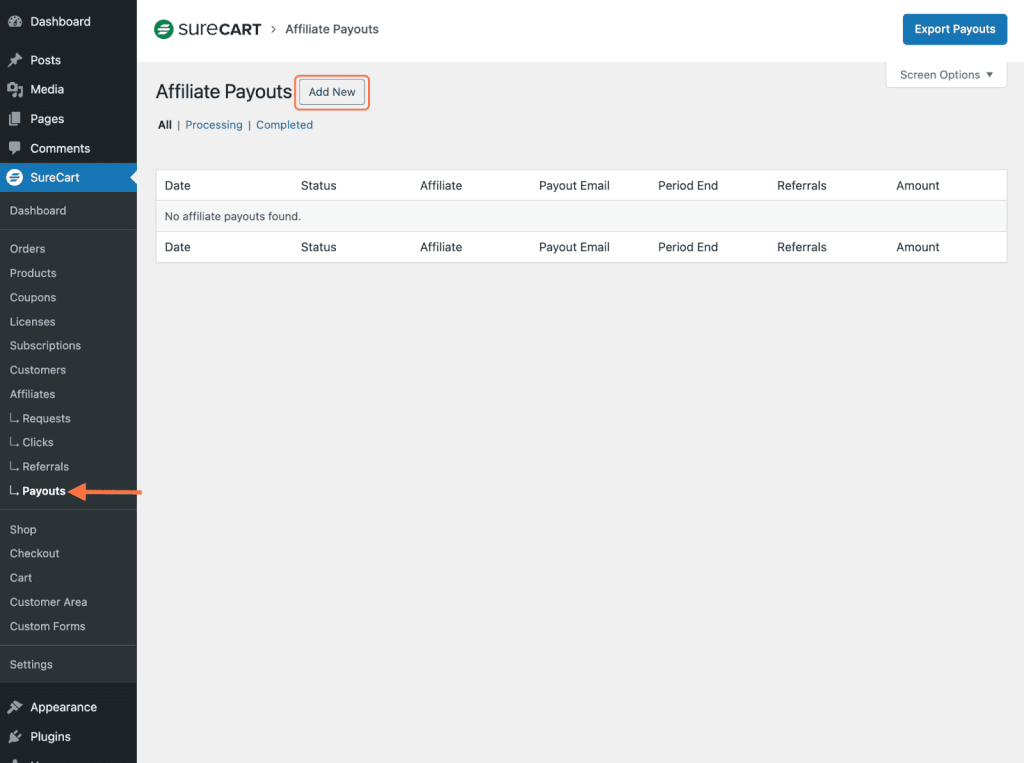
- Select the affiliate to be paid.
- Choose the end date for referral consideration.
- Click Create.
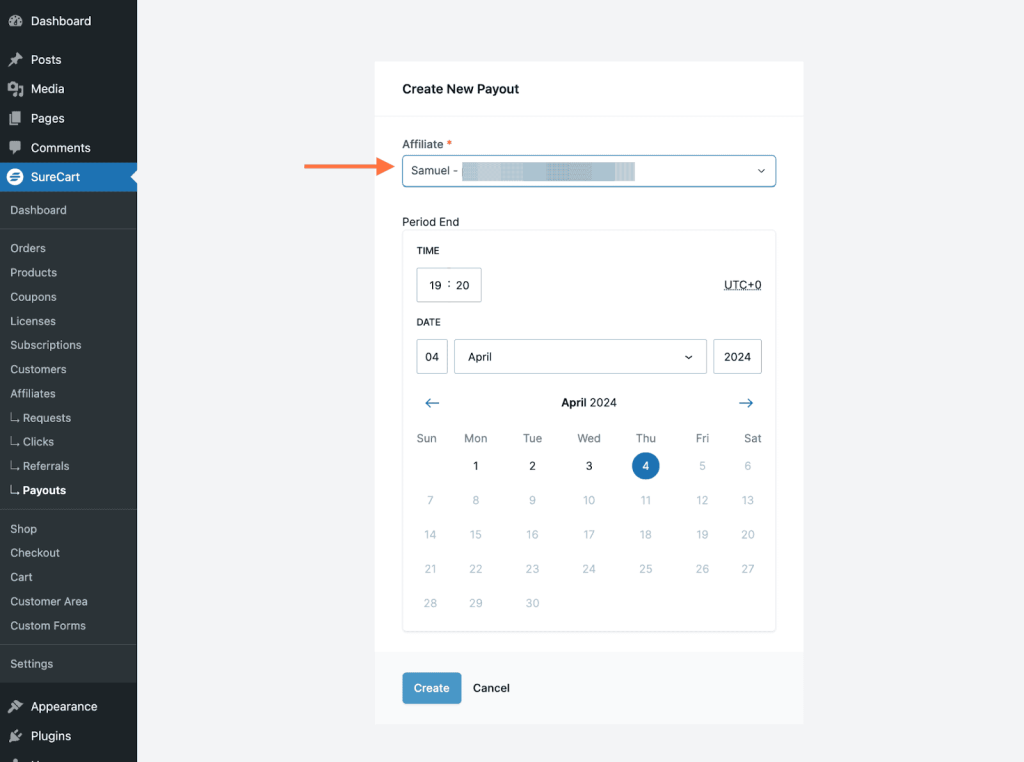
SureCart generates a list of eligible payouts and assigns them a Processing status.
Process Bulk Affiliate Payouts
Bulk payouts allow payments to multiple affiliates at once using payout batches.
- Go to SureCart → Affiliates → Payouts.
- Click Add New and select Payout Batch.
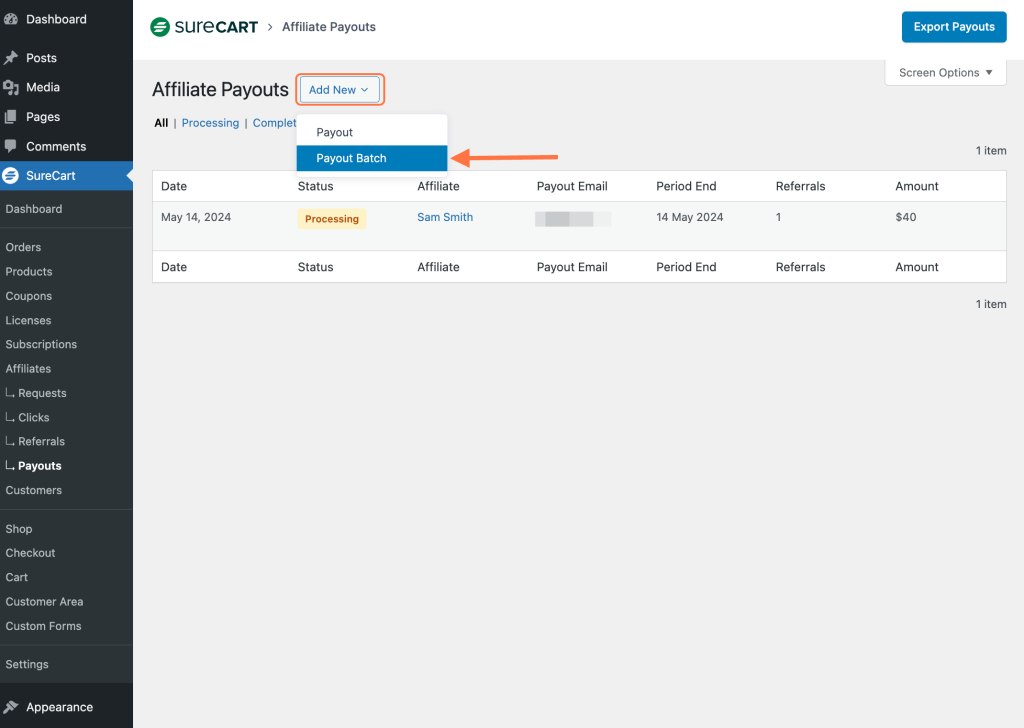
- Enter the minimum commission amount required for inclusion.
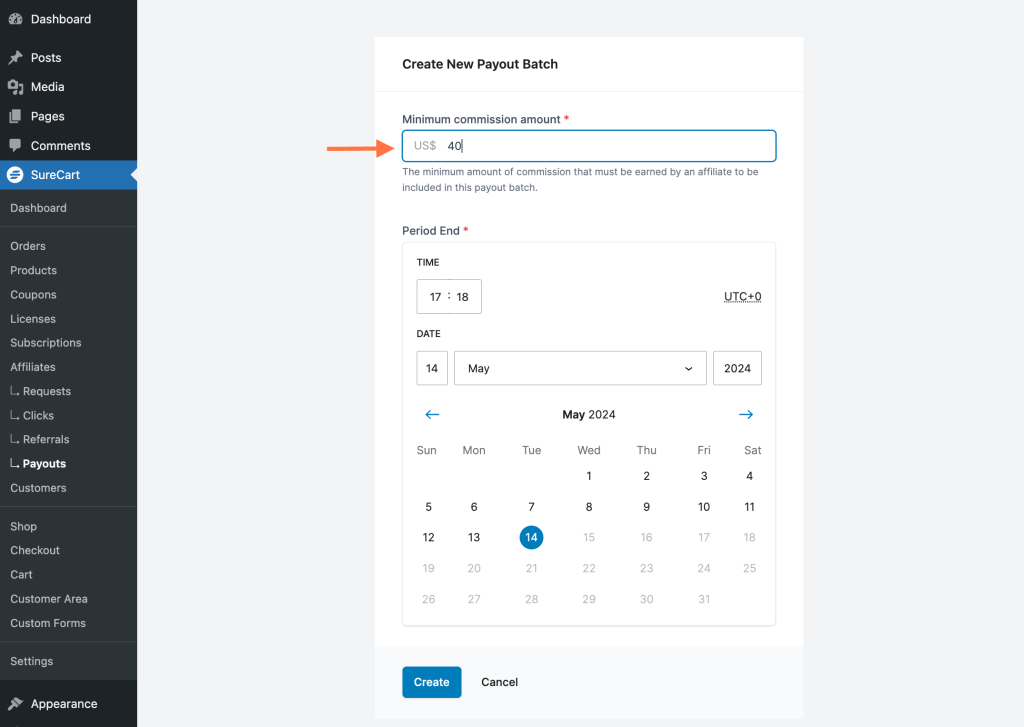
- Select the end date and time for referral consideration.
- Click Create.
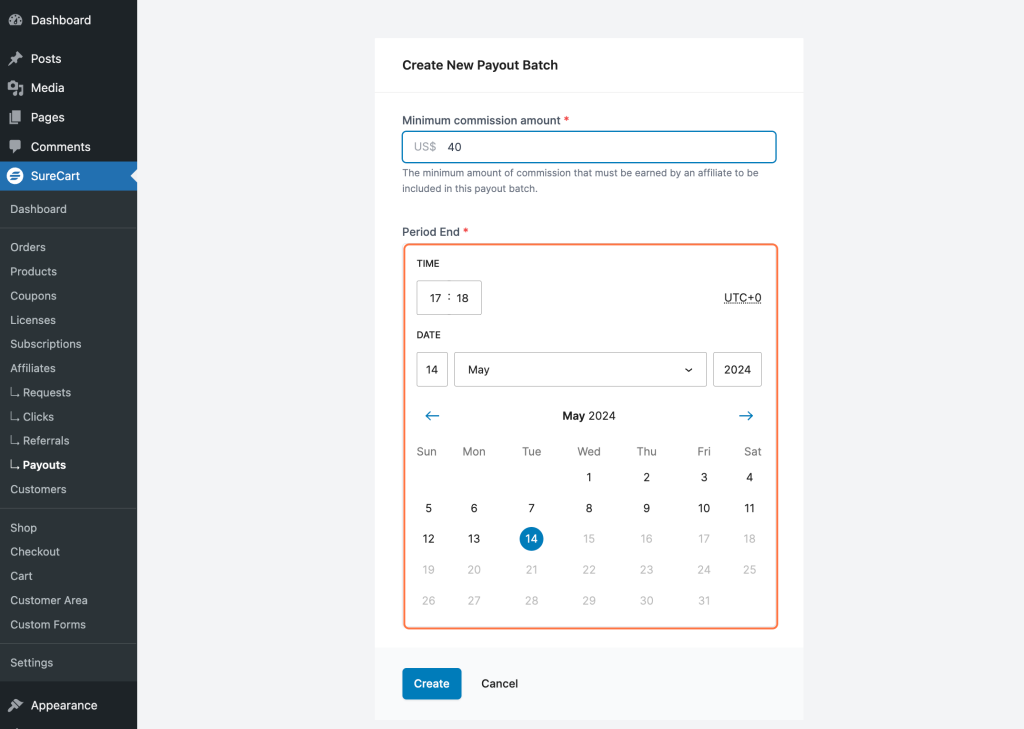
Only affiliates who meet the minimum commission threshold within the selected period are included in the batch.
Note: Payments are not processed automatically. Merchants must complete payments manually outside the platform.
Understand the Affiliate Portal
Affiliates access their portal at:
https://your-store-id.surecart.com/affiliates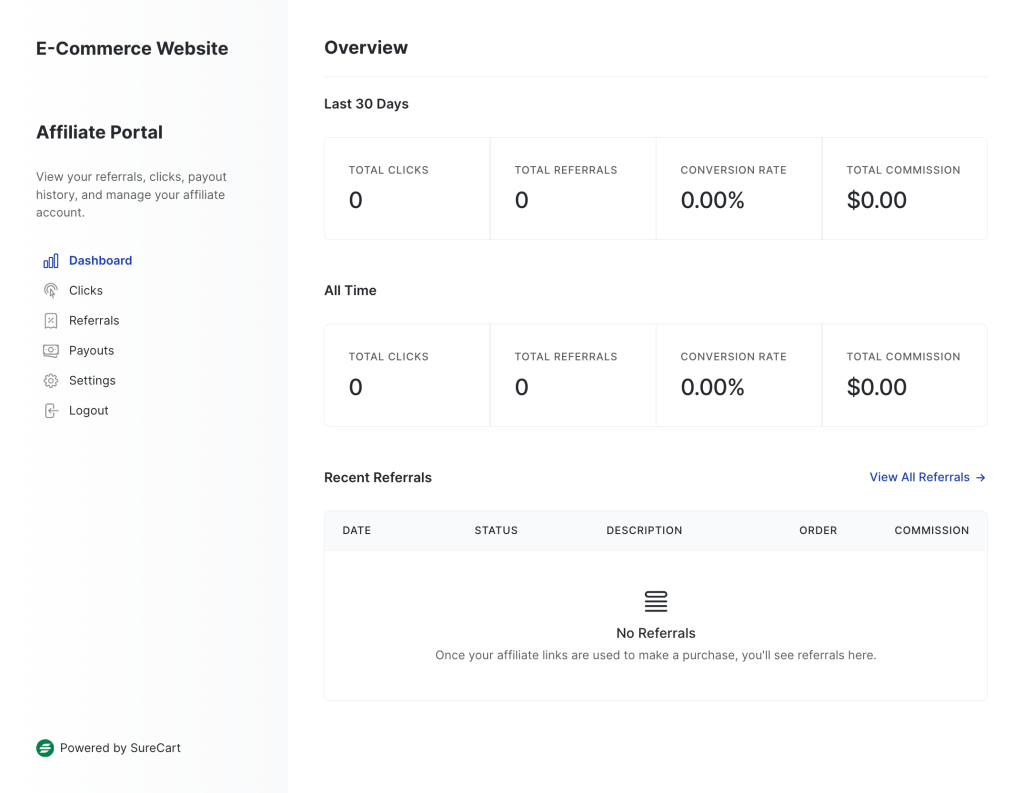
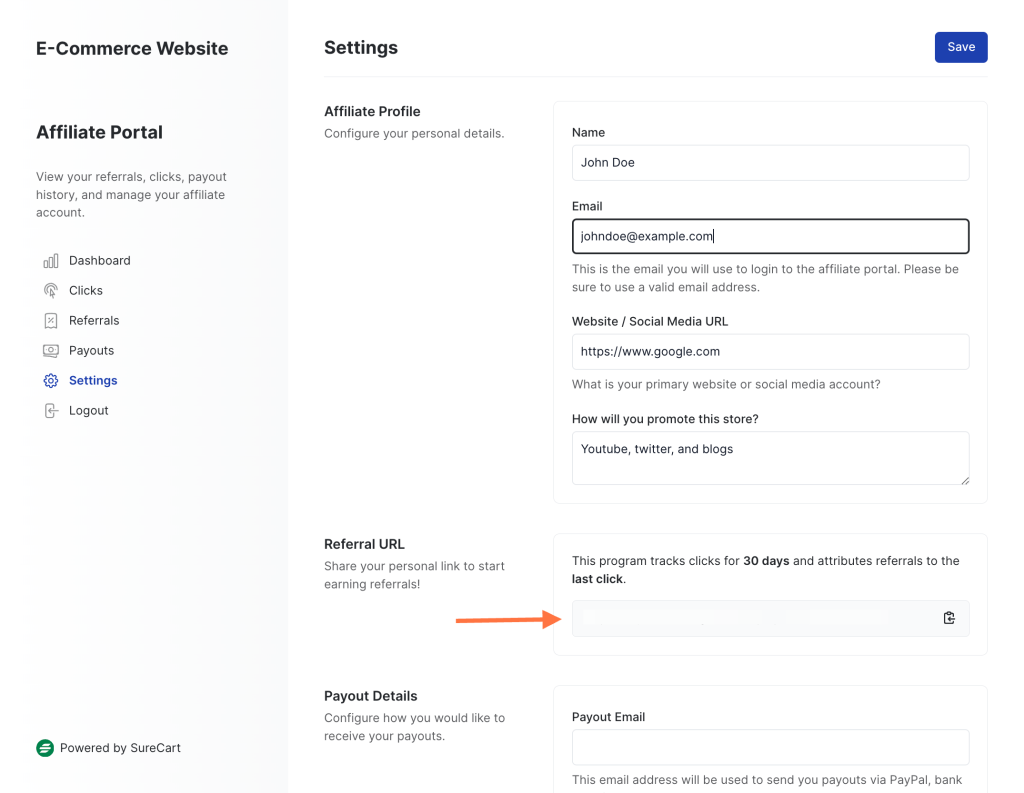
From the affiliate portal, affiliates can:
- View clicks, referrals, and earnings
- Access their unique referral URL
- Enter or update their payout email address
This portal allows affiliates to track performance and manage their account independently.
Expected Outcome
After following this guide, affiliate activity can be reviewed, approved, tracked, and paid efficiently. Affiliates gain access to their portal, while merchants maintain full control over approvals and payouts.
Notes and Limitations
- Affiliate payouts must be completed manually by the merchant.
- Test mode referrals do not affect live affiliate data.
- Only approved referrals are eligible for payouts.
FAQ
We don't respond to the article feedback, we use it to improve our support content.