Black Friday orders can arrive late when a store promises dates its carrier, packing capacity, or stock can’t support.
Here’s an example. A customer orders a gift from your store on December 15. Your site says “ships in 2 to 3 business days,” so the box leaves on December 18. That’s one day after USPS’s recommended last date for Ground Advantage, December 17. On December 26, the email lands: “Where’s my order?”
Carrier dates aren’t your dates. Your real deadline is the carrier’s date minus the time you need to pack, with a little room for mistakes. These holiday shipping tips walk you through eight steps in the order you should do them, starting with that deadline.
Quick answer: Set order cutoffs from each carrier’s recommended last date, minus your processing time and a buffer day. Then check packing capacity and stock, and price free shipping from your label cost. Budget for peak fees, test your setup, stock supplies, update your shipping policy, and plan for delays and returns.
- Your Black Friday Shipping Checklist at a Glance
- Step 2: Check Your Packing Capacity and Stock Before the Rush
- Step 3: Set Free Shipping Rules That Protect Your Margin
- Step 4: Budget for Peak Season Surcharges
- Step 5: Test Your Shipping Setup Before Black Friday
- Step 6: Stock Packaging and Set Up Your Packing Station
- Step 7: Update Your Shipping Policy and Tell Customers What to Expect
- Step 8: Plan for Delays, Lost Packages, and Holiday Returns
- Starting Late? Last-Minute Holiday Shipping Tips
- Why SureCart Is Worth a Look for Holiday Shipping
- Conclusion
Your Black Friday Shipping Checklist at a Glance
Use this table as a one-page plan for all eight holiday shipping tips, then work through each step below.
| Task | When | Done when |
|---|---|---|
| Set order cutoff dates | 2 or more weeks before Black Friday | A cutoff is written down for each shipping service you offer |
| Check packing capacity and stock | 2 or more weeks before Black Friday | You know how long the full backlog will take to clear, have estimated per-order processing time, and have checked best-seller stock against expected demand |
| Set free shipping rules | 2 or more weeks before Black Friday | Your threshold is set and tested at and just below the minimum |
| Budget for peak surcharges | 2 or more weeks before Black Friday | Your average label cost includes this season’s surcharges |
| Test your shipping setup | The week before Black Friday | Test-mode checkout and shipping-rule checks are complete; real carrier quotes are checked; if your live workflow needs confirming, one controlled live-label purchase, print, and void test is done; customer account visibility has been checked |
| Stock packaging | The week before Black Friday | Supplies for your sale estimate are on hand |
| Update your shipping policy and publish dates | The week before Black Friday | Your policy is updated and your notice is live |
| Plan for delays and returns | Before your December cutoffs | Your reply template and documented delay-handling process are saved |
Step 1: Set Your Holiday Order Cutoff Dates
Your order cutoff is a planning date: the last day a customer can order and still give you time to pack and hand the package to your carrier before the carrier’s recommended last date. It always lands before the carrier’s date. It isn’t a guaranteed Christmas delivery date. Your real deadline also depends on when your carrier picks up or accepts packages, so a box packed on time but accepted late can still miss the delivery window.
To make this concrete, meet Dana. She runs a WordPress store that sells hand-poured candles, ships with USPS, and needs 2 business days to pack an order in December.
The Cutoff Formula
Order cutoff = carrier’s recommended last date, minus 1 business day of buffer, minus your processing time in business days.
Count business days only (Monday to Friday) and skip any day your carrier is closed. The 1-day buffer is our planning choice, not a USPS rule. It covers a missed pickup or a slow afternoon.
Here’s how the days count:
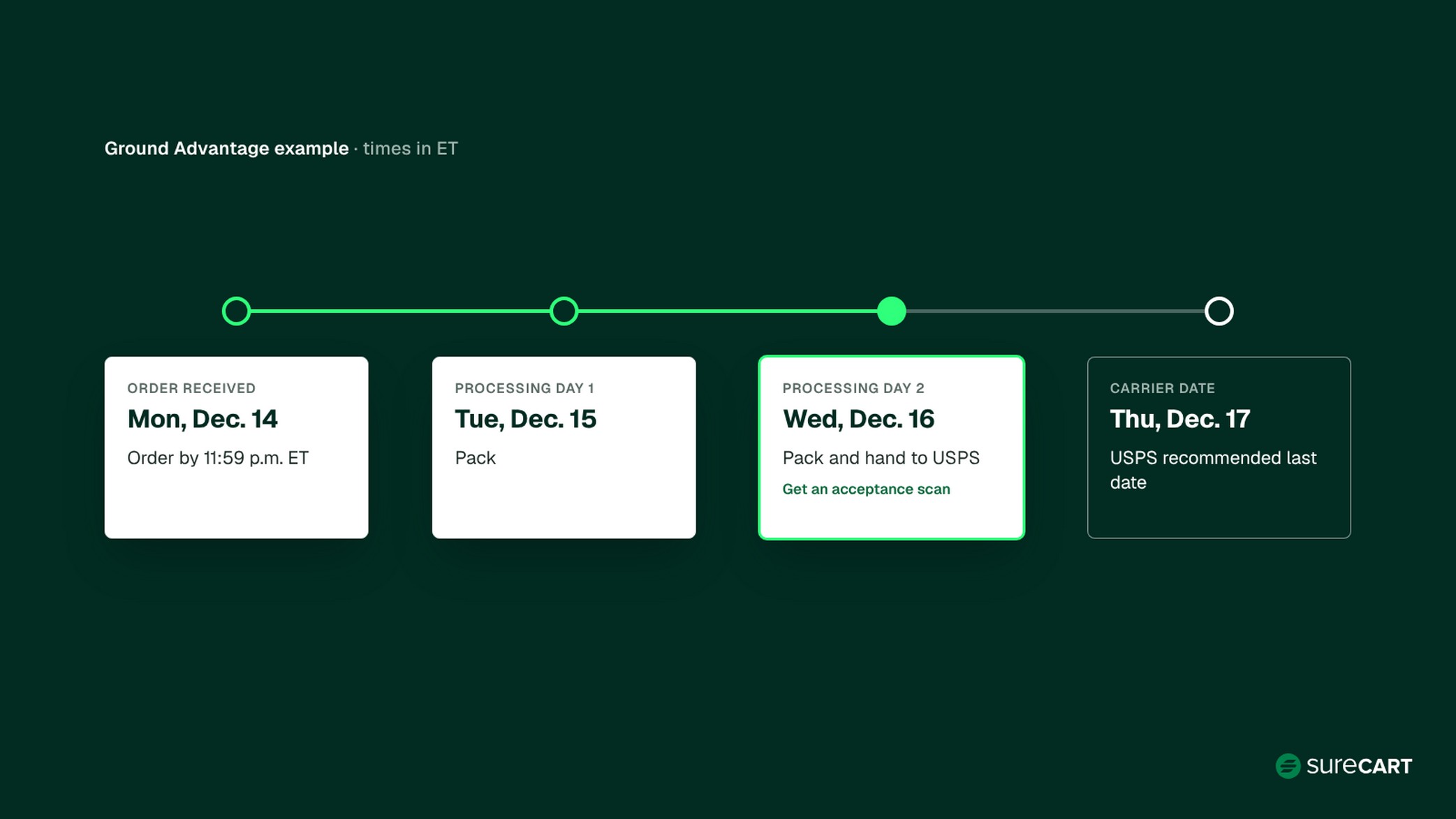
- An order placed by your cutoff (11:59 p.m. in your store’s time zone) counts as received that day.
- Processing starts the next business day.
- The package goes to the carrier at the end of your last processing day, one business day before the carrier’s date.
- Weekend orders count as received Monday and start processing Tuesday.
- If you pack and ship morning orders the same day, you can count the order day as processing day 1. That moves your cutoff one business day later.
Handing a package to a carrier isn’t the same as the carrier accepting it. Check your scheduled pickup time, or the last acceptance time at your drop-off location, and plan to hand packages over before it. When you can, get an acceptance scan or a receipt on the day you hand it off.
Dana’s Cutoff Worksheet
For Ground Advantage, Dana’s order comes in Monday, December 14 by 11:59 p.m. ET. She packs on Tuesday and Wednesday, then hands the box to USPS on Wednesday, December 16, one business day before USPS’s December 17 date.
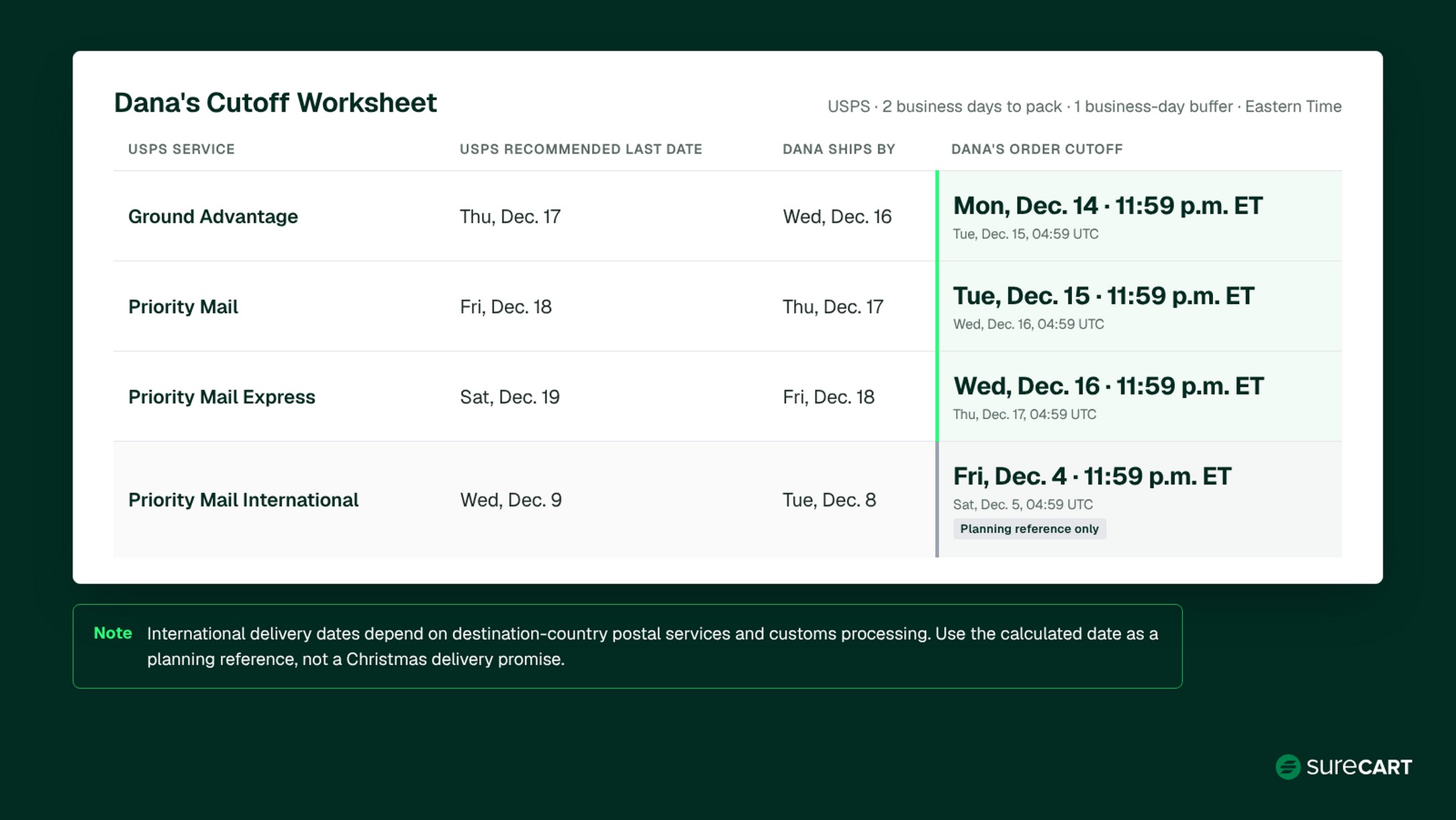
| USPS service | USPS recommended last date | Dana ships by (1 business day early) | Dana’s order cutoff (2 business days to pack) |
|---|---|---|---|
| Ground Advantage | Thu, Dec. 17 | Wed, Dec. 16 | Mon, Dec. 14, 11:59 p.m. ET (Tue, Dec. 15, 04:59 UTC) |
| Priority Mail | Fri, Dec. 18 | Thu, Dec. 17 | Tue, Dec. 15, 11:59 p.m. ET (Wed, Dec. 16, 04:59 UTC) |
| Priority Mail Express | Sat, Dec. 19 | Fri, Dec. 18 | Wed, Dec. 16, 11:59 p.m. ET (Thu, Dec. 17, 04:59 UTC) |
| Priority Mail International | Wed, Dec. 9 | Tue, Dec. 8 | Fri, Dec. 4, 11:59 p.m. ET (Sat, Dec. 5, 04:59 UTC). Planning reference only |
Note: International delivery dates depend on destination-country postal services and customs processing. Use the calculated date as a planning reference, not a Christmas delivery promise.
These dates assume Dana packs Monday to Friday and her store is closed on weekends. They also assume USPS has no extra closures on December 15 to 18 (or December 7 and 8 for the international row). If a closure lands on one of those days, skip it and move the cutoff one business day earlier. Show your cutoff as an end-of-day time in your own time zone, and check how your store displays it.
Holiday Shipping Deadlines by Carrier
Here are this season’s holiday shipping deadlines for the services most small stores use. Use them as the “carrier date” in the formula above.
| Carrier and service | Recommended last day to ship | Notes |
|---|---|---|
| USPS Ground Advantage | Thu, Dec. 17 | For expected delivery before Dec. 25, contiguous U.S. |
| USPS Priority Mail | Fri, Dec. 18 | Same |
| USPS Priority Mail Express | Sat, Dec. 19 | Same |
| USPS Priority Mail International | Wed, Dec. 9 | All listed destinations; delivery depends on customs and the destination country’s postal service |
| USPS Priority Mail Express International | Wed, Dec. 16 | Same customs and destination caveat |
| FedEx Ground and Home Delivery | Dec. 17 (5-day transit) to Dec. 23 (1-day transit) | Check the transit time for your lane. FedEx bases these dates on a regular scheduled pickup or a drop-off at a staffed FedEx location |
| FedEx Express Saver | Mon, Dec. 21 | – |
| FedEx 2Day | Tue, Dec. 22 | – |
| UPS Ground | No single date published | Check transit time for your lane with UPS Calculate Time and Cost; no UPS Ground pickup on Dec. 24 |
This season’s dates, checked November 12, 2026, from the USPS holiday shipping deadlines, FedEx’s last days to ship chart, and the UPS holiday schedule. Carriers can change them, so recheck before you publish your own dates.
These are recommendations, not guarantees. USPS notes that “actual delivery date may vary and is based on origin, destination, Post Office acceptance time, and other conditions.” If you ship to Alaska, Hawaii, Puerto Rico, or U.S. territories, USPS lists no Ground Advantage date and warns of “a 10-day or more service expectation,” so check the estimated delivery date for the destination ZIP Code.
See How SureCart Handles Holiday Shipping Rates, labels, and tracking for physical products, managed from your WordPress dashboard. Explore shipping features
Step 2: Check Your Packing Capacity and Stock Before the Rush
Work out how many days your sale weekend will take to pack, and whether you have the stock to fill it, before you promise any ship date.
There are two numbers here, and they answer different questions.
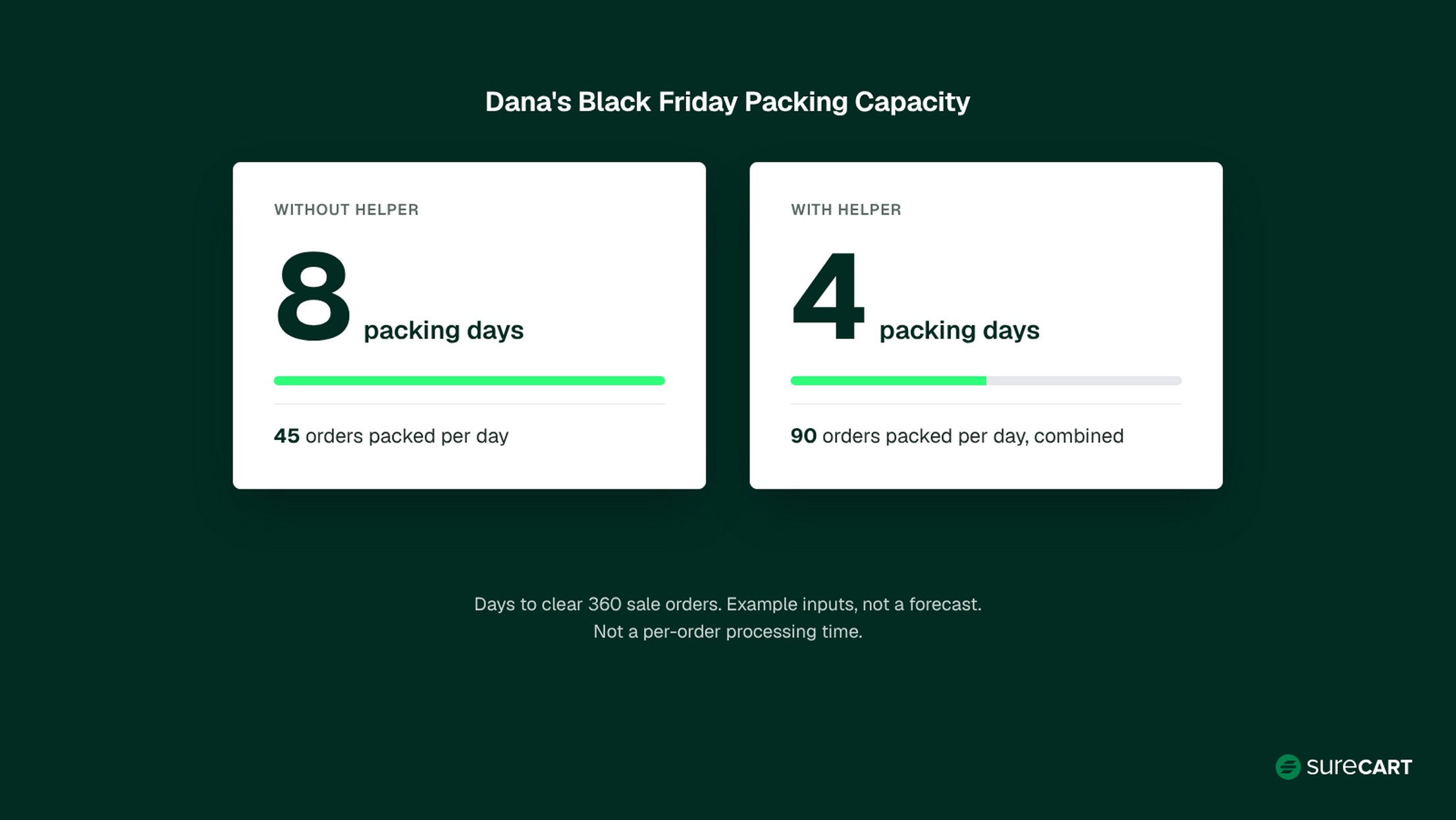
Backlog capacity is how long the whole sale queue takes: orders received during the sale divided by orders packed per day. Say Dana receives 360 orders from Black Friday to Cyber Monday. Packing alone at 45 orders a day, she needs 8 packing days. With a helper, they can pack 90 orders combined per business day, so the queue takes 4 packing days.
Per-order processing time is what one customer actually waits. In this example, Dana receives 90 orders on each calendar day from Friday through Monday. Saturday and Sunday orders count as received on Monday. So 90 orders count as received Friday, and 270 count as received Monday. Dana starts packing the sale queue on Monday, November 30. Alone, her last eligible sale order, placed Monday night, is handed to the carrier by Wednesday, December 9, after up to 7 business days of processing. With a helper, the latest eligible order is handed to the carrier by Thursday, December 3, after up to 3 business days of processing.
So 8 days is how long the whole queue takes, not how long any one order waits. This estimate assumes orders are packed in the order they arrive. If you prioritize certain products or orders, your actual processing times may differ.
The dates also assume Dana packs her full rate every business day, nothing goes wrong, no new orders arrive after Cyber Monday, and stock and packaging are available throughout. They assume Dana has a scheduled carrier pickup or can drop off the packed orders on each handoff day, including December 9 when working alone or December 3 with a helper. If she misses a pickup or acceptance window, dispatch moves to the next day the carrier operates. If real orders run higher or land earlier in the weekend, she re-runs the numbers and updates her notice that day.
Finally, count your stock. Compare inventory of your best sellers with your sale estimate. Packing speed doesn’t help once a popular item sells out, so decide now whether you’ll close the listing or show a later ship date.
Step 3: Set Free Shipping Rules That Protect Your Margin
A free shipping threshold covers its own cost only when the extra spend it brings in pays for the shipping charge you stop collecting. Here’s an illustrative starting point, not a universal break-even formula:
Threshold = average order value + (shipping charge you give up ÷ margin on added items)
- Shipping charge you give up is what customers pay you for shipping today on an average order. It isn’t always your full label cost. If you pass the whole label cost on to customers, it’s that full amount. If you charge a $5 flat fee, it’s $5, because you were already absorbing the rest of the label. If you already ship everything free, a threshold adds no new shipping cost, and this formula doesn’t apply.
- Margin on added items is what you keep from each extra dollar a customer spends, after product cost and other per-order variable costs such as payment processing and SureCart’s 2.9% transaction fee on the free Launch plan.
Dana’s average order is $45. She currently passes her full label cost on to customers, which averages $9 including peak fees, and she keeps 50% of each added dollar after product cost and fees. So $9 ÷ 0.50 = $18, and $45 + $18 = $63. An order that grows from $45 to $63 adds $18 of revenue, and half of that, $9, replaces the shipping charge she no longer collects.
If Dana charged a $5 flat shipping fee instead, free shipping would cost her $5 per qualifying order, not $9. Then $5 ÷ 0.50 = $10, and her threshold would be $45 + $10 = $55.
$63 is Dana’s example, not a recommended threshold, so run the formula with your own shipping model and numbers. It assumes all the extra spend is new money, meaning the customer would otherwise have bought at your average. It doesn’t account for product mix, extra packaging for larger orders, returns, ad spend, or overhead. It’s a check on one cost, not a full profitability calculation.
To set it up in SureCart, go to Promotions > Dynamic Pricing > Add New and pick the Free-shipping minimum template (see how Dynamic Pricing works). Add a name and the display name customers will see, and set your minimum.
Before you publish, decide which orders free shipping should cover. You may want free standard shipping in your home country without also making express or international delivery free. SureCart’s Dynamic Pricing guide lists a “Selected Shipping Method Name” condition, and the feature page mentions shipping country conditions. If your rule offers them, add conditions so it applies only to the methods and destinations you intend. SureCart sets shipping zones by country, and each zone has its own methods and rates, so review every zone you ship to.
Then publish and test the rule before the sale:
- Place test checkouts just below and at your threshold in each shipping zone, with every method offered there, including any live carrier rates.
- Confirm free shipping appears only on the methods and destinations you chose.
- Repeat a test with a coupon applied, and with any other active Dynamic Pricing rules that could match the same cart. SureCart manages coupons separately from Dynamic Pricing and doesn’t guarantee which applies first, so check the final total yourself.
- If more than one rule can change shipping, check the shipping strategy in Dynamic Pricing’s Global Settings (All, First, Smallest, or Largest) so customers get the result you expect.
That way you see exactly what customers see.
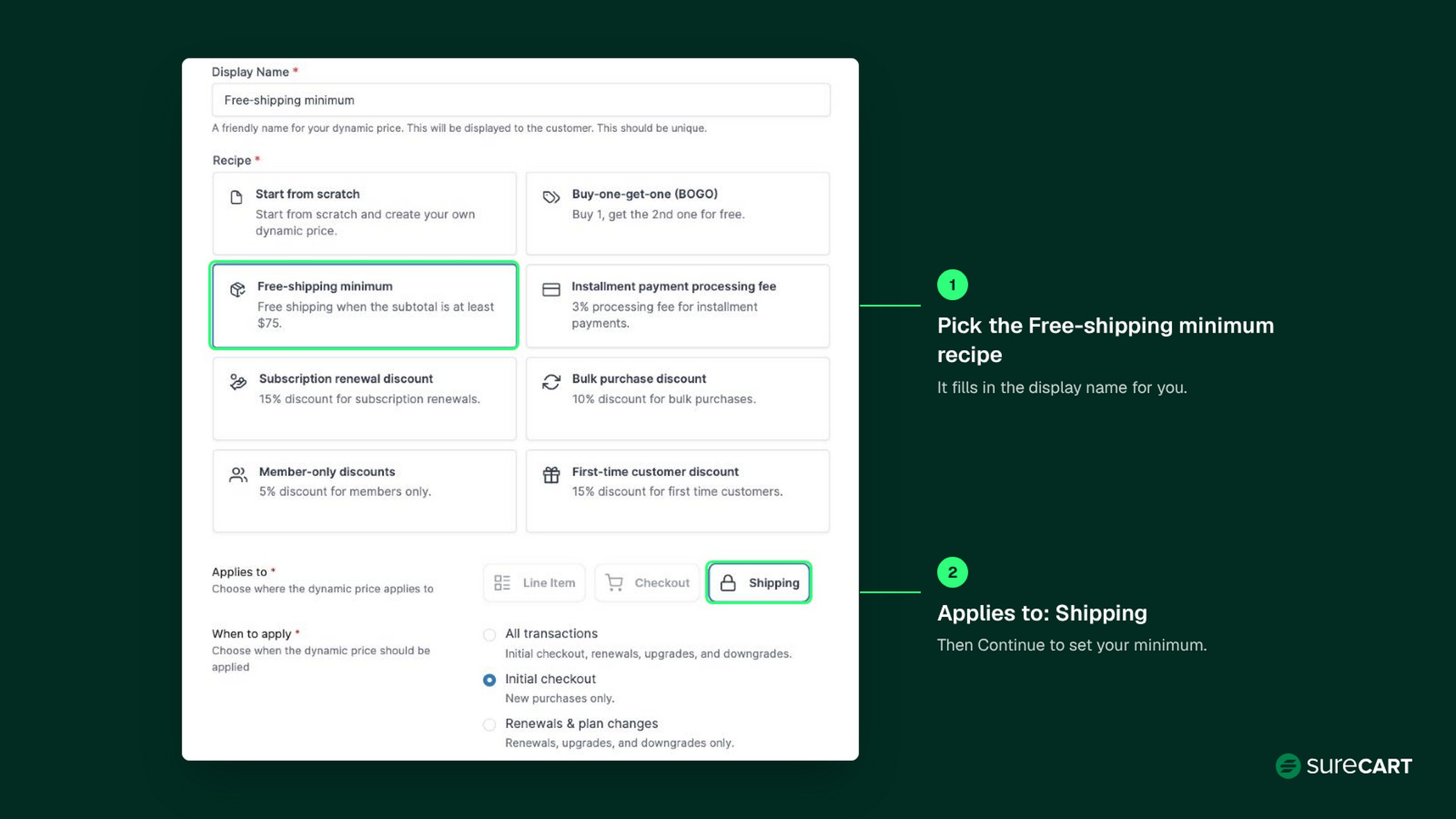
For more ways to raise order value, see how to increase average order value. For setup details, see the Dynamic Pricing guide, and for other rule ideas, these Dynamic Pricing use cases.
Step 4: Budget for Peak Season Surcharges
Peak season shipping costs more because carriers add temporary fees on top of normal rates. The amounts below are the carriers’ published standard surcharges for this season, not the total you’ll pay. Other surcharges, handling fees, account-specific charges, and contract terms can all change your final label cost.
- USPS has temporary holiday prices on Priority Mail Express, Priority Mail, Ground Advantage, and Parcel Select through midnight Central on January 17.
- UPS publishes a standard Ground Residential Demand Surcharge of $0.75 per package from November 22 to December 26 (see UPS’s current Demand Surcharges schedule). UPS says these surcharges apply in addition to all other applicable charges.
- FedEx publishes a fixed Ground Residential and Home Delivery demand surcharge of $0.80 per package from November 23 to December 27 (see FedEx’s current demand surcharges page).
Some packages cost more. Both carriers charge separate, much higher demand surcharges on packages that need additional handling or are oversize. At peak, the Additional Handling demand surcharge is $11.90 per package at UPS and $11.85 at FedEx. Shippers sending more than 20,000 packages a week can also pay tiered charges of up to $8.00 per package.
These rates change often, so check the carriers’ current schedules before you budget. Add the fees that apply to your packages to the average label cost you used in Step 3, then compare the rate shown when you buy each label.
Step 5: Test Your Shipping Setup Before Black Friday
Run two separate tests before real orders arrive. They rely on two different settings, so it helps to keep them apart:
- SureCart Test Mode is your store’s checkout test environment. Orders and payments placed in it are test transactions.
- Shippo’s test connection is a separate Shippo API token. SureCart holds one Shippo connection per mode, each with its own token. While Shippo is connected in test mode, the rates returned at checkout are simulated.
Test 1 checks your checkout and shipping rules with simulated rates. Test 2 checks the real label flow, which needs a live Shippo connection and a paid order, and may cost you a real label fee. Neither test tells you exactly what your labels will cost, so check real carrier quotes separately.
Test 1: checkout and shipping rules in test mode
- Check zones and rates. Under SureCart > Settings > Shipping (zones and rates guide), confirm your zones cover every country you sell to and that each rate type you use (flat, weight-based, order-price, or live carrier rates through Shippo) shows at checkout.
- Test your free shipping rule just below and at the minimum, with each shipping method.
- Place a test order with a complete address, and make sure checkout asks for every field you need, including apartment or unit.
- Confirm which rates appear, not what they cost. SureCart’s Shippo guide says test keys let you test “without purchasing real labels or incurring charges,” and rates in test mode are simulated. Use this test to check that the right carriers and services show for each zone, not to check prices.
- Check real carrier quotes separately. For your most common box sizes, weights, and destinations, check prices through your live Shippo connection once it’s active. You can also cross-check with the carriers’ own tools, such as the USPS Postage Price Calculator or UPS Calculate Time and Cost. Rates through Shippo can differ from carrier retail prices. Use the live figures, plus the surcharges from Step 4, as your average label cost.
Test 2: the live label flow
- Use a live connection and a paid order. SureCart’s label guide requires a paid order containing a physical product, and carrier terms accepted in the Shippo portal for each carrier you buy labels from. A test-mode order with Shippo’s test connection lets you practice the steps, as in the screenshot below, but it doesn’t buy a real label. To confirm live label purchasing works, place a real paid order on a physical product in live mode, such as one you place yourself. It’s a real payment, so refund it afterward, and note that your payment processor may not return its fees.
- Buy, print, and void the label, and expect a possible real cost. This is a real label purchase, not a free test. Run it only when you need to confirm your live workflow, for example after connecting live Shippo keys or changing your printer, label size, or carrier. Keep it controlled: buy one label for one order, shipped to an address you control, with a service you’ll actually offer. Print it on the printer and label size you’ll use during the rush, then void it so it’s never used to ship. Voiding only requests a refund of the label cost through Shippo. Approval and timing depend on the carrier, so treat the refund as uncertain and budget for paying the full label cost. Voiding the label doesn’t refund the order payment either, so handle the test order separately.
- Check what the customer sees on their account order page.
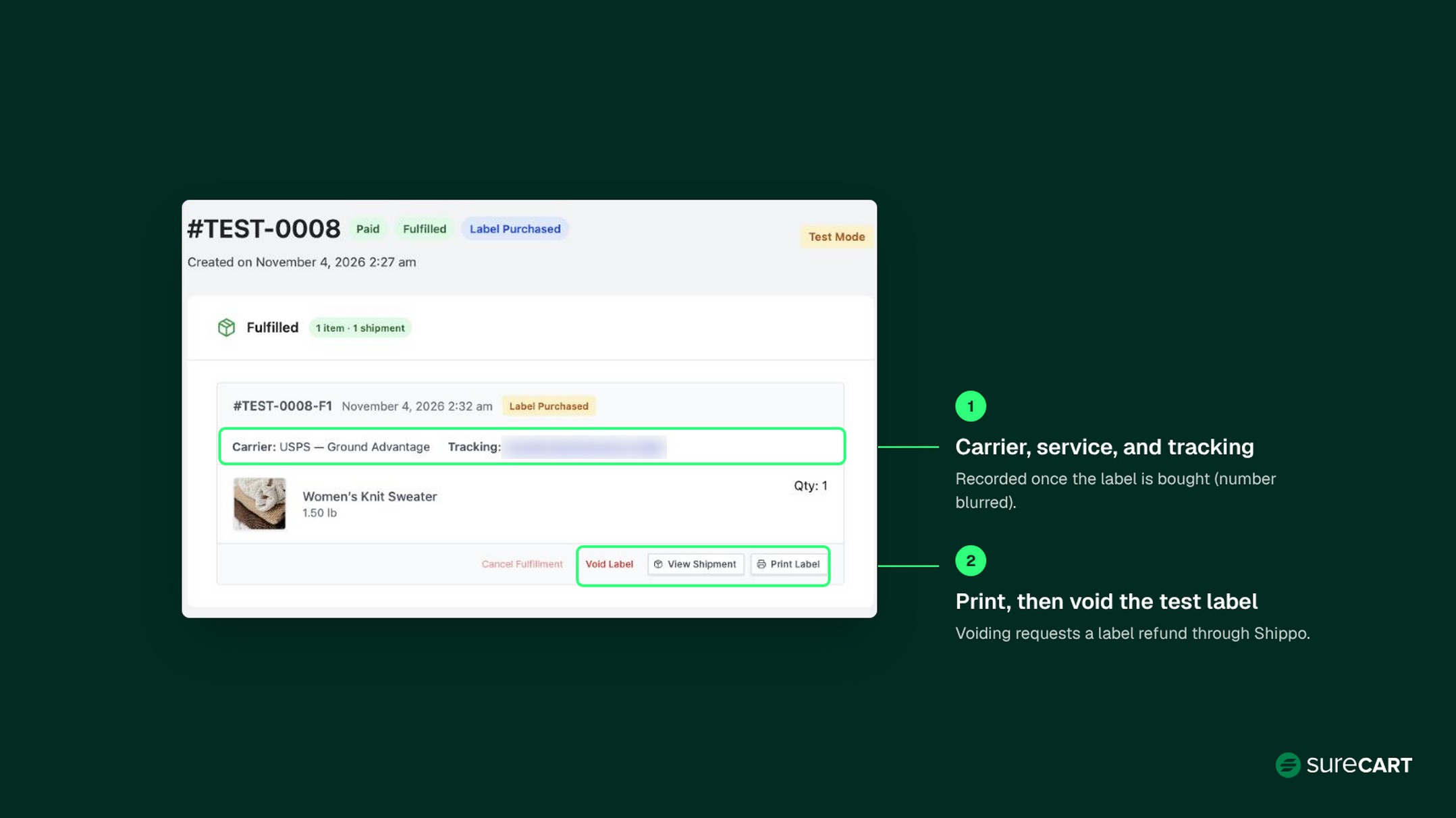
Tracking events aren’t simulated in test mode, and a voided label never ships, so you’ll confirm tracking updates on your first real shipments.
Request your live Shippo API keys and complete any required setup well before Black Friday. The same Shippo guide notes that live keys for Shippo’s API plan are requested from Shippo directly. Keep using test keys while checking checkout and shipping rules, then verify the live-label process and real prices separately. During the rush, scan new orders for incomplete or unusual addresses before you buy labels, and contact the customer first. For the full setup, see the WordPress shipping setup guide and how to purchase shipping labels.
Connect Shippo and Test Labels Today Set up your test connection now and request live keys early, so labels are ready before the first sale order. Read the Shippo setup guide
Step 6: Stock Packaging and Set Up Your Packing Station
Packaging is one of the easiest parts of your shipping setup to prepare early. Order supplies for your sale estimate, not your normal week. Use Step 2’s order count to size:
- Mailers or boxes for each product size
- Tape, label stock, and void fill
- Packing slips or inserts, if you use them
Set up one station where everything for an order sits within reach: supplies, printer, scale, and a spot for packed orders waiting for pickup.
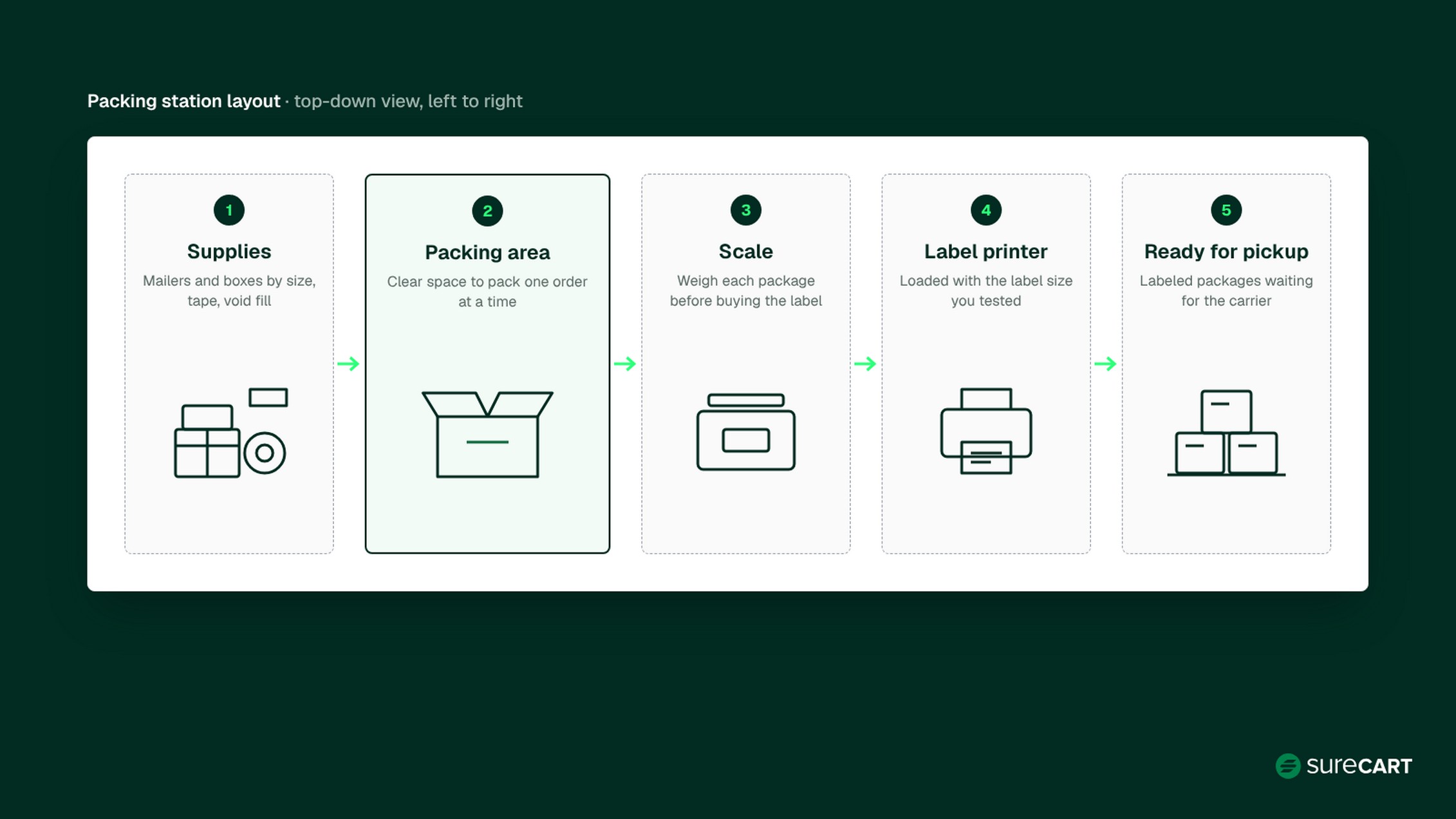
Step 7: Update Your Shipping Policy and Tell Customers What to Expect
Customers forgive a slow ship date they were told about. They don’t forgive one they weren’t.
Before Black Friday, update your shipping policy with:
- Processing time
- Estimated delivery time for each shipping method
- Shipping restrictions (places or items you don’t ship)
- Holiday cutoff dates
- Returns and refunds, including any holiday returns window
Then put your dates where shoppers will see them, in a dedicated holiday notice: site-wide, on product or cart pages, and near checkout. Keep cutoff dates out of your shipping method names. A fixed date in a method name can mislead customers whose destination has a different cutoff, and it stays there after the date has passed. Method names are better for details that don’t expire, like the service.
Make your notice destination-specific. Say which destinations your dates cover, and point everyone else to the right dates, for example on your shipping page. Then set a reminder for each cutoff, and update or remove that date as soon as it passes.
Here’s Dana’s notice:
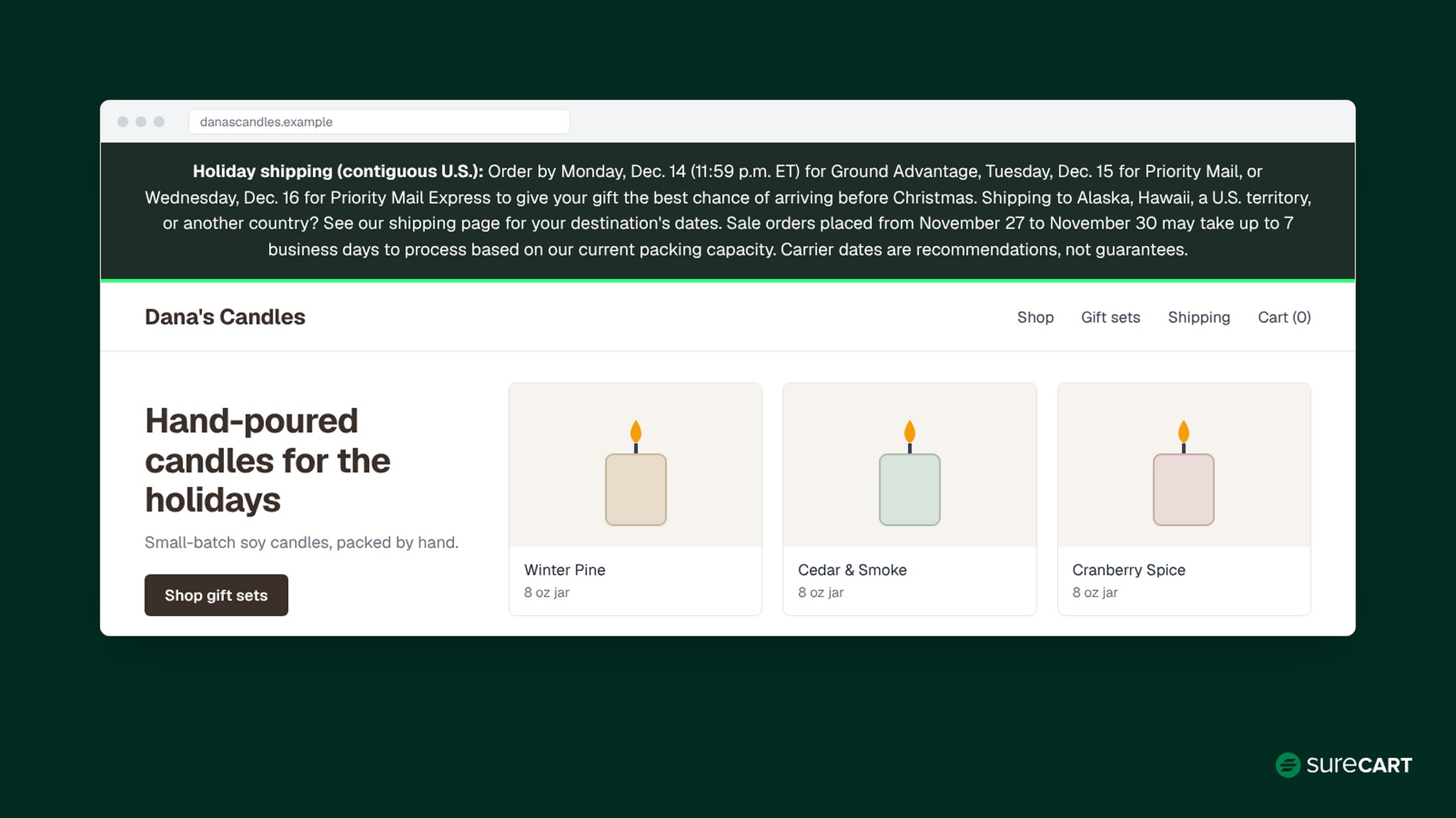
Holiday shipping (contiguous U.S.): Order by Monday, Dec. 14 (11:59 p.m. ET) for Ground Advantage, Tuesday, Dec. 15 for Priority Mail, or Wednesday, Dec. 16 for Priority Mail Express to give your gift the best chance of arriving before Christmas. Shipping to Alaska, Hawaii, a U.S. territory, or another country? See our shipping page for your destination’s dates. Sale orders placed from November 27 to November 30 may take up to 7 business days to process based on our current packing capacity. Carrier dates are recommendations, not guarantees.
That processing estimate of up to 7 business days comes from Dana’s example numbers, not a delivery commitment. She updates it as soon as real orders or her packing rate change. Processing time ends when the order is handed to the carrier. It doesn’t include transit, so delivery takes longer than 7 days.
When you fulfill an item, SureCart gives you the option to notify the customer. Once you buy a label through Shippo, customers can also see shipment status from their account.
Step 8: Plan for Delays, Lost Packages, and Holiday Returns
Decide now what you’ll do when a package is late, so you aren’t deciding at midnight on December 22. Save a reply like this one:
Hi [first name], thanks for checking in. Your order #[number] shipped on [date] with [carrier], and the latest tracking update is: [status] ([tracking link]). [Only if the carrier is reporting a real delay: The carrier is reporting delays on this route right now.] If it hasn’t moved by [date], reply to this email. We’ll look into it with [carrier], check your order against our shipping policy, and confirm the next step with you.
Use the bracketed delay line only when tracking or the carrier’s own service alerts show an actual delay. The template promises an investigation, not a specific fix. Decide on a reship or refund only after you’ve checked:
- The carrier’s latest tracking and its trace or claim process
- Your written shipping and refund policy
- Any consumer rights or payment-provider rules that apply to the order
Then write down your process: after how many business days with no tracking movement you open an investigation, what you check, and when a reship, refund, or carrier claim is the right outcome. Pick your own numbers and apply them the same way every time.
If an item runs out mid-order, SureCart’s partial shipments let you send what’s ready now and ship the rest later. State your holiday returns window plainly on your returns page.
One more note on USPS refunds: refund rules depend on the service and destination. USPS’s holiday shipping page says it no longer processes guaranteed-service refund requests for Priority Mail Express to Alaska, Hawaii, Puerto Rico, and U.S. territories, or for Priority Mail Express Military Service to APO/FPO/DPO addresses. Refund requests for loss on those items are still processed. Other Priority Mail Express shipments that miss their guaranteed arrival time may still qualify for a postage refund. Check eligibility and request windows on USPS’s domestic refunds page.
Starting Late? Last-Minute Holiday Shipping Tips
If Black Friday is days away, do these four things and leave the rest for next season:
- Work out and post your cutoff dates (Step 1).
- Run the test-mode checkout check, and one controlled live-label test if your live workflow hasn’t been confirmed yet (Step 5).
- Set an honest processing estimate (Step 2).
- Buy supplies for your sale estimate (Step 6).
Skip anything you can’t test in time: switching carriers, new packaging, or new shipping rules. For the marketing side, see our Black Friday marketing strategy.
Why SureCart Is Worth a Look for Holiday Shipping
We built SureCart, so we’re not neutral here. Here’s where it helps with the steps above:
- Shipping rules: flat, weight-based, and order-price rates, plus a Free-shipping minimum through Dynamic Pricing (Step 3).
- Live carrier rates, available through the Shippo integration (Step 5).
- Label purchase and voiding from the order screen, available through the Shippo integration (Step 5).
- Shipment status customers can see from their account (Step 7).
SureCart’s Launch plan is free, with a 2.9% transaction fee instead of a monthly cost. Payment processor fees apply separately on every plan. If you’re still choosing a platform, see how SureCart compares in our guide to WordPress ecommerce plugins for physical products.
Conclusion
Work through these holiday shipping tips in order: set your cutoffs, check capacity and stock, price free shipping, budget for surcharges, test your setup, stock supplies, publish your policy and dates, and plan for delays. Each step makes the next one easier and gives customers clearer expectations about when their orders will ship. For the rest of your holiday plan, see our holiday ecommerce tips.
Start Selling for Free With SureCart Set up shipping rates, labels, and tracking on WordPress. No credit card required. Start Selling for Free
FAQ
When should I stop taking orders for Christmas delivery?
USPS recommends December 17 for Ground Advantage, December 18 for Priority Mail, and December 19 for Priority Mail Express for expected delivery before Christmas. Subtract your processing time and a buffer day using Step 1’s worksheet. It’s a planning tool, not a delivery guarantee.
What is peak season shipping?
Peak season shipping is the holiday stretch when carriers handle their heaviest volume. This season, carriers have temporary holiday price changes and demand surcharges that vary by service and date. These fees can increase label costs, and some packages may need extra transit time.
Should I offer free shipping on Black Friday?
It can work if the extra spend is new money that covers the shipping charge you stop collecting. As a starting point, calculate average order value + (shipping charge you give up ÷ margin on added items). The shipping charge you give up is what customers pay for shipping today, which may be less than your full label cost. Use your margin after product cost, payment processing, and SureCart’s 2.9% Launch transaction fee. This illustrative check excludes product mix, packaging, returns, advertising, and overhead.
How can I lower shipping costs on holiday orders?
Compare rates for each package when you buy the label, since prices change with weight, size, distance, and service. Use parcel templates that match your real boxes, include peak surcharges in your estimates, and set a free shipping minimum instead of free shipping on everything.
Do carriers pick up on Thanksgiving and Black Friday?
UPS and FedEx don’t pick up on Thanksgiving, November 26, and it’s a USPS holiday with no mail service. On Black Friday, UPS pickup and delivery are available, FedEx runs modified service, and USPS doesn’t list it as a holiday.
How should I handle shipping delays during the holidays?
Answer “where is my order” emails fast with the tracking status and a clear next step, such as checking with the carrier. Decide on reships or refunds only after checking tracking, your shipping policy, and any customer rights that apply, using a documented process. Mention a carrier delay only when tracking or the carrier itself confirms one.