US shoppers spent $11.8 billion online on Black Friday 2025, and $14.25 billion on Cyber Monday a few days later.
A Black Friday marketing strategy built in the weeks before the sale shapes how smoothly it runs. Pick an offer late or skip a test order, and problems are more likely to surface when the sale starts. Waiting until Friday morning to decide who gets the offer, when they hear about it, and what you’ll send creates the same problem.
This guide gives you a Black Friday marketing strategy you can follow one week at a time.
We built SureCart, so we use it for WordPress-specific examples below, but the planning framework works on any ecommerce platform.
Quick answer: A Black Friday marketing strategy is a plan for your offer, store, audience, and follow-up before, during, and after the sale. Choose one clear offer, test your checkout, prepare your products, warm up your audience, and plan support. Then use Cyber Monday and the week after to keep your new customers.
- Key Takeaways
- What a Black Friday Marketing Strategy Includes
- Week 3: Get Your Products Ready and Raise Order Value
- Week 2: Warm Up Your Audience
- Week 1: Prepare Support and Run Final Checks
- Black Friday Through Cyber Monday: Run the Sale
- After Cyber Monday: Keep the Customers You Earned
- Black Friday Marketing Ideas to Add to Your Plan
- Why We Built These Tools Into SureCart
- Start Your Plan This Week
Key Takeaways
- Plan by week instead of by idea. Give each week before the sale one focus.
- Do the discount math first. A 20% discount on a 50% margin product needs 67% more units to earn the same gross profit.
- Test the complete campaign checkout. Re-run the nine checks after coupons, bumps, upsells, and recovery emails are configured.
- Talk to permitted past buyers and opted-in subscribers first.
- Plan the week after. New buyers are worth a thank-you and a reason to come back.
Start selling for free on WordPress. SureCart gives you checkout, coupons, order bumps, and upsells inside WordPress, with no credit card needed to start. Get started free
What a Black Friday Marketing Strategy Includes
A Black Friday marketing strategy is your plan for what you’ll sell and how your store will handle it. It also covers who you’ll tell, and what happens after the sale ends.
It has four parts:
- Offer: the one deal you’re running, and whether it still makes you money.
- Store readiness: a checkout, product pages, and stock that hold up under real orders.
- Audience: who hears about the sale, through which channel, and when.
- Follow-up: what you do with new customers and lost checkouts once the weekend is over.
Some people call this a Black Friday ecommerce strategy. The parts are the same either way.
Most Black Friday guides start with a list of ideas. The order you do them in matters more, so this guide runs on a calendar, with extra ideas at the end.
Your Black Friday Planning Table
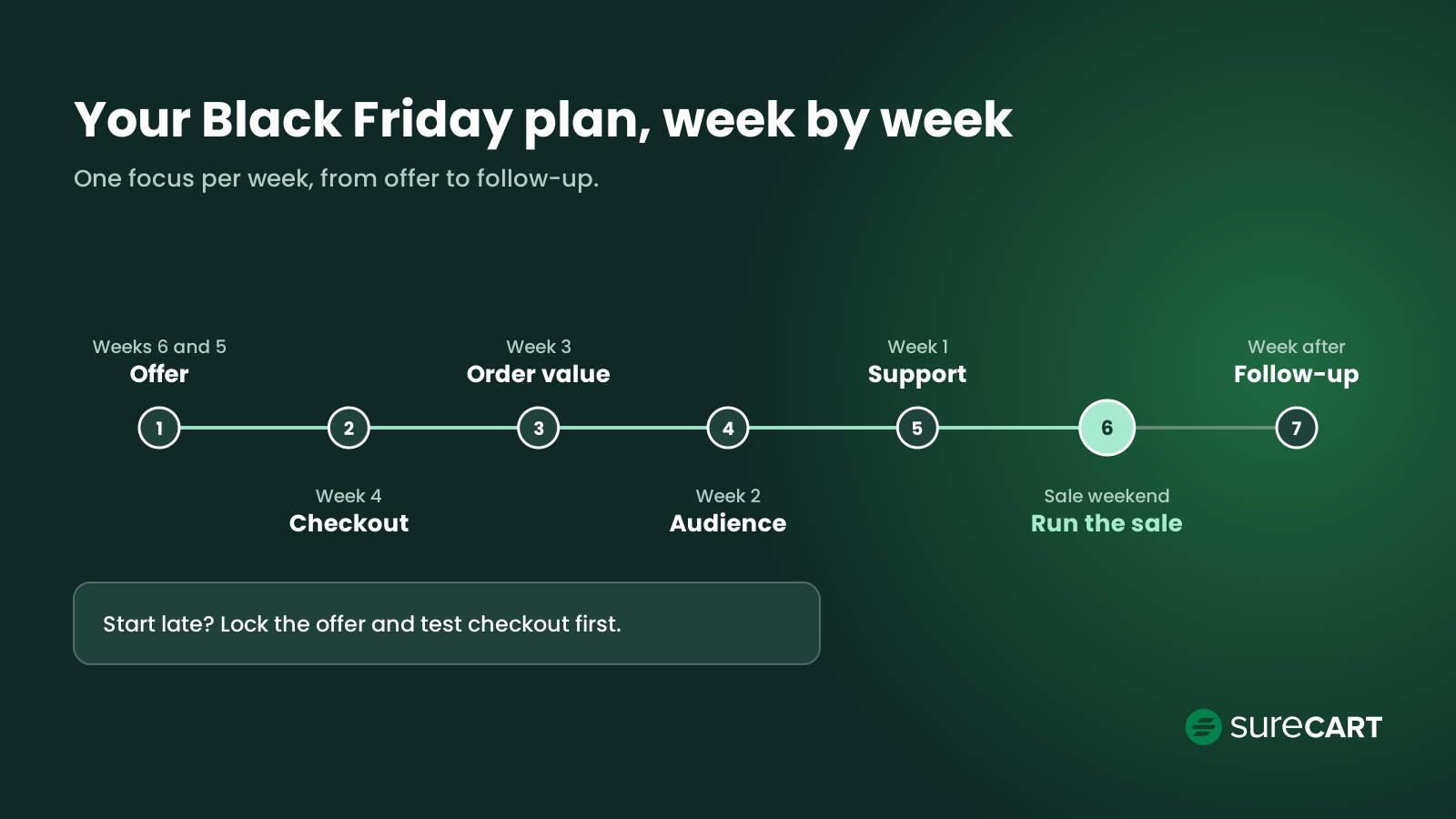
Here’s the whole plan on one page. Count back from Black Friday, then work down the table one row per week.
| When | Focus | Key tasks |
|---|---|---|
| 6 and 5 weeks before Black Friday | Offer | Pick one offer, run the discount math, review last year’s best sellers |
| 4 weeks before | Site and checkout | Create and test the campaign coupon, check eligibility, exclusions, stacking, tax, shipping, speed, mobile, and confirmation emails; plan for a slowdown |
| 3 weeks before | Products and order value | Check stock, refresh product pages, build a sale landing page and gift guide, choose one or two complementary order-value tactics |
| 2 weeks before | Audience | Send a heads-up email, offer early access, line up SMS and social posts, share the tested coupon and its link when planned |
| The week before | Support and final checks | Write canned replies, confirm shipping cutoffs and promotion end dates, configure recovery emails, re-run the full checkout checklist with all campaign mechanics |
| Black Friday to Cyber Monday | Run the sale | Watch orders, reply fast, send a last-chance email, honor the announced end date |
| The week after | Follow-up | Thank new buyers, review recovery emails before resuming follow-up, offer a loyalty perk, review results |
The offer and checkout weeks come first on purpose. Everything after them depends on a deal that makes money and a checkout that works.
In 2026, Black Friday falls on Friday, November 27, and Cyber Monday on November 30.
Use this short Black Friday checklist and tick it off as you go:
- One offer, written in a single sentence
- Discount math done for your top three products
- A test order placed and checked on desktop and phone
- Stock counts confirmed for featured products
- One or two complementary order-value tactics set up
- Coupon created, with its link and end date
- Heads-up email sent to permitted buyers and opted-in subscribers
- Canned replies written for shipping, returns, and order changes
- Abandoned checkout emails turned on
- A thank-you email drafted for new buyers
Starting Late? A Shorter Version of the Plan
You don’t need all six weeks to run a good sale. You need to drop the right things.
- 3 to 4 weeks out: Combine weeks 6, 5, and 4. Lock the offer and test checkout in the same week, then follow the table from week 3.
- 1 to 2 weeks out: Do five things only: the offer, a test order, a heads-up to your list, a stock check, and support replies.
- A few days out: Don’t rebuild anything. Pick a clear offer, confirm checkout works, tell your customers, and make sure you can ship what sells.
A small sale that runs smoothly beats a big one that breaks at checkout. Whatever your timeline, the offer comes first.
Weeks 6 and 5: Lock In Your Offer
Pick one offer you can explain in a single sentence.
Meet Maya, an example store owner we’ll follow through this guide. She sells hand-poured candles on her WordPress store, plus a short online course on candle making. Her best seller is a $40 candle that costs her $20 to make and ship.
Black Friday Promotion Ideas by Offer Type
Here’s when each offer type fits:
- Percentage off: easy to understand. Best when your margins can take it.
- Fixed amount off: “$10 off” feels concrete on low-priced items.
- Free gift with purchase: protects your price and moves slow stock.
- Bundle: pairs a best seller with something people buy less often. See these product bundling examples for ideas.
- Buy one, get one: works for products people use up and reorder.
- Early access: let subscribers shop before everyone else, either with the same offer or with a subscriber-only incentive.
Maya picks 20% off candles, plus a bundle that pairs any candle with her course.
You can also skip the discount entirely. On Black Friday 2020, Allbirds raised prices across its whole collection by $1 and matched each dollar as a donation to the climate group Fridays For Future. It avoided a conventional discount and gave shoppers a reason to buy that had nothing to do with price.
How Much More Do You Need to Sell After a Discount?
A discount reduces your gross profit per order. So you need to sell more units to end up where you started.
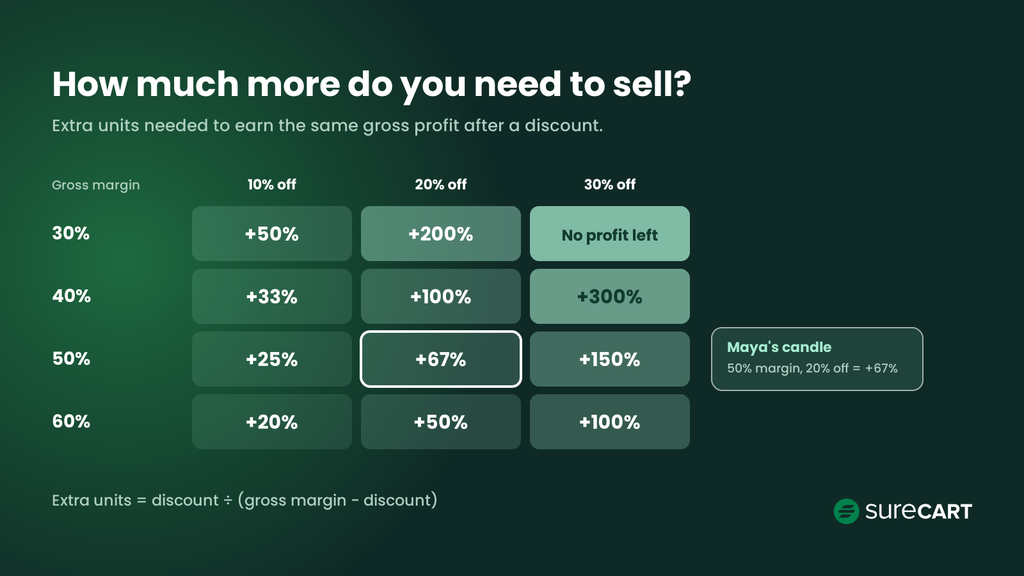
Here’s the math. Divide the discount by your gross margin minus the discount. For this simplified calculation, gross margin is the share of the original selling price left after product and shipping costs.
Extra units needed = discount ÷ (gross margin − discount)
| Gross margin | 10% off | 20% off | 30% off |
|---|---|---|---|
| 30% | +50% | +200% | No gross profit left |
| 40% | +33% | +100% | +300% |
| 50% | +25% | +67% | +150% |
| 60% | +20% | +50% | +100% |
Each cell shows the extra units needed to earn the same gross profit. Find your margin on the left and read across to your discount. When the discount equals or exceeds gross margin, gross profit per unit is zero or negative, so extra volume cannot restore it.
Here’s Maya’s math. Her $40 candle costs $20, so she makes $20 on each one, a 50% margin.
At 20% off, the candle sells for $32, and she makes $12. To earn the same $20, she needs 20 ÷ 12 = 1.67 sales for every one she made before.
That’s 67% more units.
That’s a big jump. It’s why Maya keeps the discount at 20% and uses the bundle to raise the order total instead of cutting deeper.
This is a simplified gross-profit calculation. Your actual contribution margin may be lower after payment processing, transaction fees, advertising, returns, and other selling costs.
Review Last Year’s Numbers
Look at what sold last November, what got refunded, and where buyers came from. Feature the products that sold well and drop the ones that came back.
New store with no history? Set one simple goal instead, such as a target number of orders or revenue for the weekend, and plan backward from it.
Once your offer is set, you need a checkout that can handle it.
Week 4: Test Your Site, Checkout, and Payments
Create your campaign coupon now, before sharing it. Test eligibility, exclusions, stacking, and its effect on tax and checkout.
Shoppers leave checkouts often. The average documented cart abandonment rate is 70.22%, across 50 studies. Excluding shoppers who were simply browsing or not ready to buy, Baymard reports these reasons for checkout abandonment:
- Extra costs were too high (40%)
- Delivery was too slow (20%)
- They didn’t trust the site with their card details (19%)
- The site wanted them to create an account (18%)
- Checkout was too long or confusing (17%)
- The site had errors or crashed (17%)
You can’t fix every one of these in a week. But a test order can catch problems you control, such as missing shipping rates, incorrect discounts, and broken checkout steps.
In SureCart, you can make test payments with a built-in test processor, so you don’t need real card details. You can also switch Stripe, PayPal, Paystack, or Mollie into test mode. With Test Mode Restricted turned on, only test orders placed by an admin are saved as orders in your store.
The Test-Order Checklist
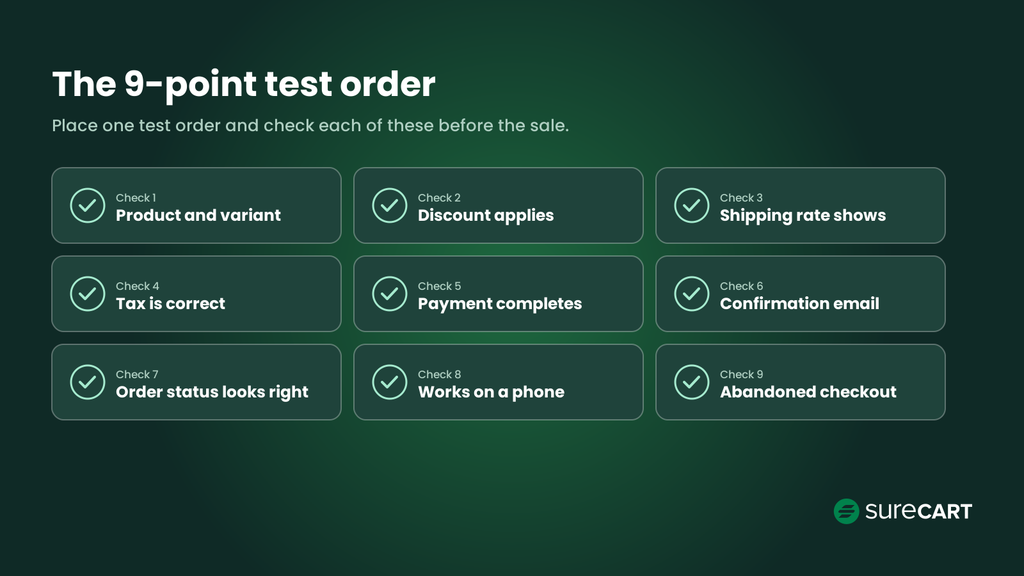
Place a test order and check each of these:
- The product and variant are correct
- The discount applies as expected
- A shipping rate shows for each zone you sell to
- Tax is calculated correctly
- Payment completes in test mode
- The confirmation email arrives and reads correctly
- The order status and fulfillment look right in your dashboard
- Checkout works on a phone
- Abandoned checkout is configured correctly when you leave after entering an email
That last item takes longer than the rest. SureCart counts a checkout as abandoned 30 minutes after the shopper leaves, and only if they entered an email, and the first recovery email goes out an hour after that by default. Allow about 90 minutes, or shorten the first email’s delay while you test.
Don’t skip the phone test. Mobile made up 57.5% of Cyber Monday 2025 online sales.
When Maya ran her test, she found no shipping rate for one zone. A shopper there would have hit a dead end at checkout. She fixed it in five minutes.
Test on a phone as a shopper, not only on desktop as an admin.
If any item on the list fails, fix it and run the whole list again. One fix can break something else, like a new shipping rule that changes tax.
Then check your page speed, and write a backup plan. Decide who you’ll contact if the site slows down, and what you’ll tell customers while it’s fixed. For more ways to tighten your checkout, see how to optimize the checkout process and how to reduce cart abandonment.
With checkout working, the next step is making each order worth more.
Week 3: Get Your Products Ready and Raise Order Value
Once the offer is set, look for simple ways to raise order value.
Start with the basics. Confirm stock counts for every product you’ll feature, so you don’t sell what you can’t ship.
Refresh photos and descriptions on those product pages. Build one simple landing page for the sale, and add a short gift guide if your products make good gifts.
Choose one or two tactics that complement the main offer:
- Order bump: a small, last-minute offer shown at checkout. In SureCart, order bumps appear based on what’s in the cart, and you can add a percentage or fixed discount.
- Bundle: products paired at a set price. Maya’s candle and course bundle is one.
- Upsell: a second offer shown right after checkout. With upsell funnels, the buyer can add it with one click.
Maya adds a wick trimmer as an order bump at 50% off, shown only when a candle is in the cart. It’s a small add-on that fits what the buyer is already getting.
A good bump or upsell fits the order. A product that has little connection to what the shopper is buying can feel irrelevant.
Here are a few Black Friday ecommerce tips for this week:
- Offer an add-on that costs less than the main item
- Keep the number of bumps limited so the checkout stays simple
- Test your chosen bumps, bundles, or upsells with the campaign discount
Use coupons for code-based or VIP offers. Use SureCart Dynamic Pricing for automatic promotions with scheduled start and end dates, including BOGO, quantity discounts, collection discounts, and spend-based offers.
Build your BFCM checkout with SureCart. Set up order bumps, upsells, and coupons in the same place you manage your store. See SureCart plans
Your store is ready. Now it’s time to tell people.
Week 2: Warm Up Your Audience
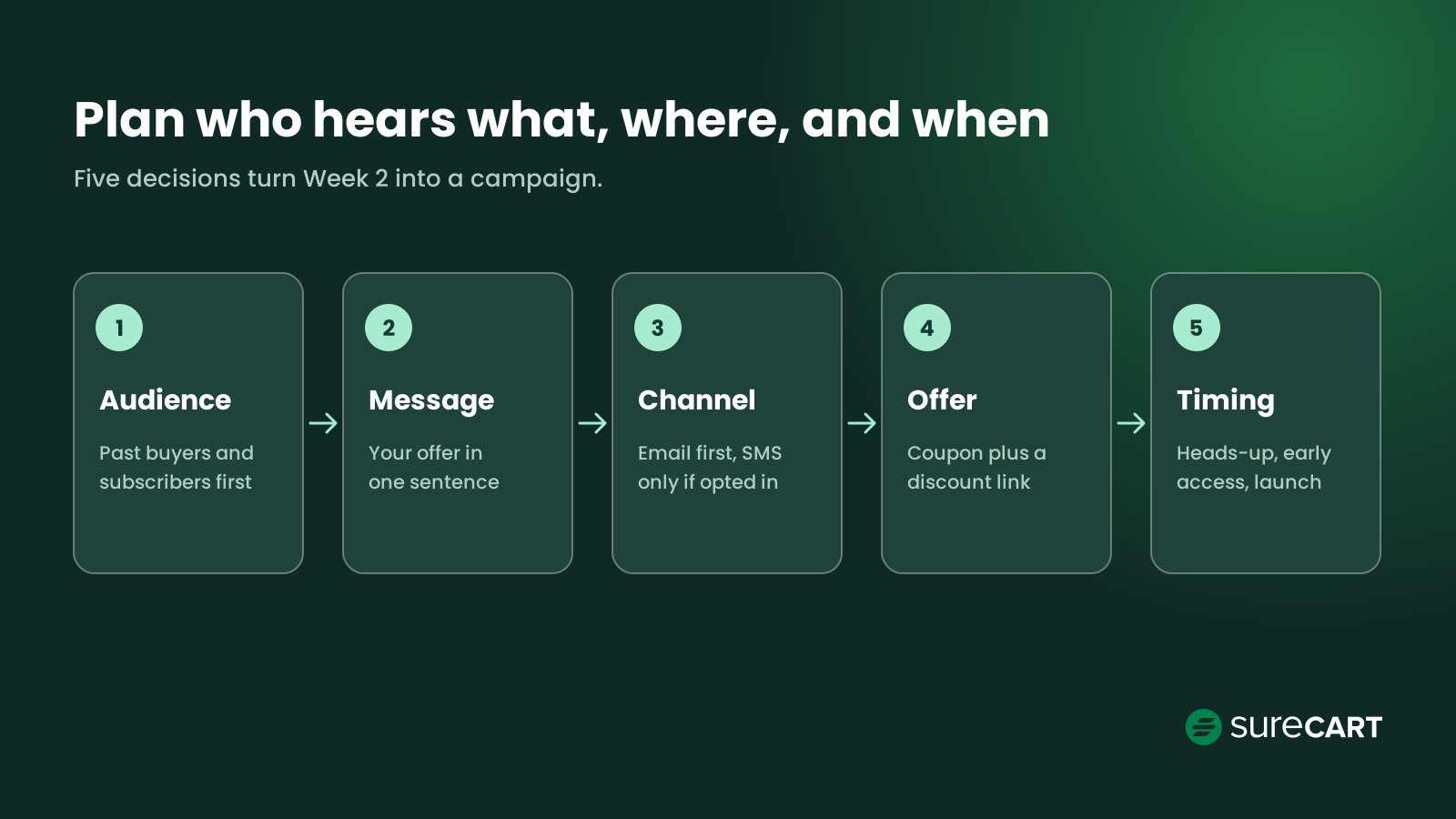
Plan who hears what, where, and when. Without a plan, BFCM marketing turns into posting everywhere and hoping something lands. A good Black Friday strategy uses five steps instead.
- Audience. Past buyers you’re permitted to market to and opted-in subscribers hear first. Site visitors and social followers come second. Maya starts with last year’s candle buyers who can receive her promotions.
- Message. Write your offer in one sentence and repeat it everywhere. Maya’s is “20% off every candle, plus a candle and course bundle.”
- Channel. Start with email, with SMS only for customers who opted in. Social posts, creator partners, and retargeting ads can support the campaign. Maya emails her list and posts on Instagram.
- Offer. Share the coupon you created and tested in week 4; its discount link applies the code when clicked. Give subscribers early access with their own code. Maya sends the early-access code only to her list and limits it to one use per customer.
- Timing. Send a heads-up now, early access a few days before, and the launch email on the day. Maya sends her heads-up 12 days out.
A strong message can carry the whole campaign. In 2015, REI closed all 143 of its stores on Black Friday, paid its staff for the day, and invited customers to #OptOutside instead. A small store can borrow the idea at a smaller scale, for example by pairing its offer with a cause or a message its customers already care about.
Here’s a simple rule for choosing channels. If your email list is small, use social posts to grow it before the sale, then email the people who join. If you have plenty of past buyers, put most of your effort into email.
Next, get ready for the questions the sale will bring.
Week 1: Prepare Support and Run Final Checks
Sales bring questions, and slow replies cost orders.
Write canned replies for the questions you’ll see most: shipping times, returns, and order changes. Update your FAQ page or live chat with the same answers. Post your shipping cutoff and any free-shipping threshold where shoppers can see them.
Maya adds her shipping cutoff to the sale banner and checkout, so shoppers know when their orders need to be placed.
Confirm the end date chosen before launch. In SureCart, coupon end times use UTC, so convert your local time to avoid ending the sale early.
Then turn on abandoned checkout emails. SureCart can send up to three follow-up emails, with delays you choose. You can also add a unique discount code for each abandoned checkout.
Should the recovery emails include a discount? If your shopper already has a sale price, the first email doesn’t need one. A reminder is enough.
Save any extra discount for the final email, and only if your margin can carry it.
Re-run the full week 4 checklist after the coupon, order-value tactics, and recovery flow are configured, including recovery links and discount combinations. Before launch, switch the checkout from Test Mode to Live Mode and run the final checks.
Now the sale starts.
Black Friday Through Cyber Monday: Run the Sale
Your job this weekend is to watch and reply.
Check orders a few times a day. Answer support messages fast, using the replies you wrote. If something breaks, use your backup plan.
Don’t stop at Friday. Cyber Monday was the bigger online day in 2025.
A few Cyber Monday marketing ideas that fit this plan:
- Send a “last chance” email the morning your coupon ends
- Remind cart abandoners that the offer ends soon
- Honor the end date chosen before launch: Friday, the weekend, or Cyber Monday
Treat an extension as an exception. Explain the change and give a firm new end date.
In 2022, The Ordinary ran its Slowvember campaign with 23% off for most of November and paused transactions on Black Friday.
One more thing to watch: your coupon’s usage limits. If you capped total uses, check how many are left each morning. Running out on Saturday night, with no warning to shoppers, creates angry support tickets.
Once the sale closes, the next week decides how many of these buyers come back.
After Cyber Monday: Keep the Customers You Earned
The week after the sale is an important opportunity to start turning new buyers into repeat customers.
Thank new buyers within a few days. Before recovery emails continue after the sale, review or pause Black-Friday-specific messages so they don’t send expired discounts, outdated urgency, or obsolete cart prices. Offer future promotions only to customers you’re permitted to market to.
Shoppers keep looking for deals, too. Adobe found shoppers could still find bargains through the first week of December, in categories like toys, computers, and electronics.
Maya emails new candle buyers she’s permitted to market to and invites them to her course. The course costs nothing to ship, so each additional sale has relatively low fulfillment costs.
Last, write a short review while the weekend is still fresh. Note these numbers:
- Total orders and revenue for the sale
- Average order value, compared with a normal week
- How many people used the coupon
- How many abandoned checkouts you recovered
- Which products sold out, and which barely moved
Next year’s plan starts with that note.
Black Friday Marketing Ideas to Add to Your Plan
Add ideas that support your main offer and fit your calendar.
| Idea | Why it works | Add it in |
|---|---|---|
| Free or faster shipping over a set amount | Can reduce shipping-cost friction while encouraging a higher order value | Weeks 6 and 5 |
| Gift guide by recipient or price | Helps shoppers who don’t know what to buy | Week 3 |
| Free gift with purchase | Protects your price while still feeling like a deal | Weeks 6 and 5 |
| Early access for loyal customers | Rewards your best buyers and spreads out traffic | Week 2 |
| Creator or customer partnerships | Puts your offer in front of people who already trust that voice | Week 2 |
| Retargeting ads for recent visitors | Brings back people who already viewed your products | Week 2 |
| SMS reminders for opted-in customers | Short, timely nudges on launch day and the last day | Week 2 |
| A small giveaway before the sale | Builds your email list ahead of launch | Week 2 |
| Live chat or a clear FAQ | Answers questions before they become abandoned carts | Week 1 |
| Loyalty perk for new buyers | Gives one-time buyers a reason to come back | The week after |
Why We Built These Tools Into SureCart
On a WordPress store, you may otherwise manage coupons, upsells, and cart recovery across multiple tools. Keeping those functions together simplifies your BFCM setup.
SureCart puts coupons, order bumps, one-click upsells, and cart abandonment recovery inside one WordPress plugin.
The free Launch plan charges a 2.9% transaction fee. The Pro plan is $199 a year for one store, with no transaction fee. Payment processor fees from Stripe or PayPal are separate on both plans and aren’t part of the 2.9% transaction fee.
If you want to see how setup works first, read how to set up SureCart the right way.
Start selling for free on WordPress. Get checkout, coupons, order bumps, and upsells in one plugin, with no credit card needed. See SureCart plans
Start Your Plan This Week
A Black Friday marketing strategy works best as a calendar.
Lock your offer and check the math first. Test checkout before your customers do. Then warm up your list and plan your support.
Maya’s sale is ready a week early. Her offer makes money, her checkout works on a phone, and her best customers heard first.
Open the planning table, find your week, and start with that row today.
Frequently Asked Questions
When should I start my Black Friday marketing?
Six weeks is a practical starting window for the plan in this guide. If you have a large catalog, longer fulfillment times, more people approving the campaign, or bigger campaigns to prepare, you may need to start earlier.
If you have less time, focus on the offer, checkout testing, audience communication, inventory, and support. The shorter plan above shows how.
How big should my Black Friday discount be?
Pick a discount your margin can carry. Divide the discount by your gross margin minus the discount. The result is how many more units you need to sell to earn the same gross profit.
At a 50% margin, 20% off needs 67% more units. If that feels out of reach, try a smaller discount or a bundle.
If the discount equals or exceeds your gross margin, there’s no volume break-even point. Each unit then earns zero or negative gross profit, so selling more can’t make up the difference.
Should I extend my Black Friday sale to Cyber Monday?
Decide before launch whether your sale runs through Cyber Monday, based on inventory and margins. Announce that end date from the start; extensions should be exceptions.
Send a last-chance email on Monday morning, and set a firm end time.
What should a small ecommerce store do differently for Black Friday?
Pick one clear offer and contact past buyers you’re permitted to market to. Choose one or two complementary order-value tactics, such as a bundle or an order bump.
Keep the plan small enough that you can test and run every part of it.
What should I do after Black Friday ends?
Thank new buyers, review sale-specific recovery emails before continuing them, and offer a reason to return where marketing permission allows. Record what sold, what didn’t, and what you’d change next year.