Picture 100 shoppers adding your best gift set to their carts on Cyber Monday. At Baymard’s documented average cart abandonment rate of 70.22%, that would be roughly 70 abandoned carts out of 100.
Now put that against the size of the season. Adobe forecasts $275.1 billion in US online sales from November 1 to December 31, with Cyber Monday alone forecast at $15.1 billion.
Many of the decisions that shape your holiday performance get made before the first sale goes live. These 15 holiday ecommerce tips are grouped into four phases, starting with a calendar you can reuse every season.
We built SureCart, so we’ll point out where it helps and where you’ll need something else.
Quick answer: the holiday ecommerce tips that matter most are setting offers and stock early, removing checkout friction (surprise costs, forced sign-ups, long forms), recovering abandoned checkouts, publishing your order cutoff, and planning how to keep first-time buyers after December. Start with a calendar so nothing waits until Cyber Week.
Key Takeaways
- Adobe forecasts $275.1 billion in US online holiday sales from November 1 to December 31.
- Cyber Week accounts for 17.3% of Adobe’s forecast US holiday online spend.
- “Extra costs too high” leads Baymard’s list of reasons shoppers gave for abandoning a purchase, at 40%.
- USPS recommends sending Ground Advantage packages by December 17 for Christmas delivery. Set your store’s order cutoff earlier.
Ecommerce Holiday Calendar: Your Week-by-Week Readiness Plan
Save or screenshot this ecommerce holiday calendar. It counts back from Black Friday instead of using fixed dates, so you can reuse it every season.
| Phase | Timing | What to do |
|---|---|---|
| Plan | 8 or more weeks before Black Friday | Review last season, pick best sellers, order stock, set your offer strategy |
| Build | About 6 weeks before | Bundles, holiday landing pages, email and banner assets |
| Test | About 4 weeks before | Test checkout end to end in test mode, verify checkout recovery, check mobile and speed, then switch each checkout back to live mode |
| Launch | About 2 weeks before | Confirm every sale checkout is in live mode, warm up email and social, schedule offers with start and end times, plan a change freeze from the week before Black Friday through Cyber Monday |
| Peak | Thanksgiving to Cyber Monday | Keep every sale checkout in live mode. Recheck it with a separate test checkout or a small live order you refund, then monitor checkout, support, and order flow through Cyber Week |
| Ship | December, through your order cutoff | Order cutoff banners, fulfillment, shift promotion to items that don’t need shipping, apply tested updates one at a time |
| Retain | Late December to January | Returns, reviews, thank-you emails, repeat-purchase offers |
Find Black Friday in the Key Dates table below and count back.
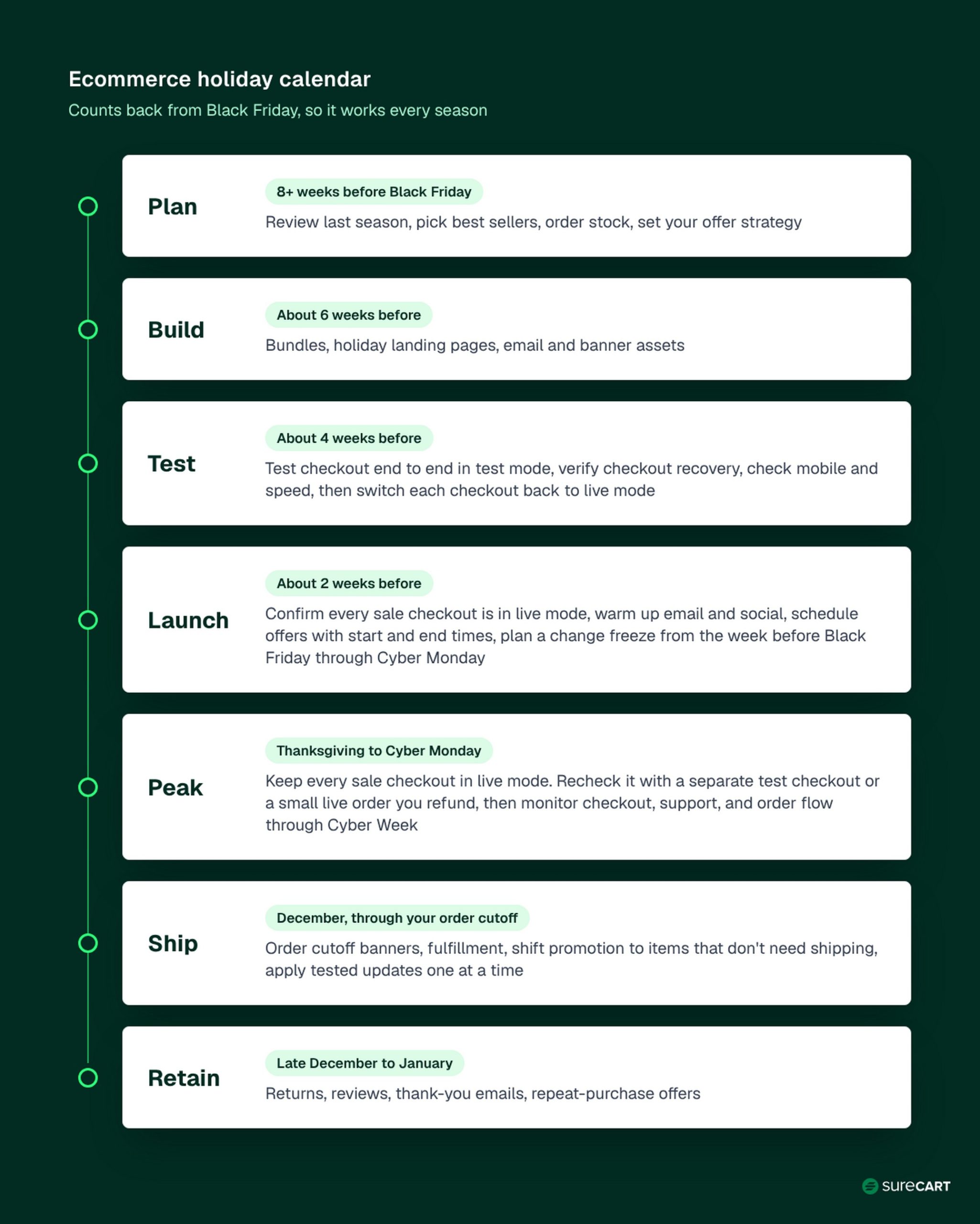
Phase 1 covers the Plan row and tips 1 to 4, and Phase 2 covers the Build and Test rows and tips 5 to 8. Phase 3 covers the Launch and Peak rows and tips 9 to 12, and Phase 4 covers the Ship and Retain rows and tips 13 to 15.
Starting in November? Do These 5 Things First
- Run a full test order in test mode on a phone, then switch your checkout back to live mode.
- Pick one offer for your best seller, set its end time, and test when it actually ends.
- Turn on checkout recovery emails.
- Publish your order cutoff.
- Plan a change freeze from the week before Black Friday through Cyber Monday.
Free to start, no credit card required.
When Does the Holiday Ecommerce Season Start? Key Dates to Know
For this guide, we use November 1 to December 31 as the holiday season, matching the period in Adobe’s US holiday forecast. Adobe forecasts Cyber Week (Thanksgiving through Cyber Monday) will bring in 17.3% of its forecast US holiday online spend.
| Date | Event or deadline | Why it matters |
|---|---|---|
| Nov 26 | Thanksgiving (event) | Cyber Week begins |
| Nov 27 | Black Friday (event) | Major promotion day |
| Nov 28 | Small Business Saturday (event) | Shop-small promotion opportunity |
| Nov 30 | Cyber Monday (event) | Adobe’s forecast biggest online shopping day of the season |
| Dec 17 to 19 | USPS recommended send-by dates (by service) | Recommended shipping window for Christmas delivery; set your order cutoff earlier |
| Dec 25 | Christmas Day (event) | The date most gift buyers work back from |
Across all retail, NRF forecasts November and December sales will grow 4.2% to $1.013 trillion, a figure that excludes auto dealers, gas stations, and restaurants. Only this table changes from year to year; the calendar above stays the same.
Phase 1: Plan Your Holiday Offers and Stock
This phase matches the Plan row of the calendar. Everything after it depends on the choices you make here.
1. Use Last Season’s Sales Data to Pick Your Best Sellers
Pull last November and December orders by product. Look for the items that sold most, sold out first, or brought customers back.
Pick a short list of hero products and order stock early, since restocking in mid-December leaves little room for supplier delays.
No holiday history yet? Use your best sellers from the last few months.
For example, Emily (a made-up store owner we’ll follow through this guide) sells hand-poured candles from her WordPress store. Her order history points to three hero products, so those get the deepest stock and the most promotion.
2. Time Your Offers With Discount Data, Then Check Your Margin
Adobe tracks when large retailers discount and by how much. Its forecast shows when shoppers will see the deepest deals across the season.
| Period | Adobe’s forecast discount off listed price |
|---|---|
| Early November | Up to 14% |
| Just before Thanksgiving | Up to 21% |
| Cyber Week | Up to 30% |
| Through December | Up to 10% to 15% |
By category, Adobe forecasts electronics to peak at 30% off listed price and toys at 29%, with apparel at 23%.
These are forecast discounts across large retailers, not a recommended discount for your store. Your discount should come from your own margin.
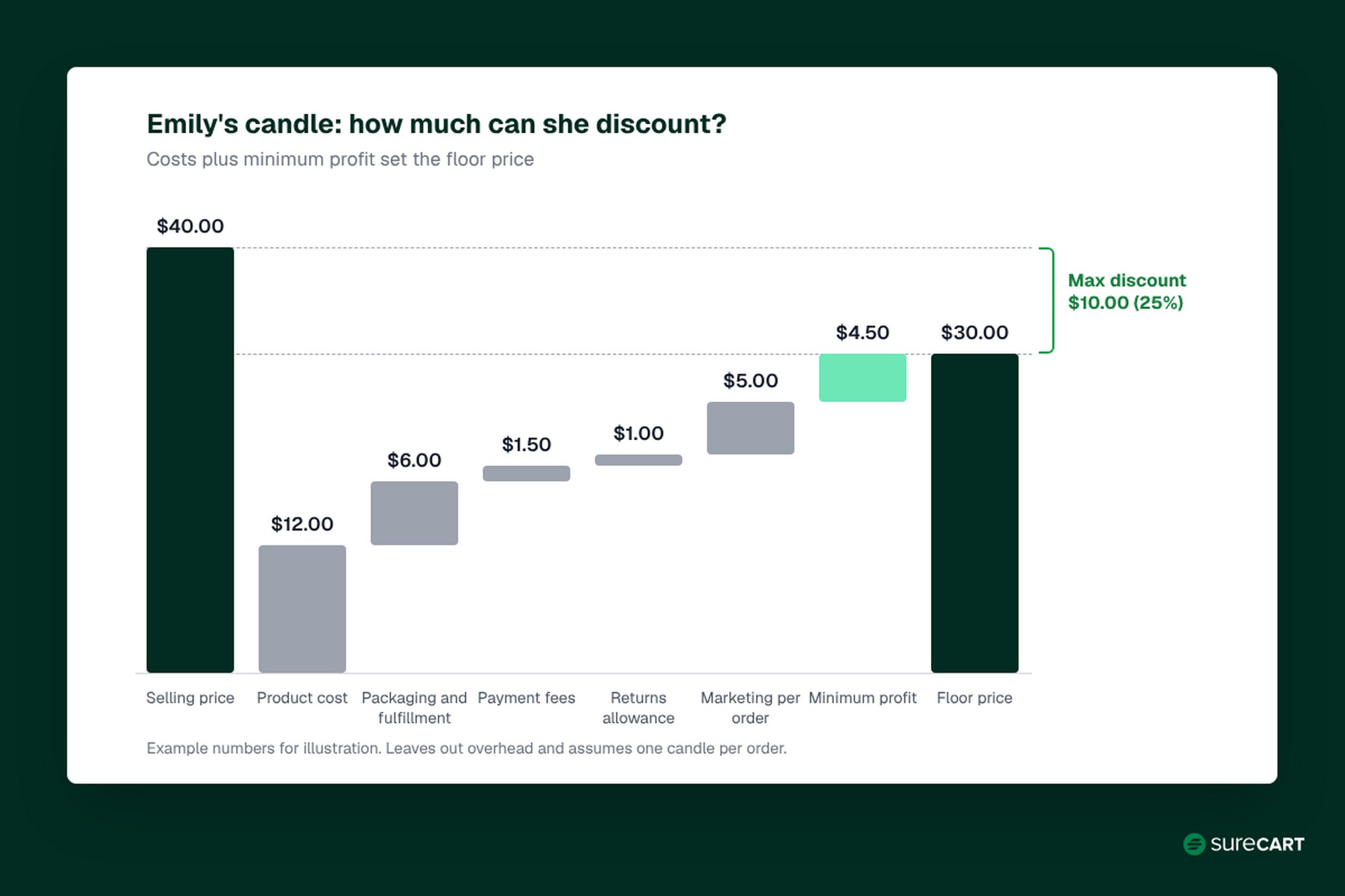
Here’s a quick way to find your ceiling. Emily’s numbers below are made up for illustration.
| Emily’s best-selling candle (example) | Amount |
|---|---|
| Selling price | $40.00 |
| Product cost | $12.00 |
| Packaging and fulfillment | $6.00 |
| Payment fees | $1.50 |
| Returns allowance | $1.00 |
| Marketing cost per order | $5.00 |
| Total costs per order | $25.50 |
| Minimum profit she wants per order | $4.50 |
| Floor price (costs plus minimum profit) | $30.00 |
| Maximum discount ($10.00 off $40.00) | 25% |
Emily’s floor price is $30.00, so the most she can take off a $40.00 candle is $10.00, or 25%. A deeper discount means she sells below the profit she set for each order.
This is a simplified check. It leaves out overhead and assumes each order is one candle, so treat it as a ceiling, not a full profit calculation.
For a complete offer plan, see our Black Friday marketing strategy guide.
In SureCart: create coupons with usage limits and an end date, or schedule Dynamic Pricing rules with start and end dates. Coupon end times are calculated in UTC, so convert from your local time. Before the sale goes live, test when each offer actually starts and ends (see tip 8).
3. Build Gift Bundles
A ready-made set saves a gift buyer from guessing what goes together. It also lifts order value without asking shoppers to hunt for a second item.
Pair a main product with smaller add-ons. Price the bundle so it reads as a better deal than buying each item separately, while staying above your floor price from tip 2.
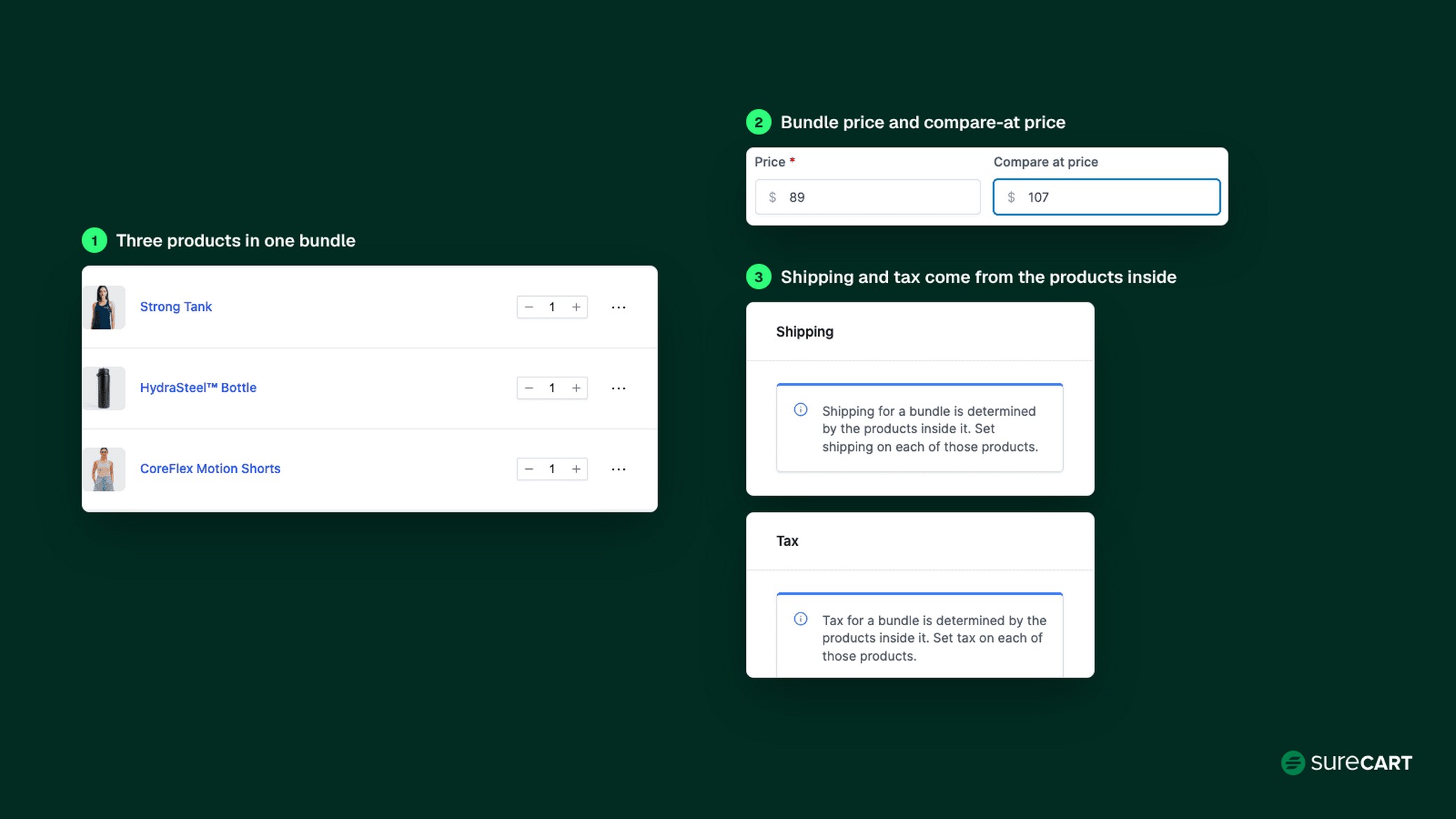
Emily builds a “Cozy Night In” bundle from three of her existing products and gives it the top spot in her gift guide.
In SureCart: Product Bundle groups at least two existing products into one item with its own price and an optional compare-at price. Shipping and tax come from the products inside it.
4. Set a Free-Shipping Threshold
In Baymard’s list of reasons shoppers gave for abandoning a purchase, “extra costs too high (shipping, tax, fees)” comes first, at 40%.
Blanket free shipping can eat the margin on small orders. A threshold removes the surprise cost and gives shoppers a reason to add one more item.
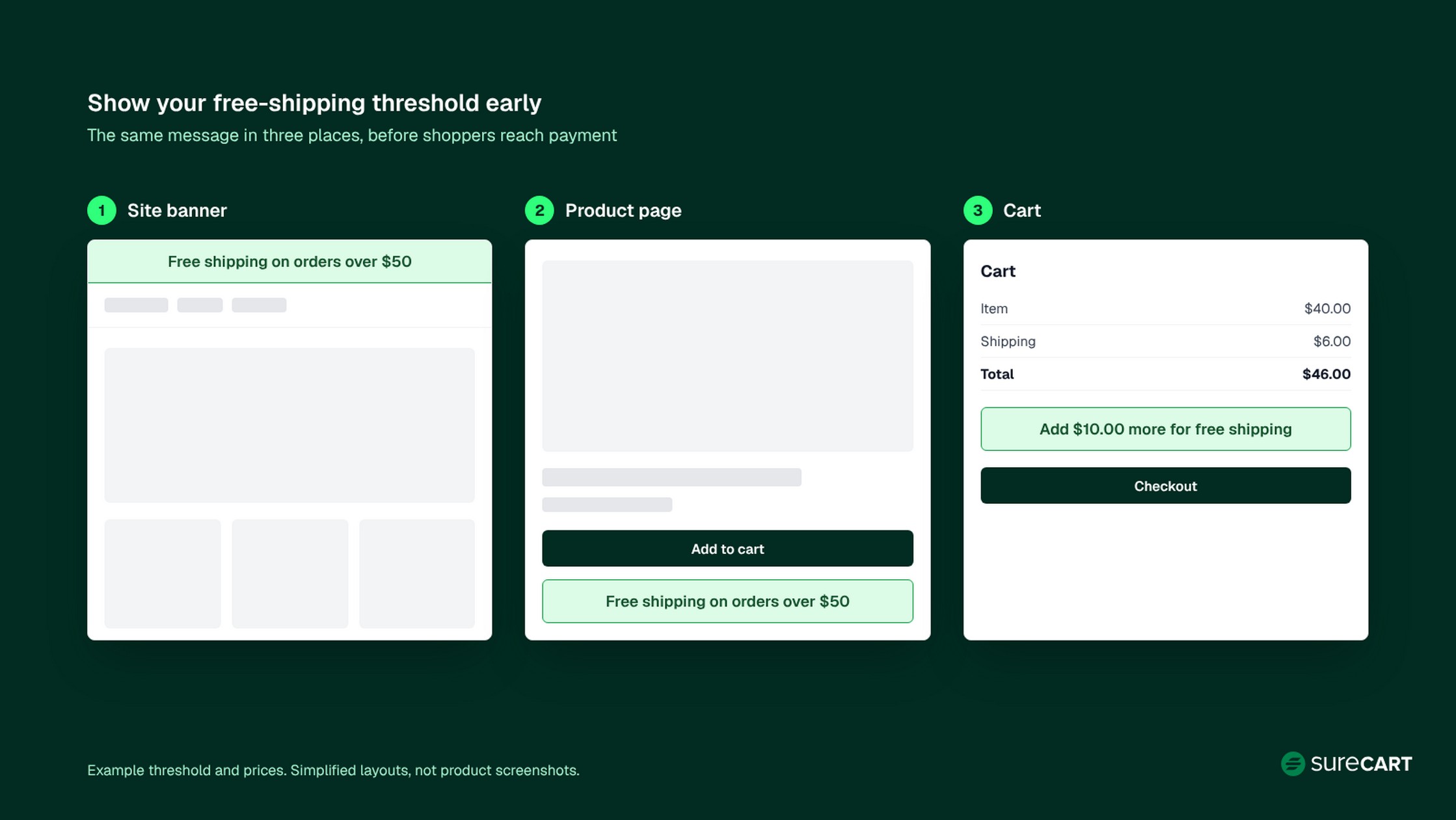
Show the threshold early: in a site banner, on product pages, and in the cart. Emily sets hers just above her typical order, as an example of the approach rather than a benchmark.
In SureCart: Dynamic Pricing includes a free-shipping minimum template. It applies automatically, so shoppers don’t need a coupon code.
Phase 2: Prepare Your Store and Checkout
This phase covers the Build and Test rows of the calendar. The goal is a store that works under pressure before the pressure arrives.
5. Freeze Site Changes Around Black Friday and Cyber Monday
A change freeze means plugin updates, theme changes, and new features wait until the peak is over. Start it the week before Black Friday, after your final round of testing, and hold it through Cyber Monday.
Security fixes and critical fixes, such as a checkout error, are the exceptions: apply them, then retest checkout right away. Keep a recent backup and a known way to restore it, and decide who can approve an exception.
After Cyber Monday, you can update your site again in a controlled way. Apply one update at a time, test it on a staging site first if you have one, and recheck checkout after each change.
For load testing and backend prep, see our guide to Black Friday website performance.
6. Test Speed and the Mobile Checkout
Adobe forecasts mobile devices will account for 57.4% of season online spend, so test on a phone first.
Run the whole path on a real device: home page, product page, cart, checkout, and the confirmation email. Then check your key pages in PageSpeed Insights and review the Core Web Vitals results.
Common fixes are simple. Compress large images, remove scripts you no longer use, and cut popups that cover the checkout on small screens.
7. Remove Checkout Friction
Two terms worth separating
Cart abandonment: a shopper adds products to the cart but doesn’t complete the purchase. Baymard’s 70.22% measures this.
Checkout abandonment: a shopper starts the checkout process but doesn’t finish it.
Checkout recovery tools, including SureCart’s Abandoned Checkout, work on checkout abandonment, and only when the shopper entered an email.
Checkout friction is anything that makes a ready buyer stop. Baymard’s list captures reasons shoppers gave for abandoning a purchase, and a shopper can give more than one reason.
| Reason (share in Baymard’s list) | Fix | In SureCart |
|---|---|---|
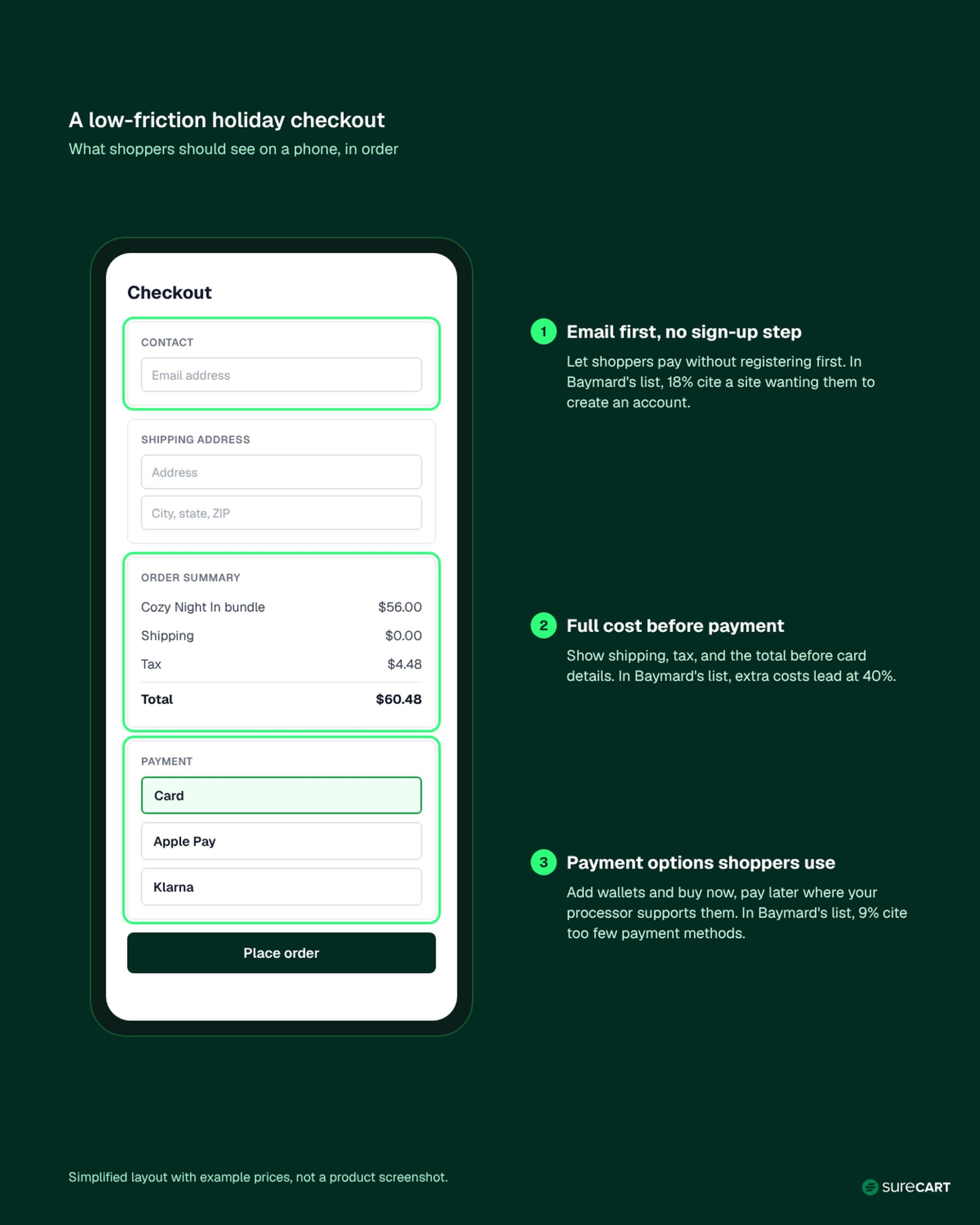
| Extra costs too high (40%) | Reduce unexpected fees with a free-shipping threshold and fewer add-on charges | Dynamic Pricing |
| Delivery too slow (20%) | Show delivery estimates and your order cutoff | Configure shipping methods and rates, and pair them with clear delivery messaging |
| Didn’t trust the site with card info (19%) | Use well-known processors and show your policies and contact details | Stripe, PayPal, and other supported processors |
| Site wanted an account (18%) | Don’t make shoppers register before they pay | No separate sign-up step: the customer account is created from the checkout email when the purchase completes |
| Too long or complicated checkout (17%) | Cut fields and give hero items a single-product checkout | Checkout Forms, Instant Checkout links |
| Returns policy not satisfactory (13%) | Publish a clear holiday returns policy on product pages, checkout, and your FAQ | Store policy (no setting needed) |
| Couldn’t see total cost up front (12%) | Show shipping, tax, and the order total before payment details | Tax and shipping are calculated in checkout |
| Not enough payment methods (9%) | Add wallets and buy now, pay later options | Methods you enable in Stripe, such as Klarna and Clearpay, where Stripe supports them in your region |
The 40% and 12% rows describe different problems. The first is about how much extra a shopper pays, and the second is about when they find out.
Emily adds Apple Pay through Stripe, then runs a full test order in test mode on her phone. Run your own test as a new customer in a private browser window, so you see exactly what shoppers see.
Test mode is for before launch. In SureCart, you turn it on for each checkout form, and it covers every product on that form. A sale checkout left in test mode won’t collect real payments. Once your tests pass, switch each checkout form and Instant Checkout page you’ll use for the sale back to live mode.
During the sale, keep those checkouts live. To recheck the flow, use a separate checkout form set to test mode on a page that isn’t linked from your store. Or place a small live order and refund it. Your payment processor may not return its fee on a refund, so keep that order low value.
8. Build Holiday Pages and Banners Ahead of Time
Draft your gift guides, offer pages, and holiday banners early, then schedule them. Give each offer a page with a clear headline, the offer’s end time, and your order cutoff.
Don’t assume every promotion runs on your store’s time zone. In SureCart, a coupon’s end date and time are calculated in UTC, so convert from your local time. For example, to end a coupon at 11:59 p.m. Eastern on Cyber Monday, November 30, set it to end at 4:59 a.m. UTC on December 1.
Dynamic Pricing rules have their own start and end dates. Before the sale, set up a short test promotion and check in your checkout exactly when it starts and stops. Then schedule the real offer. Shoppers notice when a “Cyber Monday” price disappears early.
Set up your holiday offers and checkout inside WordPress.
Phase 3: Sell and Increase Order Value
This phase covers the Launch and Peak rows of the calendar. Your offers are set, so the work shifts to getting attention and making each order count.
9. Warm Up Your Email List and Social Followers
Start with the people who already know you. A few weeks out, invite past buyers and subscribers to an early-access list.
Then send a short sequence before the sale: a heads-up, the offer, and a last call. Segment past buyers from new subscribers so each group gets a message that fits.
On social, share your gift guide and bundles before the sale starts. For creative ideas, see these Christmas marketing campaigns.
10. Increase Order Value With Add-Ons and Post-Purchase Offers
An add-on works best when it complements what’s already in the cart and costs much less than the main item. Offer it at checkout or right after purchase, and keep post-purchase offers easy to decline.
Emily adds a matching wick trimmer as a checkout add-on for anyone buying a candle.
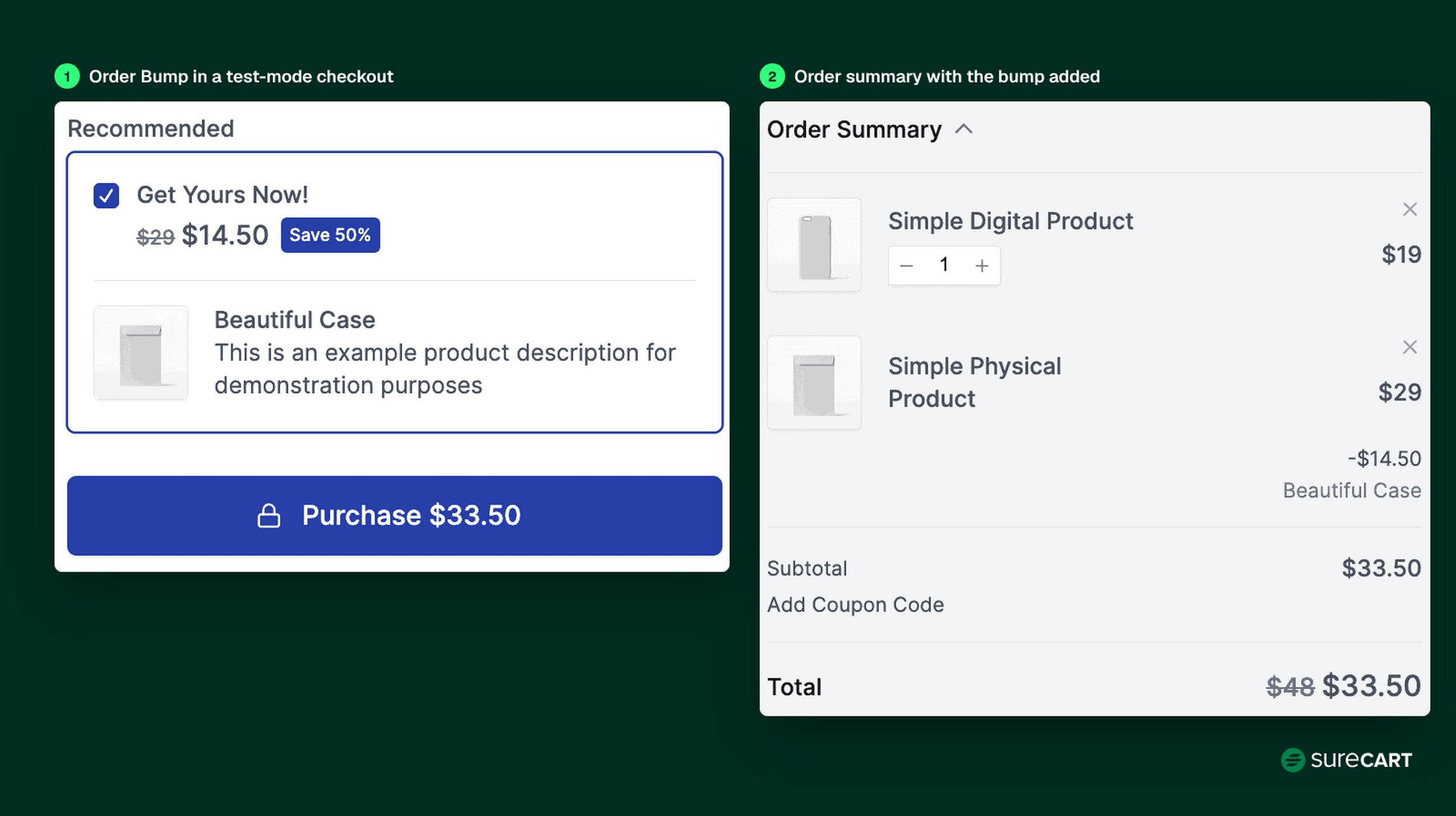
In SureCart: Order Bumps show an offer at checkout based on the product or price in the cart, with an optional discount. One-Click Upsells run after checkout, with an upsell, a second upsell if the first is accepted, or a downsell if it’s declined.
Important: If you use an upsell funnel, only reusable payment methods are shown at checkout. iDEAL and Bancontact aren’t available for those flows.
11. Recover Abandoned Checkouts
Recovery emails reach shoppers who started checkout, entered an email, and left. They won’t reach every abandoned cart from the opening example, only the ones where you captured an email.
Send the first reminder within hours, with what they left, a link back, and your order cutoff. Decide ahead of time whether a discount belongs in a later email, since discounting every reminder may teach shoppers to wait.
In SureCart: Abandoned Checkout counts a checkout as abandoned after 30 minutes if the shopper entered an email address. You can send up to three recovery emails with set delays, add a unique discount code, and set a grace period.
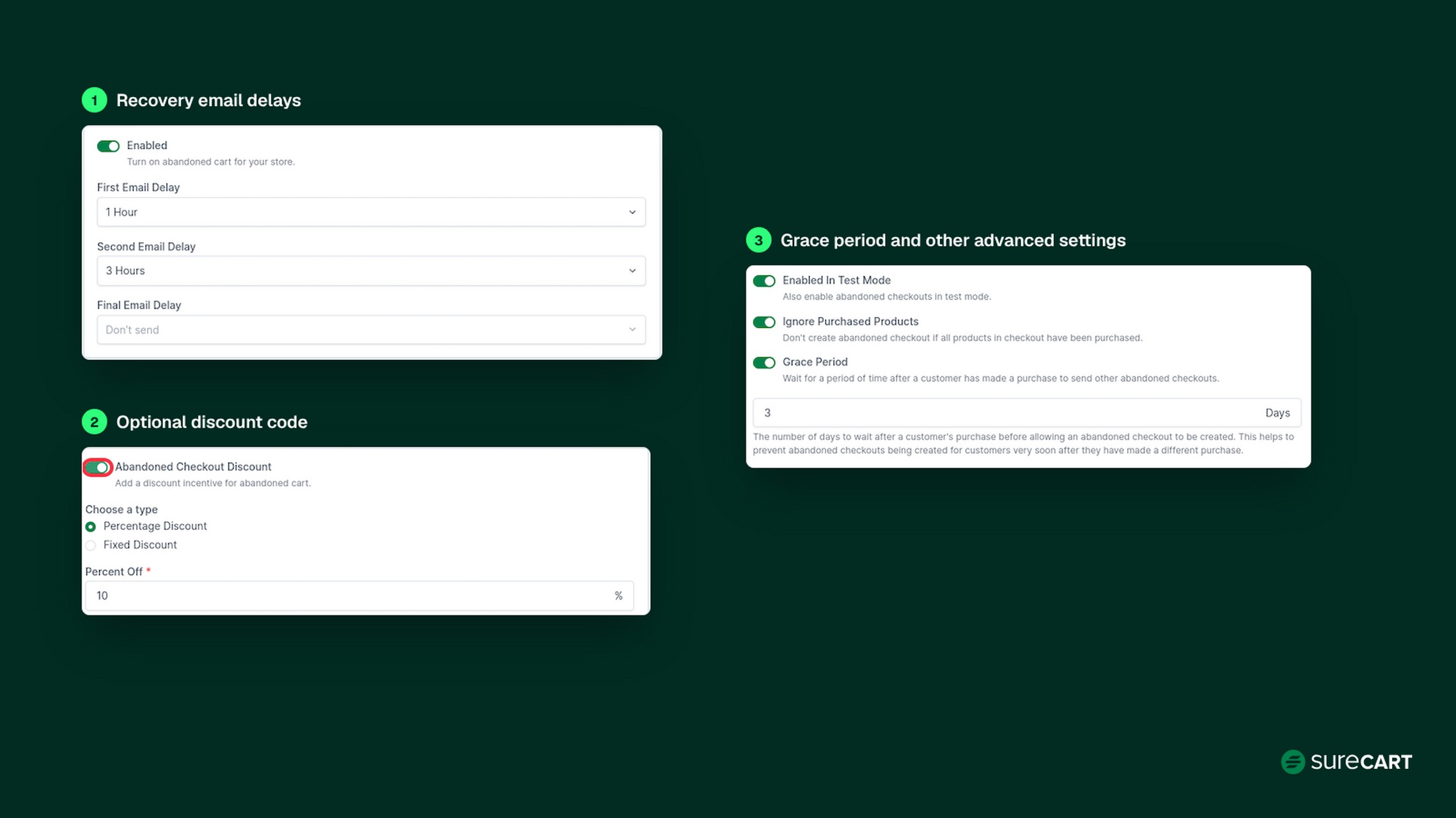
Emily turns on two recovery emails and saves the discount code for the second one. For more fixes, read our guide to reducing cart abandonment.
12. Make Gifting Easy
Gift buyers want confidence the order will arrive on time and look right when it does. Make gift-ready products easy to find with a gift guide, and point to your bundles from tip 3.
Add short gift instructions to product pages, including whether you can add a note. Show delivery expectations near the add-to-cart button, offer gift-ready packaging if you can, and consider gift cards for shoppers who don’t know what to pick.
Phase 4: Fulfill, Support, and Retain Customers
This phase covers the Ship and Retain rows of the calendar. Now the job is to deliver on what your store promised.
13. Publish Your Order Cutoff
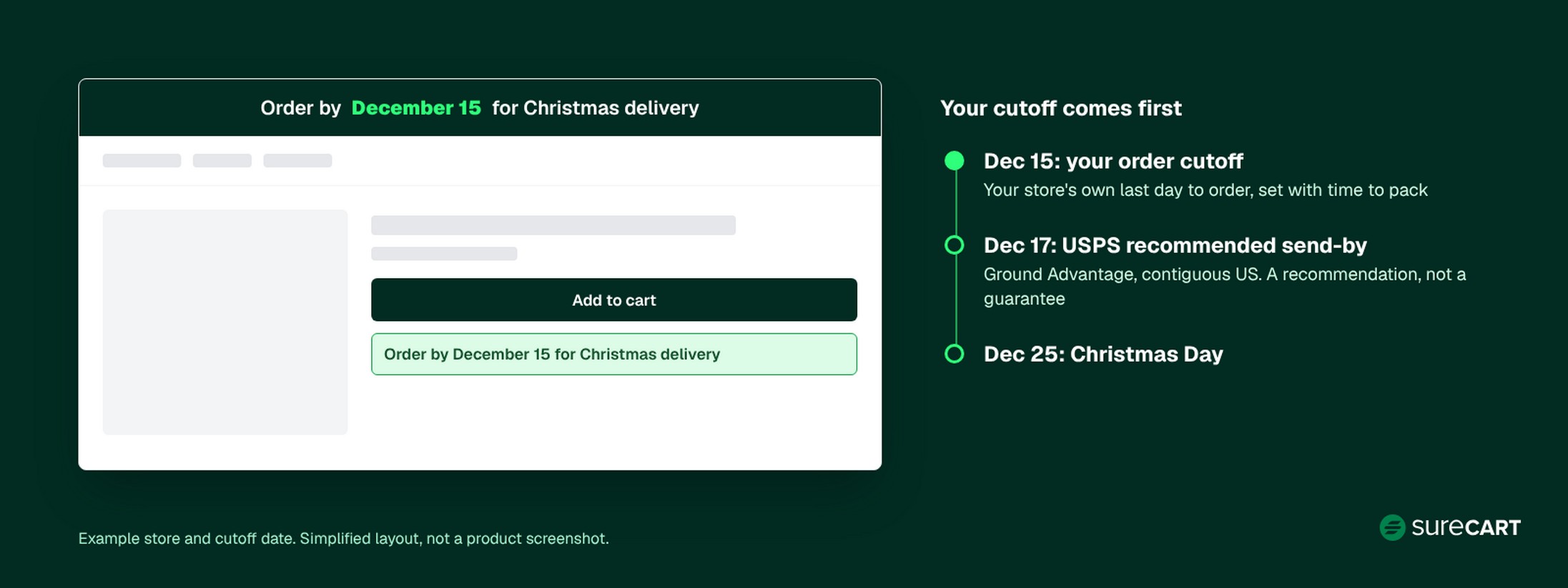
Two dates matter here. The carrier recommended send-by date comes from the carrier, and your store’s order cutoff is your own last day to order for holiday delivery.
USPS recommends these send-by dates for Christmas delivery in the contiguous US. They’re recommendations, not delivery guarantees.
| USPS service | Recommended send-by date |
|---|---|
| Ground Advantage | Dec 17 |
| First-Class Mail | Dec 17 |
| Priority Mail | Dec 18 |
| Priority Mail Express | Dec 19 |
Set your order cutoff earlier than the carrier recommended send-by date to allow time for processing and packing. Emily’s banner reads “Order by December 15 for Christmas delivery,” two days ahead of the USPS Ground Advantage date.
Publish your order cutoff in a site banner, on product pages, and in order confirmation emails. If you ship with UPS or FedEx, check each carrier’s published holiday dates.
In SureCart: set up shipping zones, methods, and rates (flat, by weight, or by order price), and buy shipping labels for several orders at once.
14. Prepare Support and a Holiday FAQ
Expect more order-status and returns questions in December. Answer them once in a holiday FAQ covering your order cutoff, shipping times, returns windows, and gift receipts.
In Baymard’s list of abandonment reasons, 13% point to a returns policy that wasn’t satisfactory. Put a short holiday returns summary on product pages, and set response-time expectations in your support auto-reply.
15. Plan the Post-Holiday Follow-Up
Late December and January bring returns, exchanges, and first-time buyers who need a reason to come back. Send a thank-you email after delivery and ask for a review.
Then give first-time buyers a reason to return in January, such as a new-year bundle or a refill offer. Emily sends hers a refill offer for the candle they bought.
In SureCart: Subscriptions can turn suitable replenishment products, such as candle refills, into recurring purchases.
Why Consider SureCart for Holiday Ecommerce?
We built SureCart, so weigh this section with that in mind.
Several tips above rely on store features: gift bundles and free-shipping rules (tips 3 and 4), checkout add-ons and recovery emails (tips 10 and 11), and shipping tools (tip 13). These capabilities are available within SureCart’s WordPress-based ecommerce stack, so you can manage several of these workflows in one place.
That can reduce the number of separate pieces you need to update and test before your change freeze starts.
The Launch plan is free with a 2.9% SureCart transaction fee, Pro plans have no SureCart transaction fee, and payment processor fees apply on every plan. Check the pricing page for current plan details, including which features each plan includes.
Conclusion
These holiday ecommerce tips follow one order: plan your offers and stock, prepare your store and checkout, sell with clear offers and recovery, then ship on time and give new customers a reason to return.
Start with the calendar and find the phase you’re in. If it’s already November, begin with the five steps in the Starting in November box, and hold your change freeze through Cyber Monday.
Launch your holiday store inside WordPress. No credit card required.
FAQ
When should an online store start preparing for the holidays?
Start eight or more weeks before Black Friday. That leaves time to review last season’s sales, order stock, plan offers, and build bundles before testing begins about four weeks out.
If you’re starting later, prioritize the five actions in the Starting in November box above.
What are the major ecommerce holidays?
In the US, the main dates are Thanksgiving, Black Friday, Small Business Saturday, and Cyber Monday, followed by Christmas. The days after Christmas matter too, with returns, exchanges, and first-time buyers you can bring back.
The Key Dates table above lists this season’s dates.
How much should I discount for Black Friday and Cyber Monday?
Adobe forecasts discounts of up to 30% off listed prices during Cyber Week across large retailers. Treat that as context, not a target.
Add up your costs per order plus the minimum profit you want, and the gap between your price and that floor is your maximum discount.
How can I reduce cart abandonment during the holidays?
Fix the checkout problems in Baymard’s list first: show the full cost early, don’t force sign-ups, trim checkout fields, and offer the payment methods your shoppers use. Then send recovery emails to shoppers who entered an email at checkout but didn’t finish.
Can I run holiday promotions on WordPress without adding multiple ecommerce plugins?
Yes. You can combine separate plugins for coupons, upsells, and recovery emails, or use an ecommerce platform that includes them.
SureCart is one option: it includes coupons, Dynamic Pricing, Order Bumps, One-Click Upsells, and Abandoned Checkout as part of its ecommerce stack. Check the pricing page for which features each plan includes. We built it, so compare it against your current setup first.