SureCart 4.10.0 brings a redesigned onboarding and a new setup guide. It walks you through each step, from creating your store to your first sale.
You can start in three places: our website, the WordPress plugin, or a ready-made site. Wherever you start, you get a clear setup guide. In the SureCart app, it shows four main steps. In WordPress, it shows six steps with a bit more detail.
How it helps you
- Fewer questions. We only ask what we need: your store name, country, what you sell, and where you sell.
- Skip what can wait. Optional steps can wait, and we save your answers. A few steps, like setting up payments, must be done before you can take real orders.
- A guided site connection. Type your WordPress address. We check that WordPress is there and guide you to install and turn on the plugin. Then we link your site to your account.
- Clear help if something goes wrong. We tell you what the problem is and how to fix it.
- Tips for your store. Once setup is done, your dashboard shows next steps that fit what you sell.
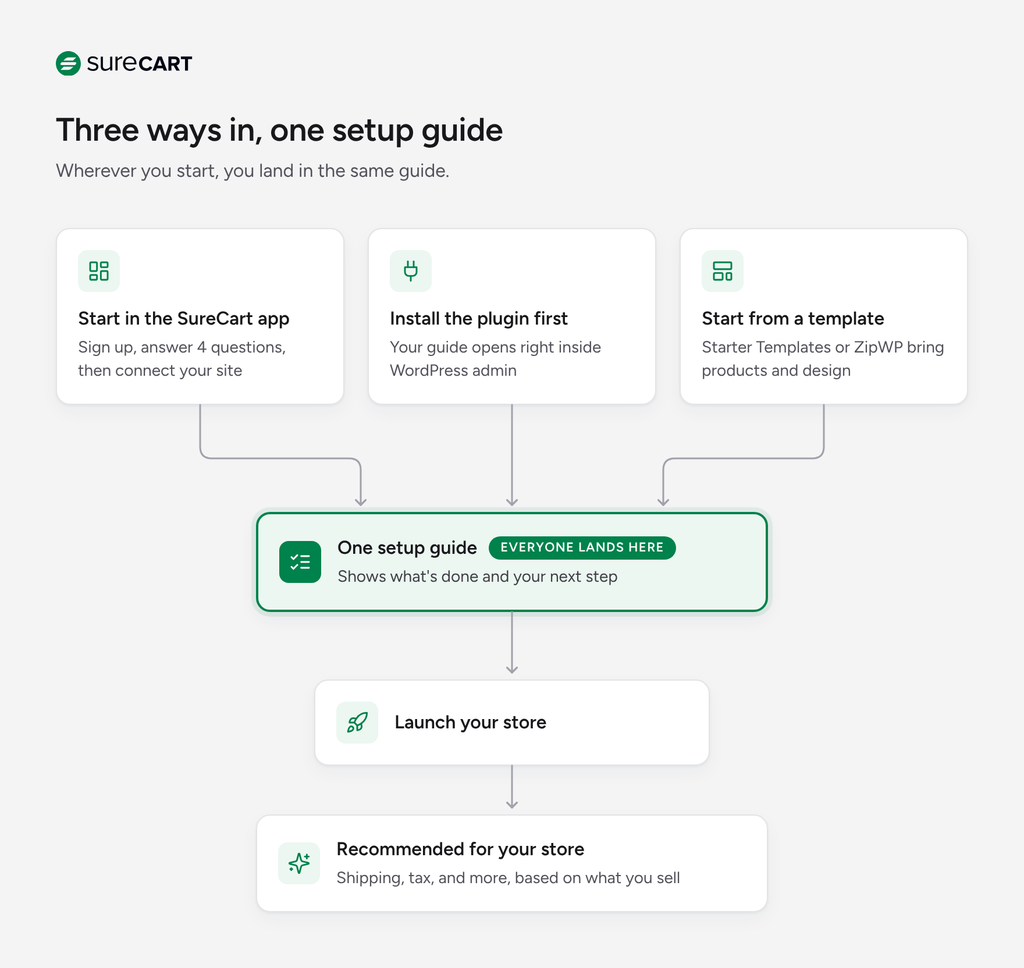
Your first few screens depend on where you start. After that, everyone follows the same setup steps.
Path 1: You start in the SureCart app
This is for you if you sign up on our website.
Step 1: Create your account. Use Google or your email. It’s free, and you don’t need a credit card.
Step 2: Answer four quick questions.
- What’s your store name, country, and currency?
- Who is the store for? Your own business, a client, or just exploring.
- What are you selling? Pick all that apply.
- Where will customers shop? Your WordPress site or a demo store.
Step 3: Connect your site.
- Have a WordPress site? Type your site address and click Install SureCart. Your plugins page opens in a new tab. Click Install Now, then Activate. Come back, and we’ll do the rest.
- Someone else runs your site? Connecting your WordPress site to SureCart takes just a simple link. Anyone who can log in to the site can finish it.
- No site yet? Pick the demo store. ZipWP builds a site with SureCart already on it. The free ZipWP site lasts 24 hours. Your SureCart store is free forever, so you can connect it to any WordPress site later, on ZipWP, Hostinger, or any host you like.
Step 4: Finish in your dashboard.
You’ll see four steps:
- Get a site to sell from
- Set up payments
- Add a product
- Launch your store
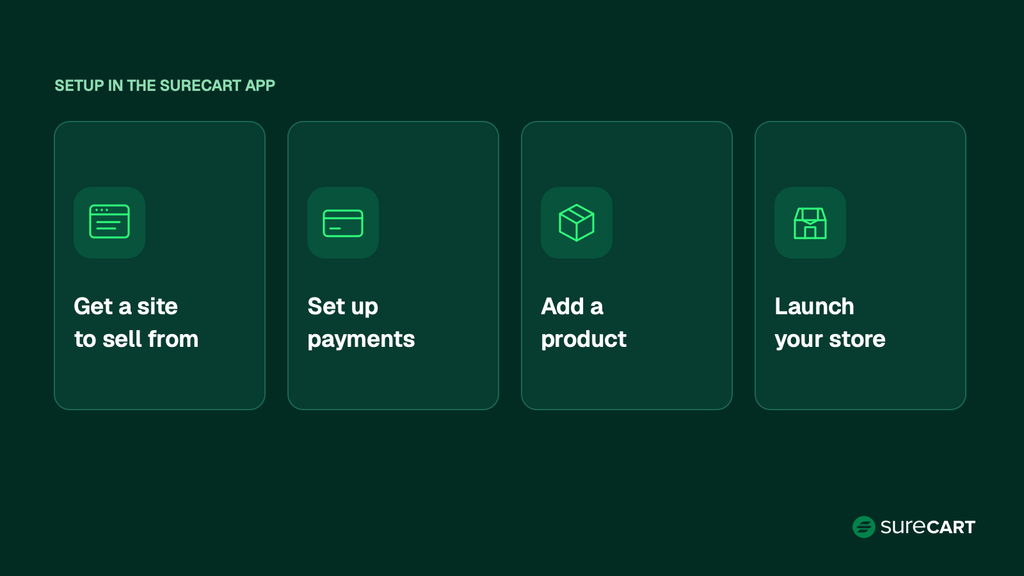
Payments come early on purpose. Stripe and other payment companies need time to check your details, so you can add products while you wait.
Path 2: You install the plugin first
This is for you if you add SureCart from your WordPress plugins page.
Open SureCart in WordPress. You’ll see Set up your store with six steps in two groups.
Get selling
- Add a product. Make your own, or import demo products to try things out.
- Add your logo and colors. They show on your store, checkout, and receipts.
- Run a test order. Once your store is connected, try the whole checkout with SureCart’s built-in test payment option. You don’t need a real payment processor yet.
Get paid
- Connect your store. Link your site to your SureCart account.
- Set up payments. Connect Stripe, PayPal, or another option.
- Launch your store. Once a live payment processor is connected, turn off test mode to start taking real orders.
Coming from WooCommerce? Pick “Import Products from Woo” during setup to bring your products over. One-time, installment, and subscription products are supported. WooCommerce stays installed, and your customers and orders stay there.
Path 3: You start from a Starter Template or ZipWP
This is the fastest way to start. Your site already comes with products and a design.
- Starter Templates: Pick a store design. You get products, pages, and a checkout, all ready to edit. You can also browse and import them in SureCart under Settings > Design & Branding.
- ZipWP: ZipWP builds a full WordPress site with SureCart already on it. You can also pick this as the demo store when you sign up.
When you open your setup guide, two steps are already checked off using the template’s sample products and branding:
- Add a product (sample products from the template)
- Add your logo and colors (set by the template)
Each step has a Review button. These come from the template, not your own brand, so edit or delete them and add your own before you launch. Then finish the rest:
- Connect your store
- Run a test order
- Set up payments
- Launch your store
If you made your demo store from the SureCart app, your site is already connected too.
After you launch
Before you go live, connect a live payment processor like Stripe and check that your products and checkout are set up. Then turn off test mode and place one real order to make sure everything works.
Once you finish setup, you land on your dashboard. It’s customized to what you told us, so the next steps you see fit your store. None of them stop you from taking orders.
Steps for every store
- Set up tax. Collect the right tax based on where your customers live.
- Add store policies. Add refund, privacy, and terms pages so customers know what to expect.
Steps based on what you sell
- Physical products: Set up shipping rates and delivery zones.
- Digital products: Set up file downloads and choose how long links last.
- Subscriptions or memberships: Turn on the customer portal. Customers can change plans and update cards on their own.
- Selling in the EU: Set up EU VAT and collect VAT numbers from business customers.
Skip any you don’t need. When you’re ready to grow, you can upgrade your plan anytime. Pro plans have no transaction fee.
Grow your sales
Once you’re live, your dashboard points you to tools that help you earn more, like order bumps, one-click upsells, and cart recovery. They’re all included, so turn them on when you’re ready.