A customer buys a $20 item from your store. On Shopify’s Basic plan with Shopify Payments, card processing takes $0.88.
Send that same order through a third-party payment provider, and Shopify adds a 2% transaction fee ($0.40) before the provider charges its own fee. On WooCommerce with Stripe, processing is also $0.88, but you pay for hosting and any extensions yourself.
Those amounts look tiny until you multiply them by a few thousand orders a month. That’s why the WooCommerce vs Shopify decision comes down to what you’ll pay at your sales volume, and how much of the store you want to run yourself.
This guide prices the same store on both platforms at four revenue levels, using each vendor’s own pricing pages.
Disclosure: SureCart publishes this comparison. We include SureCart where it’s relevant, but the primary comparison in this article is WooCommerce vs Shopify.
Quick answer: In the WooCommerce vs Shopify decision, Shopify suits sellers who want a hosted platform with hosting and core selling features included in the plan, while WooCommerce suits sellers who want maximum control inside WordPress. The better choice depends on your technical requirements, sales volume, and how much of the store’s infrastructure you want to manage. For WordPress users who want managed eCommerce without assembling a large WooCommerce extension stack, SureCart is another option to consider.
- Key Takeaways
- How We Compared WooCommerce vs Shopify
- WooCommerce vs Shopify at a Glance
- Transaction and Payment Fees
- Ease of Setup and Day-to-Day Management
- Customization, Themes and SEO
- Performance, Security and Scaling
- Data Ownership, Lock-In and Migration
- AI Tools and In-Person Selling
- Shopify or WooCommerce: How to Choose
- WooCommerce vs Shopify: Which Should You Choose?
Key Takeaways
- Card processing is most of the bill. From $10,000 a month in sales up, processing fees make up more than 80% of the total on every platform we priced.
- Shopify has the lowest modeled total at all four revenue levels in this scenario. Hosting, abandoned checkout recovery, and sales tax calculation are included in every plan, and Grow’s lower card rate keeps Shopify ahead at higher volume. At $10,000 a month, Shopify Basic came to $380.17, against $416.50 for WooCommerce, before a paid upsell tool on either.
- Tax coverage matters more than the tax fee. For a store collecting tax in one state, Shopify Tax averaged $29.17 a month at $50,000 in sales and $64.17 at $100,000 in our first-year model. Collecting in many states raises Shopify’s fee, and on WooCommerce it means paying for a multi-state tax service, which the free WooCommerce Tax extension doesn’t replace.
- WooCommerce’s paid parts are hosting and extensions. The plugin and WooCommerce Tax are free; WooCommerce Subscriptions is $279 a year.
- Third-party payment providers cost extra on Shopify: 2% on Basic, 1% on Grow, 0.6% on Advanced, and 0.2% on Plus, on top of the provider’s own fee.
- Shopify’s cheapest plan changes with volume. Grow beats Basic from about $25,000 a month, and stays cheaper than Advanced until about $110,000 a month.
How We Compared WooCommerce vs Shopify
How we calculated the costs
We priced the same hypothetical US store on each platform: physical products plus one subscription product, a $50 average order value, and 100% online card payments.
The store needs automated sales tax and abandoned checkout recovery, so each platform was priced with the software needed to match those capabilities. We also name a post-purchase upsell option for each platform, but leave it out of the four-level totals so the core comparison stays consistent (SureCart includes upsells in every plan). We used annual billing where available and divided annual prices by 12.
The store has one sales tax nexus: its home state. That keeps the tax comparison like-for-like, because the free WooCommerce Tax extension automates US tax for the store’s primary tax location, while Shopify Tax can calculate tax in any eligible US region you activate. A store collecting tax in many states would need a paid multi-state service on WooCommerce, which this model doesn’t price.
Payment processing fees are shown separately from platform fees. A custom domain isn’t strictly required, since Shopify provides a free myshopify.com address, but we leave the custom-domain cost out because the model assumes every comparable professional store will use one. Developer time is excluded because it varies too much by store.
We checked pricing in October 2026, on each vendor’s own pricing pages. Prices and fees change, and we update this comparison when vendor pricing changes.
Two more assumptions sit behind the hosting and tax lines. To size hosting, we assume a 2% conversion rate, so $50,000 a month (1,000 orders) means about 50,000 visits.
That’s a modeling assumption for the hosting line only, not a benchmark or a WooCommerce requirement. We use Kinsta’s Single plans, billed on measured visits, rather than its newer Launch plans, which are sized by estimated visits.
For Shopify Tax, we model a new store created in 2026. Shopify Tax is free until a store reaches $100,000 in lifetime sales, then charges 0.35% on US orders where tax is collected on Basic, Grow, and Advanced, capped at $0.99 per order. With one nexus, only orders shipped to the home state are taxed. We assume that’s 20% of orders.
At $50,000 a month, the store passes the threshold after two months. Taxed orders make up $100,000 of the remaining $500,000 in first-year sales, which carries $350 in fees: $29.17 a month averaged over the year. At $100,000 a month, $220,000 of the remaining $1.1 million is taxed, carrying $770, or $64.17 a month.
From year two, once the lifetime threshold has been crossed, the fee applies to every eligible taxed US order: about $7 a month at $10,000, $35 at $50,000, and $70 at $100,000. Stores created before May 13, 2026 follow older rules, with a $100,000 annual threshold and a $5,000 yearly cap.
If more of your orders are taxed, Shopify’s fee rises with them. In our first-year model, Shopify keeps the lowest total at $50,000 a month unless more than about 55% of orders are taxed, and at $100,000 a month unless more than about 66% are.
We built SureCart, so we’ve kept it out of the head-to-head sections and added it only to the cost tables and its own section near the end.
WooCommerce vs Shopify at a Glance
Pricing checked October 2, 2026.
| WooCommerce | Shopify | |
|---|---|---|
| What it is | Free, open-source eCommerce plugin for WordPress | Hosted eCommerce platform on a monthly plan |
| Starting cost | $0 for the plugin, plus hosting; a custom domain is optional but excluded from our cost model | Basic: $29/month billed yearly, or $39 monthly (the cheapest full online store plan) |
| Platform transaction fee | None | None with Shopify Payments; 2%, 1%, 0.6%, or 0.2% with a third-party provider |
| Payments | Stripe, PayPal, WooPayments, and other gateways through extensions | Shopify Payments, or a third-party provider |
| Hosting | You choose and pay for it | Included |
| Features vs add-ons | Core store features included; subscriptions, automation, and many upsell tools are free or paid extensions | Abandoned checkout recovery and sales tax calculation included; subscriptions through Shopify’s free Subscriptions app |
| Customization | Full code access (PHP) and any WordPress theme | Liquid themes and apps; advanced checkout customization is Shopify Plus only |
| In-person selling | WooCommerce POS, free in the Woo mobile app (tablets in 10 countries, limited phone POS in the UK); cash or card, with card readers at $5/month per active reader | Shopify POS, with POS Pro at $89/month per location |
| Data and portability | Store data sits in your own WordPress database | Data lives on Shopify, exportable by CSV and API |
| Support | Community forums, extension vendors, and your host | Shopify support on every plan |
What WooCommerce vs Shopify Actually Costs at 4 Revenue Levels
Short answer: In our single-nexus scenario, Shopify has the lowest modeled total at every revenue level. Included hosting keeps it ahead at low volume, and Grow’s lower card rate keeps it ahead at higher volume.
Above $1,000 a month, card processing is so much larger than the platform bill that the gaps between platforms stay small.
Here’s what every line costs at $10,000 a month, so you can see where the totals come from. SureCart appears as a third column because it’s one of the options WordPress users weigh at this point.
Pricing checked October 2, 2026. Annual prices divided by 12; original annual prices in parentheses.
| Cost line at $10,000/month (200 orders) | WooCommerce | Shopify Basic | SureCart Pro (1 Store) |
|---|---|---|---|
| Platform plan | $0 | $29.00 ($348/year) | $16.58 ($199/year) |
| Hosting | $30.00, Kinsta Single 35k billed yearly | Included | $30.00, same WordPress host |
| Subscriptions | $23.25, WooCommerce Subscriptions ($279/year) | $0, Shopify Subscriptions app (free) | Included |
| Sales tax calculation (one nexus) | $0, WooCommerce Tax (primary tax location) | $1.17, Shopify Tax (first-year average, 20% of orders taxed) | Included |
| Abandoned checkout recovery | $13.25, AutomateWoo ($159/year) | Included | Included |
| Post-purchase upsell | Not in totals; e.g. UpsellWP Starter, $6.25 ($75/year) | Not in totals; e.g. Aftersell Post-Purchase, $34.99 | Included |
| Card processing (2.9% + 30¢) | $350.00, Stripe | $350.00, Shopify Payments | $350.00, Stripe |
| Platform transaction fee | $0 | $0 | $0 on Pro |
| Total before an upsell tool | $416.50 | $380.17 | $396.58 |
SureCart still runs on a WordPress site, so it carries the same hosting line as WooCommerce. What SureCart’s hosted platform takes over is the commerce backend: store data, checkout, pricing, and tax logic.
The same method at all four revenue levels gives these monthly totals:
| Monthly sales (orders) | WooCommerce | Shopify | SureCart |
|---|---|---|---|
| $1,000 (20) | $101.50 | $64.00 (Basic) | $81.58 (Pro) or $94.00 (Launch) |
| $10,000 (200) | $416.50 | $380.17 (Basic) | $396.58 (Pro) |
| $50,000 (1,000) | $1,828.50 | $1,758.17 (Grow) | $1,808.58 (Pro) |
| $100,000 (2,000) | $3,611.50 | $3,443.17 (Grow) | $3,591.58 (Pro) |
Totals exclude a post-purchase upsell tool on WooCommerce and Shopify; adding the named examples would raise WooCommerce by $6.25 and Shopify by $34.99 a month at every level.
Hosting is $30/month at the first two levels and assumes larger plans at $42 and $75/month for about 50,000 and 100,000 monthly visits (Kinsta Single 65k and Single 125k, billed yearly). Shopify uses the lowest-cost plan at each revenue level based on the modeled card-processing rates, with Shopify Tax shown as a first-year monthly average for a store created in 2026, assuming one tax nexus and 20% of orders taxed.
Card processing is the percentage rate plus 30¢ on every order: $35 at $1,000, $350 at $10,000, $1,750 at $50,000, and $3,500 at $100,000 on Stripe. Shopify Basic has the same processing cost at the first two levels; Shopify Grow is $1,650 at $50,000 and $3,300 at $100,000.
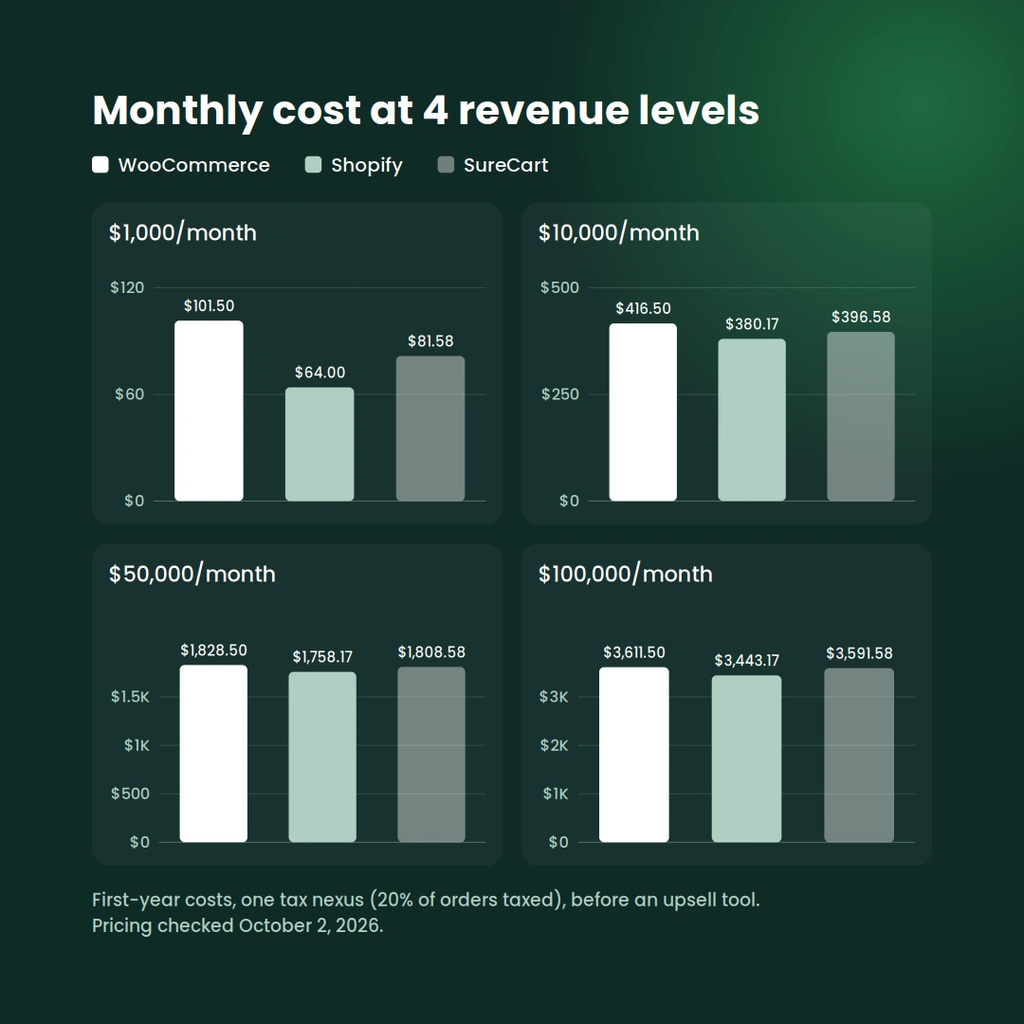
$1,000 a month
Shopify Basic is the lowest total here at $64.00, since its $29 plan replaces both hosting and the extension stack. Shopify Tax adds nothing yet, since the store is far from the $100,000 lifetime threshold.
WooCommerce comes to $101.50, and $36.50 of that is the assumed extensions. If your store doesn’t need subscriptions or automated recovery emails, WooCommerce drops to $65.00, nearly level with Shopify.
SureCart’s two plans split the cost differently. Launch has no plan fee but adds 2.9% of every sale on top of Stripe’s fee, which is $29 a month at this level. Pro replaces that with $199 a year, or $16.58 a month. With the same $35 in Stripe fees and $30 in hosting on both, Launch comes to $94.00 and Pro to $81.58.
Pro becomes the cheaper plan once your sales pass about $6,862 a year (roughly $572 a month), because that’s where 2.9% of your sales equals the $199 Pro fee.
$10,000 a month
All three land within $37 of each other. Card processing is $350 on every platform, so the difference is the fixed stack: Shopify’s $29 plan plus a $1.17 first-year Shopify Tax average, WooCommerce’s $66.50 in hosting and extensions, and SureCart’s $46.58 in hosting and plan fee.
These are first-year figures. After the store crosses the $100,000 lifetime threshold, Shopify Tax applies to every eligible taxed US order. That’s about $7 a month instead of the $1.17 first-year average, which puts Shopify at about $386.00, still the lowest of the three.
$50,000 a month
Shopify Grow becomes cheaper than Basic from about $25,000 a month, because its 0.2-point lower card rate saves more than the extra $50 plan fee.
Shopify Tax isn’t a flat monthly charge. It’s usage-based: 0.35% of eligible taxed sales once the store passes the $100,000 lifetime threshold. At this level, with 20% of orders taxed, there’s no Shopify Tax fee for the first two months. From month three onward, the modeled fee is about $35 a month.
Spread over the first year, that averages $29.17 a month. Shopify keeps the lowest modeled total, $50.41 below SureCart and $70.33 below WooCommerce, mainly because Grow’s card rate costs $100 a month less than Stripe’s at this volume. SureCart comes in $19.92 below WooCommerce, the gap between WooCommerce’s extensions and SureCart’s plan fee.
$100,000 a month
Grow remains $20 cheaper than Advanced ($3,443.17 against $3,463.17), since Advanced’s lower card rate only pays for its higher plan price at about $110,000 a month. Shopify Tax is free for the first month at this level, then about $70 a month in eligible-order fees, which averages $64.17 a month over the first year.
Shopify’s lead widens here: $148.41 below SureCart and $168.33 below WooCommerce, because Grow’s card rate saves $200 a month against Stripe. At this volume, a negotiated processing rate would matter more than any plan choice on any platform.
What the numbers mean
The lowest total isn’t automatically the right choice.
Percentage fees rise directly with sales, while plan, extension and hosting costs are fixed or increase in steps. So fixed costs largely determine which platform has the lower modeled total at low volume, and percentage costs determine it at high volume.
Shopify’s additional percentage-based costs are Shopify Tax and, if you skip Shopify Payments, the third-party provider fee. How much Shopify Tax adds depends on how many of your orders are taxed. WooCommerce’s fixed costs depend on how many paid extensions your store needs, and that’s the easiest line to underestimate.
Already using WordPress? If you want to keep WordPress but don’t want to manage hosting upgrades, several eCommerce extensions, and their updates, SureCart is another option, with managed eCommerce infrastructure while WordPress stays your site and storefront. Explore SureCart →
What WooCommerce and Shopify Are
WooCommerce
WooCommerce is a free, open-source plugin that turns a WordPress site into a store. You install it on hosting you choose, and you’re responsible for that hosting, plus updates, security, backups, and whichever extensions your store needs.
In return, you get full access to the code and the data, and the whole WordPress ecosystem of themes and plugins.
Shopify
Shopify is a hosted eCommerce platform you pay for monthly. Shopify runs the servers, security, and core updates, and you build your store with its themes and the Shopify App Store.
You trade some control for a store that works the day you sign up.
WooCommerce vs Shopify Pricing: What You Pay Each Month
Shopify plan costs
Pricing checked October 2, 2026, on shopify.com/pricing.
| Plan | Price | Online card rate (Shopify Payments) | Third-party provider fee |
|---|---|---|---|
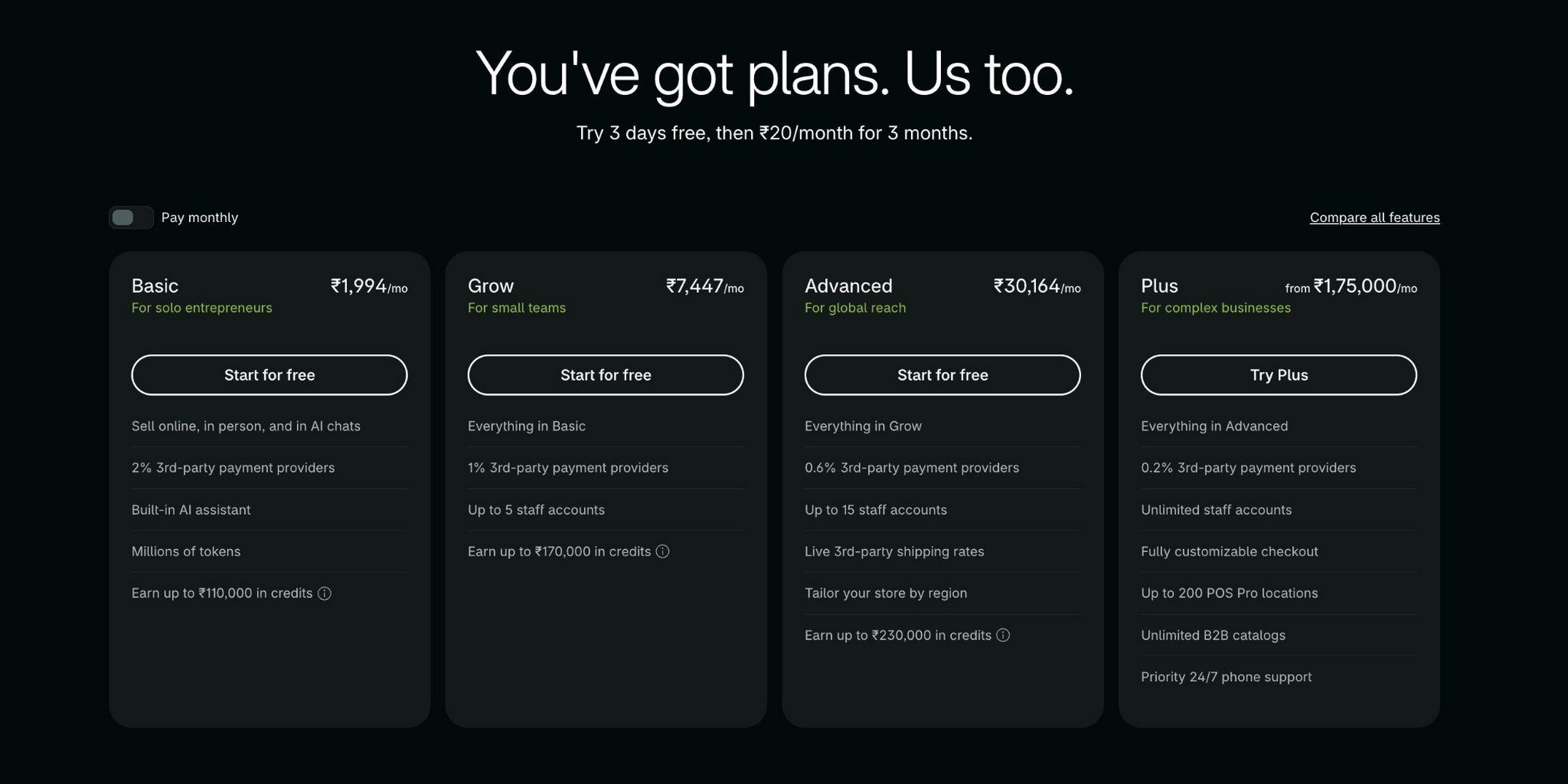
| Basic | $39/month, or $29/month billed yearly | 2.9% + 30¢ | 2% |
| Grow | $105/month, or $79/month billed yearly | 2.7% + 30¢ | 1% |
| Advanced | $399/month, or $299/month billed yearly | 2.5% + 30¢ | 0.6% |
| Plus | From $2,300/month on a 3-year term ($2,500/month on a 1-year term) | Varies / contact Shopify | 0.2% |
Every plan includes hosting, abandoned checkout recovery, and automated sales tax calculation. New stores get three days free, then $1 a month for the first three months.
Shopify also lists a $0 Agentic offering for selling through AI channels; we’ve left it out because it isn’t a full online store plan.
Two costs sit outside the plan price. Shopify Tax calculates tax in the eligible US regions you activate. It’s free until a new store reaches $100,000 in lifetime sales, then charges 0.35% on US orders where tax is collected, capped at $0.99 per order. Stores created before May 13, 2026 use an annual $100,000 threshold with a $5,000 yearly cap.
And most stores add apps, which range from free to a monthly subscription each.
WooCommerce’s real running costs
WooCommerce itself costs nothing, and so does WooCommerce Tax, which calculates tax at checkout but doesn’t file or remit it. Its US automation is generally limited to the store’s primary tax location, so it isn’t equivalent to Shopify Tax’s multi-state coverage. Stores that collect tax in several states need a paid tax service on top.
The paid parts depend on what your store does:
- Hosting: from low-cost shared plans to $30 a month and up for managed WordPress hosting, such as Kinsta’s Single 35k plan billed yearly.
- Subscriptions: WooCommerce Subscriptions is $279 a year.
- Abandoned cart emails: AutomateWoo is $159 a year, and the Abandoned Cart Recovery extension on Woo’s marketplace is $79 a year.
- Upsells: marketplace and third-party options range from free to paid annual plans; UpsellWP’s single-site Starter plan, for example, is $75 a year.
- Themes: free, or a one-time or yearly paid license.
For a closer look at WooCommerce’s extension costs, see our WooCommerce pricing breakdown.
Transaction and Payment Fees
Short answer: WooCommerce doesn’t charge a platform transaction fee; payment processors still charge their own fees. Shopify charges no transaction fee when you use Shopify Payments, and adds one when you don’t.
On Shopify, that extra fee is 2% on Basic, 1% on Grow, 0.6% on Advanced, and 0.2% on Plus. On WooCommerce, you pick a gateway such as Stripe, PayPal, or WooPayments and pay that gateway’s rate.
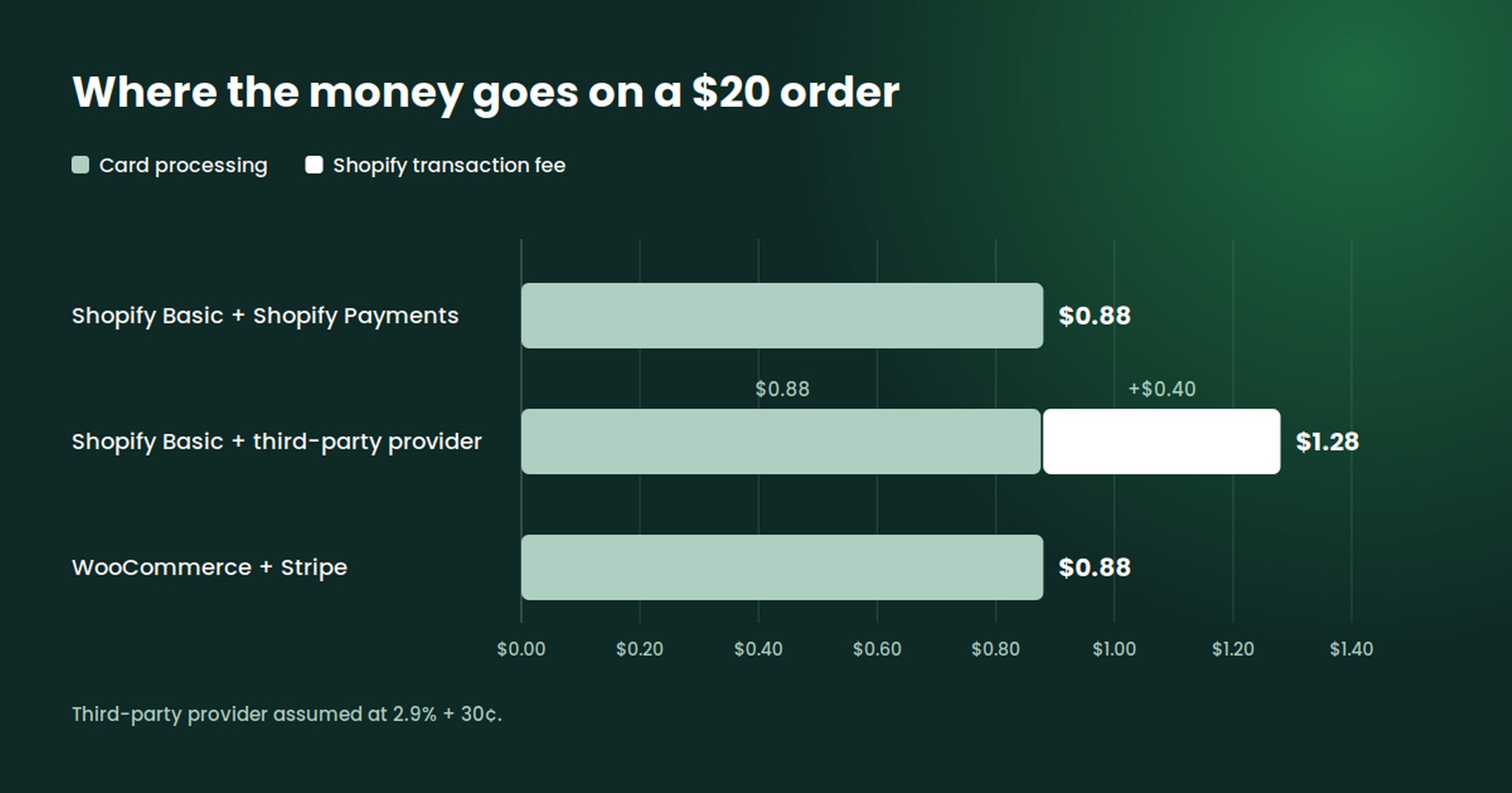
So how much does Shopify take from a $20 sale? On Basic with Shopify Payments, $0.88 in card processing (2.9% + 30¢), with no extra transaction fee. With a third-party provider, Shopify takes $0.40, and the provider charges its own fee on top.
Per-order fees, checked October 2, 2026. Stripe’s US card rate is 2.9% + 30¢ on stripe.com; the third-party provider is assumed to charge the same.
| Setup | $20 order | $50 order |
|---|---|---|
| Shopify Basic, Shopify Payments | $0.88 | $1.75 |
| Shopify Basic, third-party provider | $1.28 | $2.75 |
| WooCommerce, Stripe | $0.88 | $1.75 |
| SureCart Launch, Stripe | $1.46 | $3.20 |
| SureCart Pro, Stripe | $0.88 | $1.75 |
SureCart’s Launch plan adds a 2.9% transaction fee on top of processor fees; Pro removes it. Our guide to eCommerce fees walks through how the two fee layers stack.
Ease of Setup and Day-to-Day Management
Short answer: Shopify generally needs less technical setup because hosting and core infrastructure are managed for you, while WooCommerce gives you more control but asks you to configure and maintain more of the stack.
A new Shopify store starts with a guided setup: pick a theme, add products, connect Shopify Payments, and you can take orders the same day. Updates and security patches happen without you.
WooCommerce setup has more steps. You pick a host, install WordPress and WooCommerce, choose a theme, connect a payment gateway, and add the extensions your store needs.
Once it’s live, someone has to keep WordPress, WooCommerce, the theme, and every extension updated, and check that the updates still work together.
If you already run a WordPress site, part of that work is familiar. If you don’t, it’s a real time cost that never shows up on an invoice.
Built-In Features vs Apps and Extensions
Short answer: Shopify includes more selling features in the plan price, and WooCommerce relies more on extensions. Both platforms need add-ons for some features, so the real question is which ones your store needs.
Here’s how the features in our example store are delivered on each platform:
| Feature | WooCommerce | Shopify |
|---|---|---|
| Subscriptions | Paid extension (WooCommerce Subscriptions, $279/year) | Free first-party app (Shopify Subscriptions) |
| Automated sales tax | Free extension (WooCommerce Tax) for the primary US tax location; multi-state coverage needs a paid service | Included in eligible activated US regions; Shopify Tax fee applies to eligible US orders after $100,000 in lifetime sales |
| Abandoned checkout recovery | Paid extension (AutomateWoo $159/year, or Abandoned Cart Recovery $79/year) | Included |
| Post-purchase upsells | Free or paid third-party extensions | Free or paid third-party apps |
| Product reviews | Included in WooCommerce core | Third-party app; free plans available (for example, Judge.me) |
The pattern holds beyond these five. Shopify bundles the common features and charges for scale, while WooCommerce gives you a lean core and lets you buy only what you use.
Neither approach is cheaper by default. A store with simple needs can run WooCommerce on almost no paid extensions, and a store with many needs can collect a long list of Shopify app subscriptions.
WooCommerce pros and cons
Pros:
- No platform transaction fee with any gateway.
- Full control over code, hosting, and data.
- Access to the full WordPress library of themes and plugins.
- You only pay for the extensions you actually use.
Cons:
- You’re responsible for hosting, updates, security, and backups.
- Paid extensions renew every year and can conflict with each other.
- Performance depends on your host and how many plugins you run.
- Support is split across your host, Woo, and each extension vendor.
Shopify pros and cons
Pros:
- Hosting, security, and updates are handled for you.
- Abandoned checkout recovery and sales tax calculation are included.
- Shopify POS covers in-person selling from the same admin.
- One support team for the platform.
Cons:
- A fee on every order if you don’t use Shopify Payments.
- Shopify Tax charges a percentage once your store passes $100,000 in lifetime sales.
- App subscriptions add up as the store grows.
- Less control over code, checkout, and where your store runs.
Customization, Themes and SEO
Short answer: WooCommerce offers deeper customization because you can change any line of code. Shopify is customizable within its theme and app system, with limits that loosen on higher plans.
WooCommerce runs on PHP and WordPress, so a developer can change templates, checkout fields, and store logic directly.
Shopify themes use Liquid, its own templating language, and while every plan gets the checkout editor, advanced customization of the information, shipping, and payment steps is limited to Shopify Plus.
For SEO, both platforms let you edit titles, meta descriptions, URLs, and structured data. WordPress has the edge for content-led stores, since its publishing tools and SEO plugins were built for blogs and long-form pages.
Shopify includes a blog and handles technical basics like sitemaps automatically, but its URL structure has fixed prefixes such as /products/ and /collections/ that you can’t remove.
Performance, Security and Scaling
Shopify manages the hosting infrastructure and core security for you. WooCommerce’s performance and security depend more heavily on your host, configuration, and maintenance.
On Shopify, traffic spikes, server security, and PCI compliance for checkout are Shopify’s job. On WooCommerce, a good managed host covers much of the same ground, but you still choose the plan, size it for your traffic, and keep plugins updated.
A WooCommerce store with many extensions can slow down, since each plugin adds code that loads on your site. That’s one reason our cost model moves WooCommerce to a larger hosting plan as traffic grows.
Data Ownership, Lock-In and Migration
With WooCommerce, your products, orders, and customers live in your own WordPress database on your own hosting. You can move hosts, back it up however you like, and connect any tool that reads WordPress data.
Shopify stores your data on its platform. You can export products, customers, and orders as CSV files, and developers can pull more through Shopify’s API.
Leaving Shopify still means rebuilding the theme, replacing apps, and redirecting URLs, because none of those carry over to another platform. Moving off WooCommerce takes similar work, since your extensions and their data are specific to WooCommerce.
No direction is a one-click move, so pick the platform you’d be comfortable staying on.
AI Tools and In-Person Selling
Shopify builds AI features into the admin, including Shopify Magic for generating product descriptions and Sidekick, an assistant that answers questions and runs tasks in your store. Shopify Magic is free on every plan, though individual features vary.
WooCommerce has its own official AI work too, including its MCP integration and Abilities API for connecting AI tools, and a free AI Product Advisor in public beta. You can also add AI features through WordPress plugins and third-party services, some of which are paid.
For in-person sales, Shopify’s POS is the more complete option out of the box. Shopify POS runs from the same admin as your online store, so inventory and customers stay in one place, and POS Pro adds advanced retail features for $89 a month per location.
WooCommerce now has its own WooCommerce POS, free in the Woo mobile app on tablets in 10 countries, with limited phone POS available in the UK. It accepts cash as well as card payments through WooPayments or Stripe, so the $5 monthly fee per active card reader only applies if you take cards in person.
It doesn’t yet support subscriptions or downloadable products, and receipt printing, cash drawers, and multi-location support are still on its roadmap. Stores with heavier retail needs often connect a third-party POS instead.
Shopify or WooCommerce: How to Choose
The better fit depends on your situation more than on either platform’s feature list. Here’s how common situations map to the two:
| Your situation | Leans toward | Why |
|---|---|---|
| First store, no technical help | Shopify | Hosting, security, and core features are set up for you |
| Existing WordPress content site | WooCommerce | Your store lives alongside the content and SEO you’ve already built |
| High volume, not using Shopify Payments | WooCommerce | No platform fee on third-party gateways |
| Retail shop plus online store | Shopify | Shopify POS shares inventory and customers with your online store |
| Subscriptions or software sales | Either | Shopify’s free Subscriptions app and WooCommerce Subscriptions both cover recurring billing; check licensing and renewal needs |
| Agency building client stores | Either | WooCommerce for code control and no per-store platform fee, Shopify for clients who want hands-off upkeep |
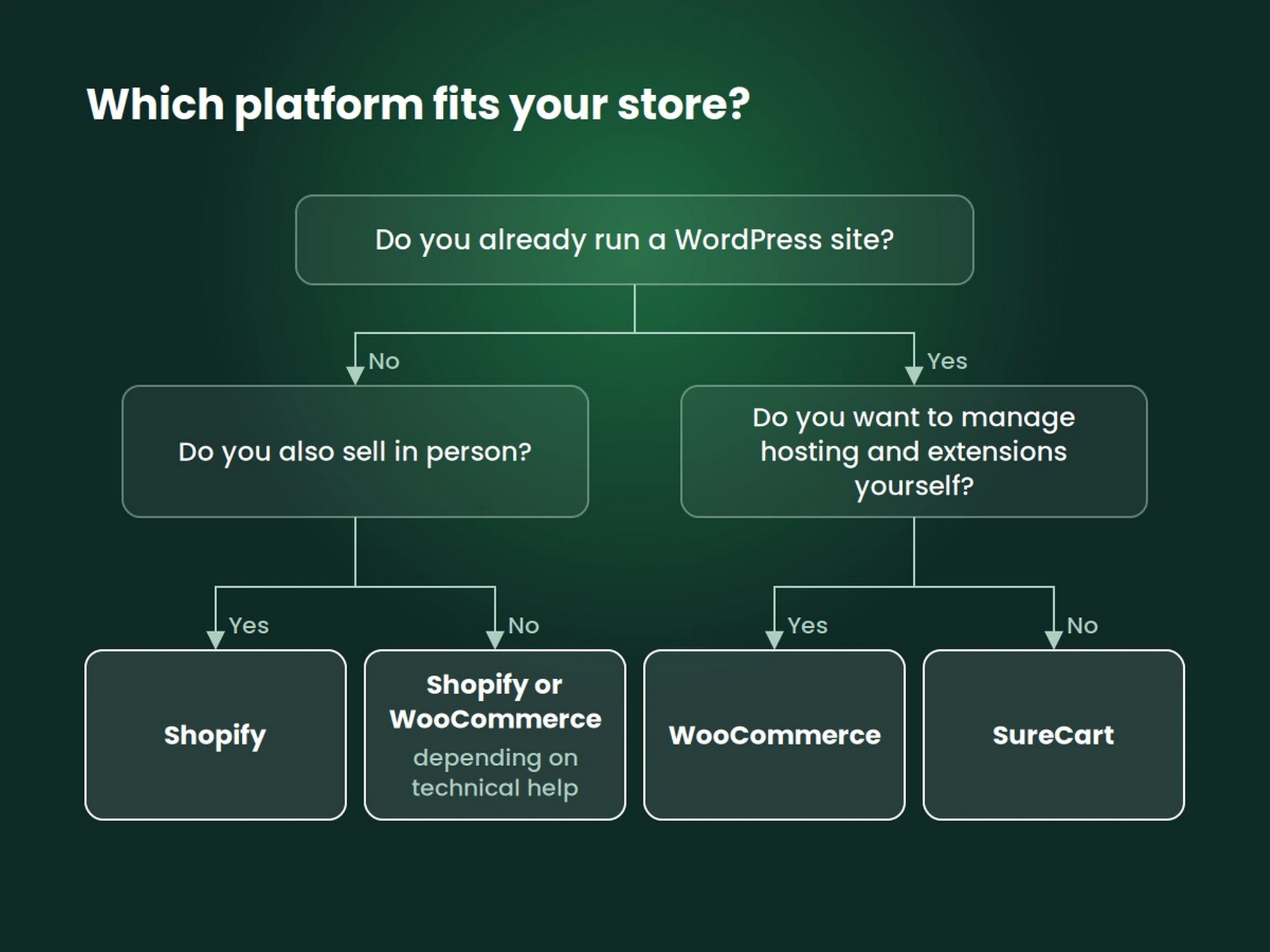
If you’re on WordPress and neither column fits, the next section is for you.
What If You Want WordPress Without the WooCommerce Stack?
Some readers land here because they want to sell on WordPress, but don’t want the hosting upgrades and extension upkeep that WooCommerce brings. Moving the whole store to a separate hosted platform isn’t what they want either.
That gap is where SureCart fits, and we built it, so read this section knowing that.
Where SureCart fits
SureCart is managed eCommerce, native to WordPress. It has two parts: a WordPress plugin and SureCart’s hosted platform.
The platform stores your store data and runs checkout, pricing, and tax logic, while WordPress stays your storefront and the place you manage the store day to day. That split is what “headless” means here, and it’s described in SureCart’s getting started docs.
Store data lives on SureCart’s platform rather than in your WordPress database, and you can export customers, orders, products, and subscriptions as CSV files or transfer the store to another organization.
Every plan includes the features our example store needed: subscriptions, One-Click Upsells, Order Bumps, Abandoned Checkout recovery, and tax calculation for 40+ countries and all US states.
It also includes an Affiliate Platform and unlimited products, and it sells physical goods, digital downloads, subscriptions, and donations from the same store.
The Launch plan is free, with a 2.9% transaction fee on top of your payment processor’s fees. Pro starts at $199 a year and removes that SureCart fee. Tens of thousands of merchants use it.
Who should consider SureCart
SureCart is worth a look if:
- You already run a WordPress site and want to sell from it.
- You’d rather not manage several eCommerce extensions and their renewals.
- You want managed eCommerce infrastructure without leaving WordPress.
- You need subscriptions and upsells without assembling them from separate extensions.
Already using WooCommerce?
If you’re looking at Shopify because your WooCommerce store has become hard or expensive to maintain, you don’t have to leave WordPress.
SureCart has a documented WooCommerce importer for your products (it doesn’t bring over customers or orders), plus CSV importers for customers, purchases, and active subscriptions.
The migration guide recommends importing customers first, then products, purchases, and subscriptions, because later imports reference earlier records.
Be realistic about the effort. Migration may need developer help, saved payment methods transfer only when you’re moving from Stripe, and there’s no one-click switch.
See how importing your store to SureCart works →
Limits to know
- Affiliate payouts are listed for you to pay manually, not sent automatically.
- When an upsell funnel is active, payment methods that can’t be reused (such as iDEAL, Bancontact, and pay-in-4 options) are hidden at checkout.
- There’s no native point-of-sale system for in-person selling.
Compare SureCart and WooCommerce → For a direct look at the hosted option, see our SureCart vs Shopify comparison. Want all three side by side? See our WooCommerce vs Shopify vs SureCart comparison.
WooCommerce vs Shopify: Which Should You Choose?
There’s no single winner in the WooCommerce vs Shopify comparison. Each platform fits a different way of running a store:
| If you want | Consider |
|---|---|
| Maximum control over WordPress, code, hosting, and extensions | WooCommerce |
| Managed eCommerce infrastructure plus Shopify’s own POS for in-person selling | Shopify |
| WordPress with managed eCommerce and less reliance on an extension stack | SureCart |
Choose WooCommerce if owning the code, the hosting, and the data matters more to you than time spent on upkeep.
Choose Shopify if you want the platform to run the infrastructure, especially if you also sell in person, and you’re comfortable with Shopify Payments and its tax fee at scale.
Consider SureCart if you want to keep WordPress while handing the commerce backend to a managed platform.
Already know you want WordPress with managed eCommerce? Start Selling for Free →
WooCommerce vs Shopify FAQs
Is WooCommerce better than Shopify?
Neither is better for every store. WooCommerce gives you more control and no platform transaction fees, while Shopify handles hosting and maintenance for you and includes more features in the plan.
The right pick depends on your technical requirements, sales volume, and how much infrastructure you want to manage.
How much does Shopify take from a $20 sale?
On the Basic plan with Shopify Payments, Shopify takes $0.88 in card processing (2.9% + 30¢), with no additional transaction fee. If you use a third-party payment provider, Shopify charges a 2% fee ($0.40) and the provider charges its own processing fee.
What are the disadvantages of WooCommerce?
You’re responsible for hosting, updates, security, and backups, and many common features need paid extensions that renew yearly. Performance also depends on your host and how many plugins your site runs.
Is Shopify still worth it in 2026?
For sellers who want a hosted store with little technical upkeep, Shopify can be a good fit. Full online store plans start at $29 a month billed yearly, hosting and abandoned checkout recovery are included, and Shopify POS covers in-person sales.
Factor in Shopify Tax’s 0.35% fee once your store passes $100,000 in lifetime sales, and the extra fee if you don’t use Shopify Payments.
Which is cheaper to run, WooCommerce or Shopify?
It depends on your store, but in our single-nexus scenario, Shopify came out cheaper than WooCommerce at all four revenue levels, from $1,000 to $100,000 a month. Included hosting helped at low volume, and Grow’s lower card rate helped at higher volume.
Those totals exclude a paid upsell tool on either platform, and they’d shift if you collect tax in many states. From $10,000 a month up, card processing was the largest cost on both.
Which is better for SEO?
Both handle the essentials, including editable titles, meta descriptions, and sitemaps. WooCommerce gives you WordPress’s content tools and full URL control, which helps content-led stores. Shopify’s URLs include fixed prefixes such as /products/.
Which is better for dropshipping?
Both support it through dedicated apps or extensions that connect your store to suppliers, but the tools and supplier coverage vary, so compare the specific suppliers you plan to work with on each platform.
Who is Shopify’s biggest competitor?
WooCommerce is one of the most common alternatives, along with hosted platforms like BigCommerce and Wix. Our Shopify alternatives guide compares the main options with live pricing.
Which is better for security?
Shopify handles server security and PCI compliance for checkout on every plan. With WooCommerce, security depends on your host, your update routine, and your plugins, though gateways like Stripe keep card data off your server.