You’ve probably already read a few “WordPress vs Shopify” comparisons. They told you Shopify starts at $29 a month and WordPress is free. What they didn’t tell you is that neither number has much to do with what you’ll actually spend.
For a real store doing $3,000 a month in revenue, Shopify Basic costs over $2,400 in Year 1 for a physical products store. That includes the 2% fee Shopify charges on every sale when you use a third-party payment provider like Razorpay, PayPal, or a local gateway. At $3,000/month, that one fee alone adds $720 a year. By Year 3 at $8,000/month, it is $1,920 a year in surcharges alone, on top of everything else.
WordPress has a version of the same problem. WooCommerce is free to install. Running it properly (subscriptions, cart recovery, security, upsells) costs $700–1,400 a year in paid add-ons before you’ve paid for a single marketing tool.
That’s why this comparison doesn’t start with plan prices. It runs the full three-year numbers for three real business types (physical products, digital products, and subscriptions) across three actual setups: Shopify, WordPress + WooCommerce, and WordPress + SureCart. The goal is a decision you won’t regret 18 months from now.
The Two Platforms Are Built on Different Business Models
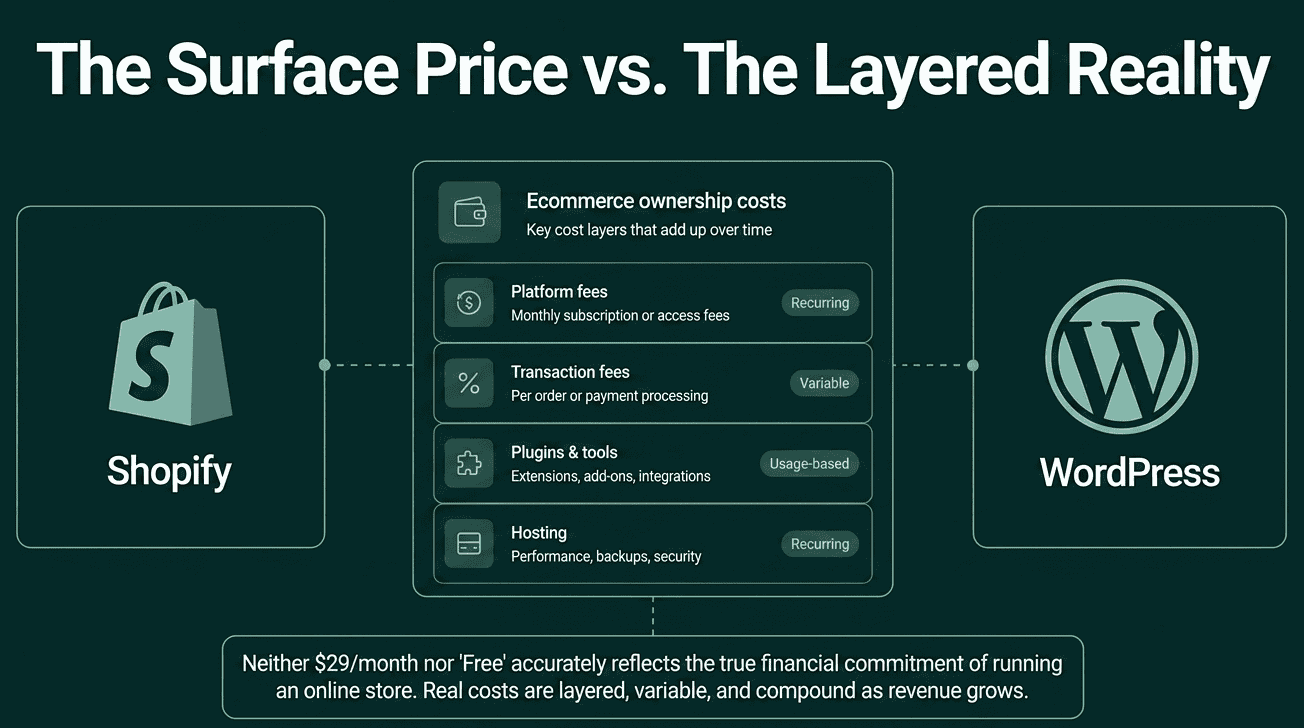
Before comparing prices, it helps to understand why the cost structures look so different.
Shopify is an all-in-one hosted platform. You pay a monthly fee and get web hosting, checkout, security, and a store builder bundled together. Everything runs on Shopify’s servers. You never update software or worry about a plugin breaking your checkout. What you pay is a recurring fee that grows as your feature requirements grow.
WordPress is free, open-source software, meaning anyone can download, install, and customize it freely. But you’re responsible for hosting, security, updates, and choosing the tools that power your store. You own your data and your site outright. What that ownership costs depends almost entirely on which tools you build with.
That last part matters more than most comparisons acknowledge. WordPress ecommerce is not one thing. WooCommerce with a full set of paid add-ons sits at one end. Newer tools like SureCart, which handle your checkout and payments on their own servers rather than yours, sit at the other end. The cost difference between those two approaches is significant, and almost no existing comparison separates them.
The most-used analogy is accurate: Shopify is like renting a fully serviced apartment. Everything works on day one and nothing is yours. WordPress is like buying land and building your own house. More work upfront, but you own it.
How Shopify Charges You
Understanding Shopify’s pricing structure before we get into the scenarios makes the numbers easier to follow.
Plan Fees
The three main plans, billed annually (source: shopify.com/pricing):
|
Plan |
Monthly (annual billing) |
Monthly (month-to-month) |
|---|---|---|
|
Basic |
$29/mo |
$39/mo |
|
Grow |
$79/mo |
$105/mo |
|
Advanced |
$299/mo |
$399/mo |
Annual billing locks you in for 12 months but saves around 25%.
The Extra Fee That Changes Everything
All cost estimates in this article use the scenario where a third-party payment provider is in use. This means Razorpay, PayPal, Mollie, Stripe, or any local gateway (anything other than Shopify’s own built-in processor).
When you use a third-party provider, Shopify charges an additional fee on top of whatever that provider charges you:
- 2% extra on Basic
- 1% extra on Grow
- 0.6% extra on Advanced
Shopify’s own payment processor is available in 39 countries: the US, UK, Canada, Australia, most of Europe, Japan, Singapore, Hong Kong, UAE, and Mexico. It is not available in India, most of South Asia, most of Africa, and several other markets.
This article uses the third-party scenario as the baseline because it is the reality for a large portion of online sellers worldwide, and because it shows the full cost picture. All three platforms charge the standard credit card processing fee (2.9% + $0.30 per transaction) to the payment provider. Shopify charges an additional 2% on top of that on the Basic plan.
What Shopify Includes at No Extra Cost
Before looking at what costs extra, it is worth noting what Shopify includes on all paid plans that many comparison blogs count as app costs:
- Abandoned checkout recovery emails: built-in and free on all plans
- Shopify Email: free for up to 10,000 emails per month
- Digital file delivery: free via the official Shopify Digital Downloads app
- Basic product reviews: free via the Judge.me free plan or Shopify’s own options
- Subscription billing: free via the Shopify Subscriptions app (basic features, built by Shopify)
These are real advantages that change the cost math for certain store types.
The Three Business Scenarios
The tables below show what each type of store actually needs, whether it’s included, what the external cost is if not, and the full Year 1 and Year 3 totals. Revenue grows between Year 1 and Year 3, which changes hosting needs, email list size, and app requirements.
All three platforms use the standard card processing fee of 2.9% + $0.30 per transaction paid to the payment provider (Stripe, Razorpay, PayPal, or similar). For Shopify, an additional 2% platform fee applies on the Basic plan on top of that.
Business Type 1: Physical Products
(e.g., skincare brand, clothing store, candles, handmade goods)
Revenue assumed: $3,000/month in Year 1, growing to $8,000/month by Year 3.
At $8,000/month, a physical products store typically needs better email tools for a growing customer list, a more robust review setup to maintain trust at scale, and slightly more hosting capacity on WordPress.
What You Need and What Each Platform Includes
|
Feature Needed |
Shopify |
WordPress + WooCommerce |
WordPress + SureCart |
|---|---|---|---|
|
Store setup (hosting, security, SSL) |
Included in plan |
Hosting needed: $25–80/mo |
Hosting needed: $25–80/mo |
|
Inventory and product variants |
Included |
Included |
Included |
|
Abandoned cart recovery |
Included |
Not included (need AutomateWoo – $159/yr) |
Included |
|
Product reviews |
Included in Judge.me free plan |
Included (WooCommerce basic reviews) |
Included |
|
Email Notifications |
Included in Shopify Email up to 10K/mo |
Not included |
Included |
|
Upsells and order bumps |
Not included (paid app $15–30/mo) |
Not included (paid plugin ~$99/yr) |
Included |
|
Security (platform responsibility) |
Included |
Not included (need Wordfence – $149/yr) |
Not included (need Wordfence – $149/yr) |
A note on security costs: The Wordfence line item applies to overall WordPress site security, including malware scanning, login protection, and firewall rules, & not to e-commerce-specific security. On WooCommerce, checkout and payment security are also your responsibility, which is why a security plugin is essential. On SureCart, the payment and checkout layer runs on SureCart’s own secure infrastructure, so that security is handled at the platform level. Wordfence is still recommended for general site protection either way, which is why the cost appears in both WordPress columns.
Cost Estimate: Physical Products Store
|
Cost Item |
Shopify Basic Year 1 |
Shopify Basic Year 3 |
WooCommerce Year 1 |
WooCommerce Year 3 |
SureCart Year 1 |
SureCart Year 3 |
|---|---|---|---|---|---|---|
|
Platform/plan |
$348 |
$348 |
— |
— |
— |
— |
|
Hosting (managed WordPress) |
— |
— |
$480 |
$720 |
$480 |
$660 |
|
Domain |
$15 |
$15 |
$15 |
$15 |
$15 |
$15 |
|
Theme |
$180 (one-time) |
$0 |
$49/yr (Astra Pro) |
$49/yr |
$49/yr (Astra Pro) |
$49/yr |
|
SureCart Pro |
— |
— |
— |
— | $199 |
$199 |
|
Abandoned cart recovery |
$0 |
$0 |
$159 (AutomateWoo) |
$159 |
$0 |
$0 |
|
Product reviews |
$0 |
$0 |
$0 |
$0 |
$0 |
$0 |
|
Email Notifications |
$0 |
$0 |
$0 |
$240 (Mailchimp, ~2K contacts) |
$0 |
$0 |
Card processing (2.9% to the payment provider) |
$180 (~$15/mo) |
$300 (~$25/mo) |
$99 |
$99 |
$0 |
$0 |
|
Security |
$0 |
$0 |
$149 (Wordfence) |
$149 |
$149 (Wordfence) |
$149 |
|
Developer help |
— |
— |
$300 |
$450 |
$0 |
$0 |
|
Card processing (2.9% to payment provider) |
$1,044 |
$2,784 |
$1,044 |
$2,784 |
$1,044 |
$2,784 |
|
Shopify extra fee (2% on Basic) |
$720 |
$1,920 |
N/A |
N/A |
N/A |
N/A |
|
Total |
~$2,487 |
~$5,367 |
~$2,295 |
~$4,665 |
~$1,916 |
~$3,856 |
The insight: Without Shopify Payments, Shopify is more expensive than both WordPress options in Year 1 for a physical products store. By Year 3 at $8,000/month, the 2% surcharge alone adds $1,920 to the annual bill, pushing the total to over $5,300. SureCart is the most affordable option at both stages, and the gap between Shopify and SureCart grows significantly as revenue increases.
Business Type 2: Digital Products
(e.g., ebooks, design templates, photography presets, Notion templates, stock photos)
Revenue assumed: $3,000/month in Year 1, growing to $6,000/month by Year 3.
Digital products stores typically grow to a larger customer list (buyers accumulate, unlike physical stores where churn is higher), which drives higher email marketing costs in Year 3. Hosting needs barely change since digital products put very little load on a server.
What You Need and What Each Platform Includes
|
Feature Needed |
Shopify |
WordPress + WooCommerce |
WordPress + SureCart |
|---|---|---|---|
|
Store setup |
Included in plan |
Hosting needed |
Hosting needed |
|
Deliver files automatically after purchase |
Shopify Digital Downloads app (free) |
Included |
Included |
|
Abandoned cart recovery |
Included |
Not included (need AutomateWoo $159/yr) |
Included |
|
Product reviews |
Included in Judge.me free plan |
Included (WooCommerce basic) |
Included |
|
Email Notifications |
Included in Shopify Email up to 10K/mo |
Not included |
Included |
|
Upsells and order bumps |
Not included (paid app $15–30/mo) |
Not included (paid plugin ~$99/yr) |
Included |
|
Security |
Included |
Not included (need Wordfence – $149/yr) |
Not included (need Wordfence – $149/yr) |
A note on license keys and access control: For software businesses, License key generation and access revocation are built into SureCart (no separate plugin needed). On WooCommerce, both require dedicated extensions purchased on top of the base subscription. On Shopify, neither is available through the native Digital Downloads app; a third-party paid app handles both.
Cost Estimate: Digital Products Store
|
Cost Item |
Shopify Basic Year 1 |
Shopify Basic Year 3 |
WooCommerce Year 1 |
WooCommerce Year 3 |
SureCart Year 1 |
SureCart Year 3 |
|---|---|---|---|---|---|---|
|
Platform/plan |
$348 |
$348 |
— |
— |
— |
— |
|
Hosting |
— |
— |
$480 |
$720 |
$480 |
$660 |
|
Domain |
$15 |
$15 |
$15 |
$15 |
$15 |
$15 |
|
Theme |
$180 (one-time) |
$0 |
$49/yr |
$49/yr |
$49/yr |
$49/yr |
|
SureCart Pro |
— |
— |
— |
— | $199 |
$199 |
|
Digital file delivery |
$0 |
$0 |
$0 |
$0 |
$0 |
$0 |
|
Abandoned cart recovery |
$0 |
$0 |
$159 |
$159 |
$0 |
$0 |
|
Product reviews |
$0 |
$0 |
$0 |
$0 |
$0 |
$0 |
|
Email Notifications |
$0 |
$0 |
$0 |
$240 (~1K–1.5K contacts) |
$0 |
$0 |
Card processing (2.9% to the payment provider) |
$180 (~$15/mo) |
$240 (~$20/mo) |
$99 |
$99 |
$0 |
$0 |
|
Security |
$0 |
$0 |
$149 |
$149 |
$149 |
$149 |
|
Developer help |
— |
— |
$300 |
$350 |
$0 |
$0 |
|
Card processing (2.9% to payment provider) |
$1,044 |
$2,088 |
$1,044 |
$2,088 |
$1,044 |
$2,088 |
|
Shopify extra fee (2% on Basic) |
$720 |
$1,440 |
N/A |
N/A |
N/A |
N/A |
|
Total |
~$2,487 |
~$4,131 |
~$2,295 |
~$3,869 |
~$1,916 |
~$3,160 |
The insight: For digital products, SureCart is the most affordable option in both Year 1 and Year 3. Despite Shopify offering free file delivery, cart recovery, and email marketing, the 2% extra fee on every sale adds $720 in Year 1 and $1,440 in Year 3, pushing Shopify to the most expensive position by Year 3. WooCommerce is in the middle, held back by the AutomateWoo cost and developer time. SureCart’s built-in file delivery, cart recovery, and upsells keep its total flat as revenue grows.
Business Type 3: Subscription Business
(e.g., monthly content membership, SaaS tool with recurring billing, subscription box, newsletter)
Revenue assumed: $3,000/month in recurring revenue (MRR) in Year 1, growing to $7,000/month by Year 3.
Subscription businesses have the most different cost profile across platforms. WooCommerce requires paid extensions from Day 1 just to accept recurring payments. Shopify handles basic subscriptions for free but needs a paid app as subscriber volume grows. SureCart includes all subscription billing built-in.
Note: for membership sites that gate content (exclusive articles, course videos), you may need an additional plugin across all WordPress setups for access control. Free plugins exist (Restrict Content, for example). This cost is not included below because it varies significantly by use case.
What You Need and What Each Platform Includes
|
Feature Needed |
Shopify |
WordPress + WooCommerce |
WordPress + SureCart |
|---|---|---|---|
|
Recurring billing/subscriptions |
Shopify Subscriptions app (free) |
Not included (need WooCommerce Subscriptions – $279/yr) |
Included |
|
Member access control (content gating) |
Not native (third-party app ~ $180/yr) |
Not included (WooCommerce Memberships – $199/yr) |
Native integration with SureMembers ($69/yr) |
|
Failed payment retries (dunning) |
Included in Shopify Subscriptions |
Included in WooCommerce Subscriptions |
Included |
|
Abandoned checkout recovery |
Included |
Not included (need AutomateWoo – $159/yr) |
Included |
|
Email Notifications |
Included in Shopify Email up to 10K/mo |
Not included |
Included |
|
Security |
Included |
Not included (need Wordfence – $149/yr) |
Not included (need Wordfence – $149/yr) |
At Year 3 with $7,000/month MRR, Shopify’s native Subscriptions app handles billing but lacks advanced churn management, subscriber analytics, and billing flexibility. A more capable app like Appstle Subscriptions (Business plan, $30/month) becomes necessary for a serious subscription operation.
Cost Estimate: Subscription Business
|
Cost Item |
Shopify Basic Year 1 |
Shopify Basic Year 3 |
WooCommerce Year 1 |
WooCommerce Year 3 |
SureCart Year 1 |
SureCart Year 3 |
|---|---|---|---|---|---|---|
|
Platform/plan |
$348 |
$348 |
— |
— |
— |
— |
|
Hosting |
— |
— |
$480 |
$720 |
$480 |
$660 |
|
Domain |
$15 |
$15 |
$15 |
$15 |
$15 |
$15 |
|
Theme |
$180 (one-time) |
$0 |
$49/yr |
$49/yr |
$49/yr |
$49/yr |
|
SureCart Pro |
— |
— |
— |
— | $199 |
$199 |
|
Subscription billing |
$0 (native free app) |
$360 (Appstle Business, $30/mo) |
$279 (WooCommerce Subscriptions) |
$279 |
$0 |
$0 |
|
Member access control |
$180 |
Included in Appstle Business |
$199 (WooCommerce Memberships) |
$199 |
$69 |
$99 |
|
Failed payment recovery |
$0 |
$0 |
$0 (included in Woo Subscriptions) |
$0 |
$0 |
$0 |
|
Abandoned cart recovery |
$0 |
$0 |
$159 (AutomateWoo) |
$159 |
$0 |
$0 |
|
Email Notifications |
$0 |
$360 (~$30/mo for subscriber management) |
$0 |
$360 |
$0 |
$0 |
|
Security |
$0 |
$0 |
$149 |
$149 |
$149 |
$149 |
|
Developer help |
— |
— |
$300 |
$450 |
$0 |
$0 |
|
Card processing (2.9% to payment provider) |
$1,044 |
$2,436 |
$1,044 |
$2,436 |
$1,044 |
$2,436 |
|
Shopify extra fee (2% on Basic) |
$720 |
$1,680 |
N/A |
N/A |
N/A |
N/A |
|
Total |
~$2,487 |
~$5,199 |
~$2,674 |
~$4,816 |
~$1,985 |
~$3,607 |
The insight: Subscriptions are where the cost gap is most dramatic. SureCart is the most affordable in both Year 1 and Year 3. WooCommerce is expensive from Day 1 because three paid extensions ($279 + $199 + $159 = $637) are required before hosting or processing fees. Shopify starts relatively well in Year 1 because subscriptions are free, but by Year 3, the combination of the 2% surcharge ($1,680/year at $7K/month) and the Appstle subscription app ($360/year) pushes its total to over $5,100, the most expensive option of the three. SureCart’s Year 3 total of $3,607 is over $1,500 less than Shopify’s.
A note on WordPress hosting costs: WooCommerce stores all transactional data (orders, customers, subscriptions, product data) in your WordPress database, which puts a load directly on your hosting server. SureCart handles that data on its own infrastructure, so your WordPress hosting only needs to serve the product pages. In practice, SureCart stores typically run well on a lower hosting tier than an equivalent WooCommerce store, which is why the SureCart hosting estimates in year 3 are slightly lower. Both use the same managed hosting range, but WooCommerce stores more often hit the ceiling first.
The Cost Nobody Puts in the Table: Your Time
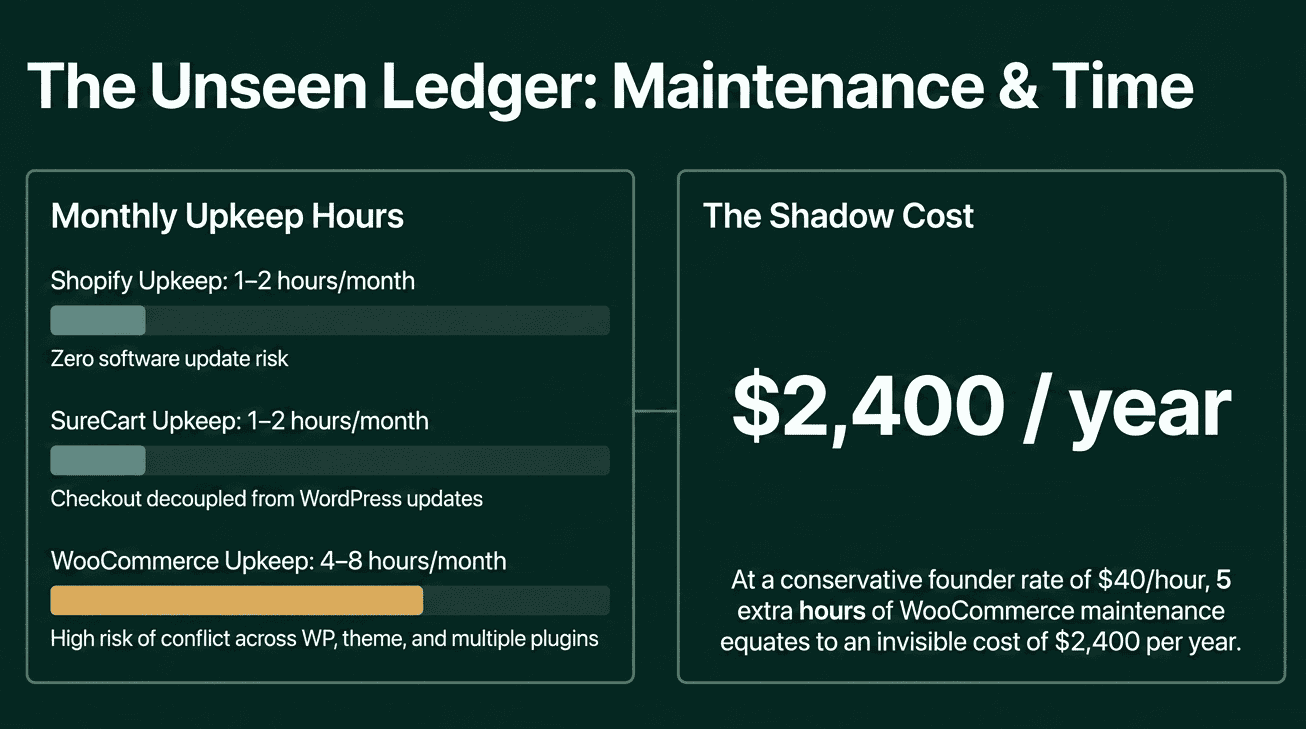
This is the section most comparison articles skip, because time is harder to put a number on. It is still real.
|
Shopify |
WordPress + WooCommerce |
WordPress + SureCart | |
|---|---|---|---|
|
Initial setup |
4–8 hours |
15–40 hours |
3–8 hours |
|
Monthly upkeep |
1–2 hours |
4–8 hours |
1–2 hours |
|
Fixing things after an update |
Rare |
Monthly risk |
Rare |
The WooCommerce maintenance estimate is not an exaggeration. Running a real store means coordinating updates across WordPress itself, WooCommerce, your theme, and every active plugin, making sure nothing breaks when they are all updated at once. Anyone who has done this knows the “5 updates available” notification sits somewhere between a minor chore and a small disaster, depending on the day.
At $40/hour (a conservative estimate for a founder’s time), 5 extra hours per month on WooCommerce upkeep equals $200/month, or $2,400/year. That number never appears in any comparison table, but it is one of the most real costs of running a WooCommerce store.
SureCart’s approach removes most of that overhead. Checkout and billing run on SureCart’s own servers. When WordPress updates, the checkout is unaffected because the two systems work independently of each other. Fewer plugins means fewer things that can go wrong.
Shopify has the lowest upkeep burden of the three. That is a genuine advantage. Whether the monthly fee is a fair trade-off depends on your revenue, your margins, and how much your time is actually worth.
SEO: Which Platform Has a Built-In Advantage?
For many stores, getting found on Google is the cheapest long-term way to bring in customers. It is worth being specific here.
WordPress has a meaningful SEO advantage for stores that rely on content. You get complete control over your page addresses, your page titles and descriptions, how your content links together, and how your site is organized. The blogging tools are built for content publishing from the ground up. If you plan to grow through guides, tutorials, and comparison articles, WordPress gives you more control with less friction.
Shopify has improved significantly on SEO in recent years. It handles the basics automatically: security certificates, site maps for search engines, product info that appears directly in search results, and SEO fields on every product page. For a physical product store that drives traffic through paid ads, Shopify’s SEO is more than adequate.
The known limitation: Shopify forces the same web address format on every store. Product pages must live at /products/product-name, collections at /collections/collection-name. You cannot change this. On WordPress, your page addresses are whatever you choose. For most stores, this rarely matters. For stores that have been building up search rankings over the years and targeting specific niche search terms, that flexibility gap can be meaningful.
If getting found through content is central to your growth plan, WordPress is the better foundation. If you’re driving traffic through paid ads primarily, the SEO difference is minor.
Data Ownership and Platform Lock-in
This topic usually gets treated as a philosophical preference. The financial side is more concrete than that framing suggests.
Being stuck on a platform with no clean way out is a real cost. It just does not show up until you want to leave.
On Shopify, you can export your product list, order history, and customer list as spreadsheet files. What you cannot take with you: your store design, theme settings, app configurations, checkout setup, and subscription billing records. Shopify also limits how quickly you can download your own data in bulk, which makes large exports slow and painful.
If you later decide to move to WordPress, you are rebuilding your store design from scratch, setting up redirect rules so your old page addresses point to the new ones (to protect your search rankings), and recreating your subscription setup in a new system. Third-party migration tools like Cart2Cart can automate the product and order data transfer, but they start at $69 for small stores, scale up with catalog size, and do not move your store design, checkout setup, or app configurations. Agencies that handle full migrations charge $2,000–15,000, depending on store complexity. Small stores can manage a data-only transfer themselves, but a full rebuild is weeks of real work.
On WordPress, your data belongs to you. You can export a copy of everything at any time, move to a different hosting provider, switch plugins, or start over. Nothing is locked in because everything lives on your own hosting account.
This is not an argument against Shopify. Many stores go in, grow, and never want to leave. The point is simply that “I can always switch later” is not a free option.
Which One Is Right for Your Store?
The honest answer depends on your situation. Here is where the evidence points for each.
Choose Shopify if:
- You are selling physical products with standard inventory and shipping requirements.
- Shopify Payments is available for your store, which removes the additional 2% platform fee and makes the total cost more predictable.
- You have no existing WordPress site and want to launch in under a week.
- Predictable monthly costs matter more to you than owning your data.
- You run a high-volume dropshipping or shipping-heavy operation where Shopify’s built-in fulfillment and shipping tools save you meaningful time.
Choose WordPress + SureCart if:
- You want a modern, low-maintenance WordPress store where physical & digital products, subscriptions, upsells, cart recovery, and checkout are all handled in one place without separate paid add-ons.
- You already have a WordPress site and want to add ecommerce without rebuilding on a new platform.
- The 2% Shopify platform surcharge applies to your payment setup, and you want to avoid it entirely.
- You want to fully own your platform and your data with no long-term dependency on a third-party service.
- You are building a subscription, membership, digital product, or software store where SureCart’s built-in billing and licensing tools directly replace a stack of WooCommerce extensions.
Choose WordPress + WooCommerce if:
- You are on WordPress, and your physical product catalog has complex shipping rules, product variations, and inventory management needs that go beyond what a managed ecommerce layer can handle today
- You have a developer available who handles updates and maintenance. WooCommerce rewards technical investment more than any other option here
- You need code-level customization of your checkout that a managed plugin would not allow
Compared to Shopify, WooCommerce gives you more control over your store’s logic and data at the cost of higher maintenance. Compared to SureCart, WooCommerce is better suited for stores where the extension ecosystem’s depth is worth the add-on cost.
Where SureCart Fits in This Picture
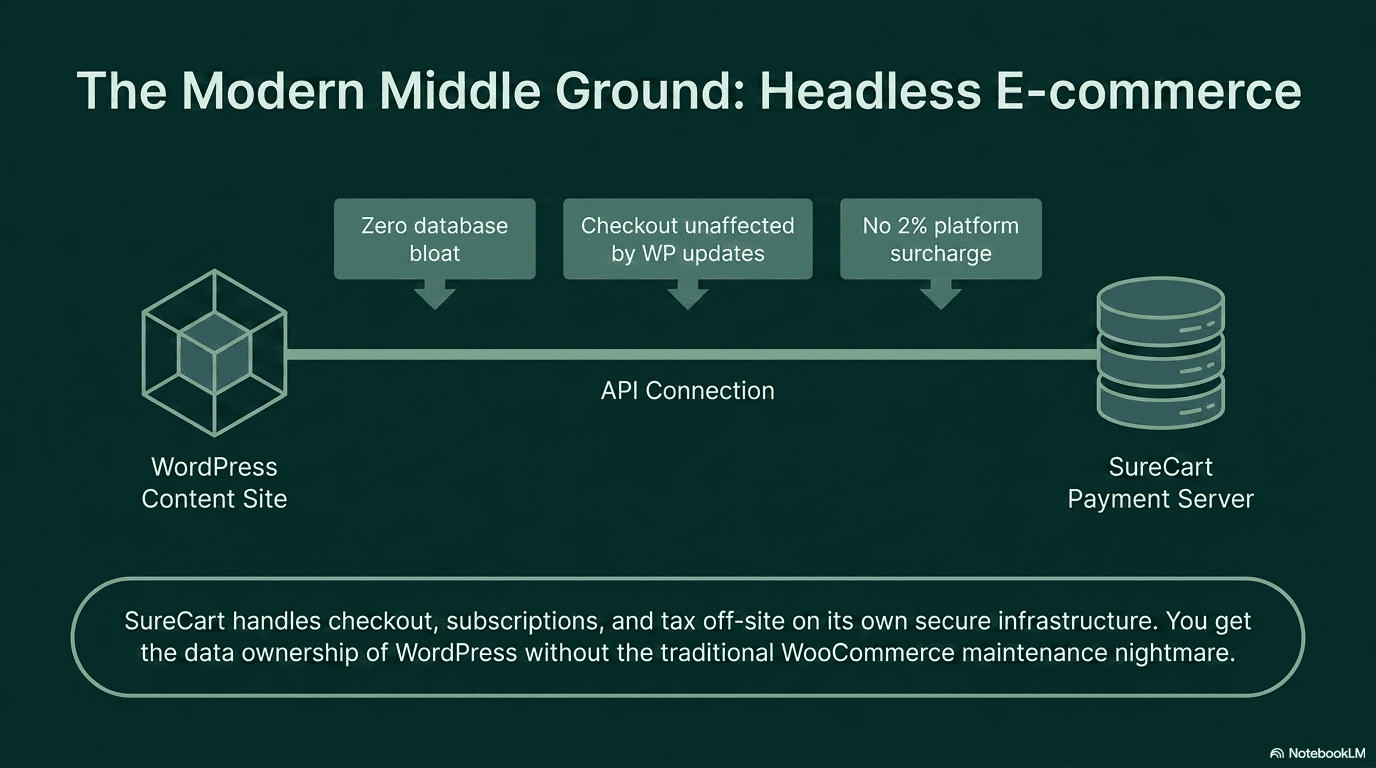
The cost tables have already shown the numbers. Here is what explains them.
SureCart is a different kind of ecommerce plugin for WordPress. Most ecommerce plugins (including WooCommerce) run everything inside your WordPress site, on your hosting server. Checkout, payments, subscriptions, tax. SureCart moves that work to its own servers. Your WordPress site connects through a small plugin, but the actual payment and billing work happens off-site.
In practice: fewer plugins on your site, faster page speeds, and a checkout that keeps working normally when you update WordPress. The features WooCommerce sells as separate annual add-ons (subscriptions $279/year, cart recovery $159/year, memberships $199/year) come included in every SureCart plan.
For sellers using Razorpay, PayPal, Mollie, Stripe, and SureCart, there is no extra platform fee on top of the payment provider’s standard rate. There is no equivalent of Shopify’s 2% surcharge.
The pricing is simple. The free Launch plan includes everything, with a 2.9% fee per sale. The Pro Yearly plan at $199/year removes that fee. At $3,000/month in revenue, upgrading to Pro pays for itself through fee savings within four months.
If you are building on WordPress and want to avoid the WooCommerce add-on pile-up, SureCart’s free plan is the starting point. No credit card required.
The Honest Verdict
WordPress or Shopify?
The cost tables make the case clearly: once the 2% Shopify platform surcharge is factored in, WordPress is the more affordable option across all three business types in both Year 1 and Year 3. The gap grows with revenue because the surcharge scales with every sale, while WordPress hosting and plugin costs stay relatively flat.
Beyond cost, the decision comes down to two things. If you have no existing website, want to launch in days, and are comfortable with a recurring platform fee, Shopify is a reasonable place to start, especially for straightforward physical products where its built-in tools (cart recovery, file delivery, email) reduce the app cost significantly. If you value data ownership, want to avoid platform lock-in, and want the flexibility of WordPress’s content and SEO tools alongside your store, WordPress is the better long-term foundation.
WooCommerce or SureCart within WordPress?
For most stores (digital products, subscriptions, memberships, physical goods with standard requirements, and anything in between), WordPress + SureCart is the right call. The built-in features remove the extension stack, the managed infrastructure removes the maintenance burden, and the total cost stays flat as revenue grows.
WordPress + WooCommerce makes sense when your physical product catalog genuinely needs the depth of WooCommerce’s extension ecosystem: complex shipping configurations, detailed inventory rules, or code-level checkout customization. It is a powerful choice, but it rewards technical investment. If you have a developer, WooCommerce delivers. If you do not, SureCart is the lower-friction path to the same result.
The mistake worth avoiding: making the decision based on the subscription price alone. Run the three-year numbers for your specific business type, factor in your own time, and make the call with the full picture in front of you.