Wix is a reasonable place to start an online store. The templates are attractive, setup is fast, and you never have to think about hosting or servers. At some point, though, when you want to grow revenue at checkout, or you look at what you are paying versus what you are getting, you start looking around.
This post walks through the main Wix alternatives for ecommerce worth considering: which platform is the right fit for you, what it costs once you factor in everything a real store needs, and a full cost breakdown so you can compare them yourself before committing.
What Wix does well for ecommerce
Wix earns its popularity among first-time store owners for real reasons. The drag-and-drop editor is one of the better ones on the market. The templates are designed to look professional from the start, and the AI store builder can generate a site structure from a few prompts. For a first store, that combination of ease and presentation is hard to match.
Wix’s Core plan at $29/month (billed annually) covers more than most people expect. Abandoned cart recovery, automatic discounts, digital product delivery, and native subscriptions are all included. For a small catalog and a straightforward checkout, it handles the basics without requiring extra apps.
Where Wix starts to show its limits
Leaving Wix means rebuilding from scratch
Wix does not allow you to export your website. If you decide to move to a different platform, everything stays behind: your pages, product listings, design, and content. Moving means rebuilding your store from the ground up on the new platform.
This is easy to dismiss when a store is running smoothly. But consider a realistic scenario: your store grows to the point where you need a specific fulfillment integration that has no Wix app, your international sales require a payment gateway Wix does not support, or you want checkout features Wix cannot offer. The moment you decide to move, you realize the cost of the exit is months of work rebuilding everything you have already built. That is worth knowing before you invest significant time and content into the platform.
Customer self-service is limited as your store scales
As a store grows, the volume of routine customer requests grows with it. Can I update my payment method? How do I pause my subscription? I cannot find my download link. On Wix, customers can view basic order history and manage some account settings, but self-service options for subscription management, billing changes, and file access are limited depending on how the store is set up.
For a small store just starting, this is a minor inconvenience. For a store with hundreds of active customers/subscribers, every gap in self-service becomes a support ticket. That inbox grows with every sale, and the time spent handling routine requests is time not spent on growing the business.
Revenue tools that grow your store are not built in
Standard checkout on Wix works well. Where the platform shows its limits is in the features that most growing stores eventually need to increase revenue.
There are no native order bumps on Wix: the one-click offers shown to a customer right before they pay, such as adding a related product for a discounted price. There are no native post-purchase upsells. Running an affiliate program, where you recruit others to promote your products in exchange for a commission, requires a third-party app, and the options are limited. Dynamic pricing rules, such as showing a lower price to returning customers or members automatically at checkout, are not a native Wix feature.
These are not edge cases. They are revenue tools that ecommerce stores use to grow without spending more on ads. On purpose-built ecommerce platforms, they are built in. On Wix, they require App Market workarounds, if they exist at all.
What to look for in a Wix alternative for ecommerce
Not every Wix alternative is built with ecommerce as the main focus. Before choosing one, check for:
- No platform lock-in: you should be able to migrate your store data without rebuilding from scratch
- Built-in revenue tools: cart recovery, upsells, and order bumps (one-click add-ons shown at checkout) should not cost extra on top of your base plan
- Checkout control: the ability to customize fields and add conditional logic without touching code
- Predictable pricing: the plan you start on should not require paid apps to run a functional store
- Data ownership: your customers, orders, and purchase history should be exportable and portable
Wix alternatives for ecommerce: the hosted platforms
Shopify
Shopify is the first alternative most people consider when leaving Wix, and for good reason. It is built as a dedicated ecommerce platform, not a website builder with a store layered on top. That distinction matters in practice.
Shopify’s Basic plan ($29/month, annually) includes unlimited products, inventory management, abandoned checkout recovery, shipping rate calculations, and integrations with major couriers. The checkout is fast and trusted by buyers. For physical product stores in particular, Shopify’s infrastructure is mature and reliable.
Where Shopify requires add-ons: order bumps and upsells require paid apps. Running an affiliate program requires a paid app. Digital product delivery needs the free Digital Downloads app. License key generation for software sellers needs a paid app. Subscriptions use a separate app: the free Shopify Subscriptions app handles basic recurring billing, but advanced subscription management needs a paid app. For a store focused on physical products with no affiliate program and no subscription model, Shopify Basic is a reasonable starting point. For anything more complex, the costs begin adding up alongside the base plan fee.
Squarespace
Squarespace is the visual alternative for stores where brand presentation drives sales. The templates are among the best-designed on any hosted platform, and the content editing tools give you real control over how pages look. For fashion, wellness, art, food, or any store where aesthetics are part of the pitch, Squarespace is worth considering seriously.
The catch is that the ecommerce features you need for a growing store, abandoned cart recovery, and native subscriptions, are only available on the Advanced Commerce plan at $49/month (annually). The lower Basic Commerce plan at $27/month handles basic product sales but is missing both. So, Advanced Commerce is the plan you start on if you want a complete setup.
At $49/month, it is the most expensive of the alternatives in this post at the entry level for a complete ecommerce store. There are also no native order bumps or upsells at any Squarespace plan tier, and no affiliate program. For stores where the brand visual is a genuine competitive advantage, and those missing features are not immediately needed, the Advanced plan makes sense. For stores that want the full toolkit from day one, the limitations and the price point work against it.
WordPress + SureCart as a Wix alternative for ecommerce
WordPress gets a “too complex” label in most comparison posts. That reputation was built years ago and has not been revisited since.
WordPress today is not what it was
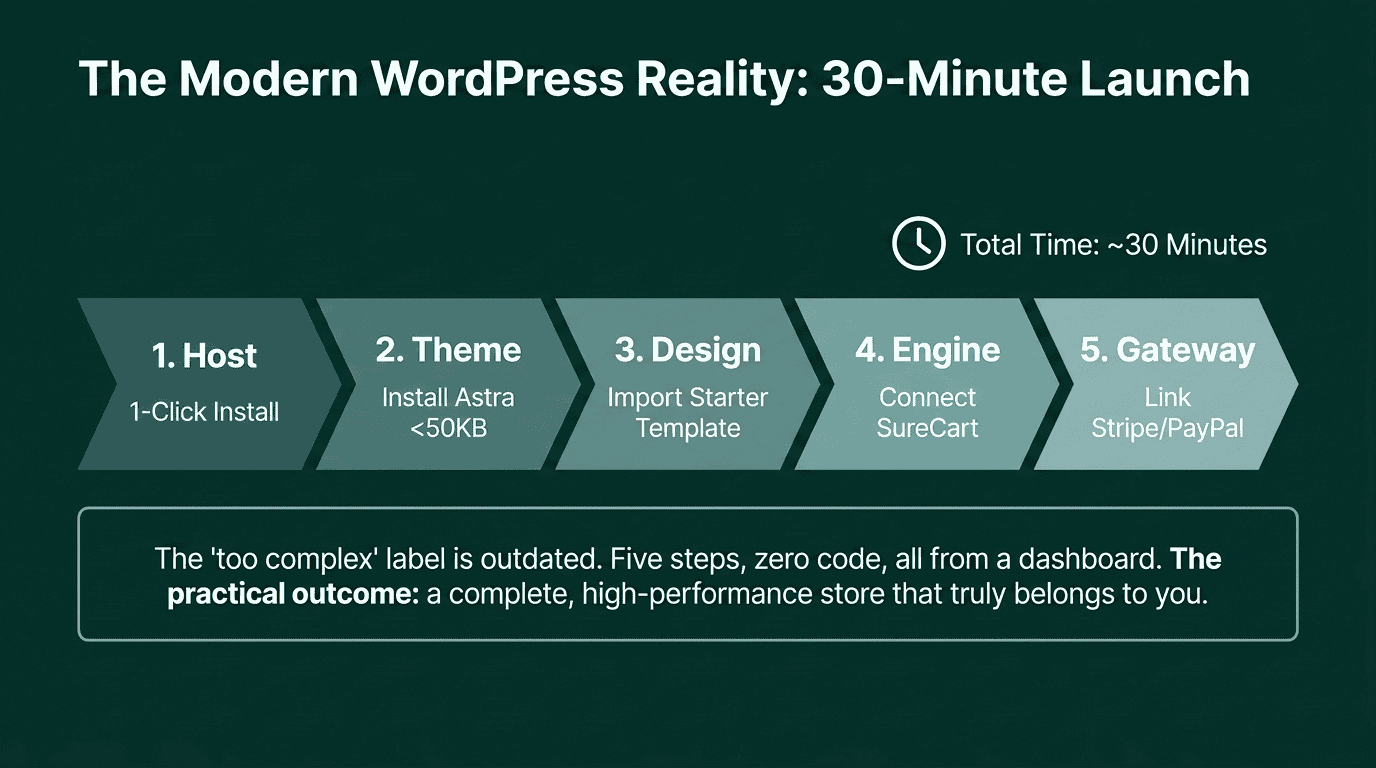
With a theme like Astra (free, loads under 50KB, activates in seconds) and Starter Templates (a free library of pre-built store designs that import in one click, including layouts built specifically for SureCart), a fully designed WordPress ecommerce site can be ready in about 30 minutes. That is roughly the same time it takes to set up a store on Wix or Shopify.
What SureCart changes about the WordPress equation
SureCart is a headless ecommerce plugin for WordPress. “Headless” means the checkout, payment processing, and subscription management run on SureCart’s own cloud infrastructure rather than on your WordPress server. Your site handles the storefront. SureCart handles the transaction layer. The result is a fast site with no plugin compatibility problems.
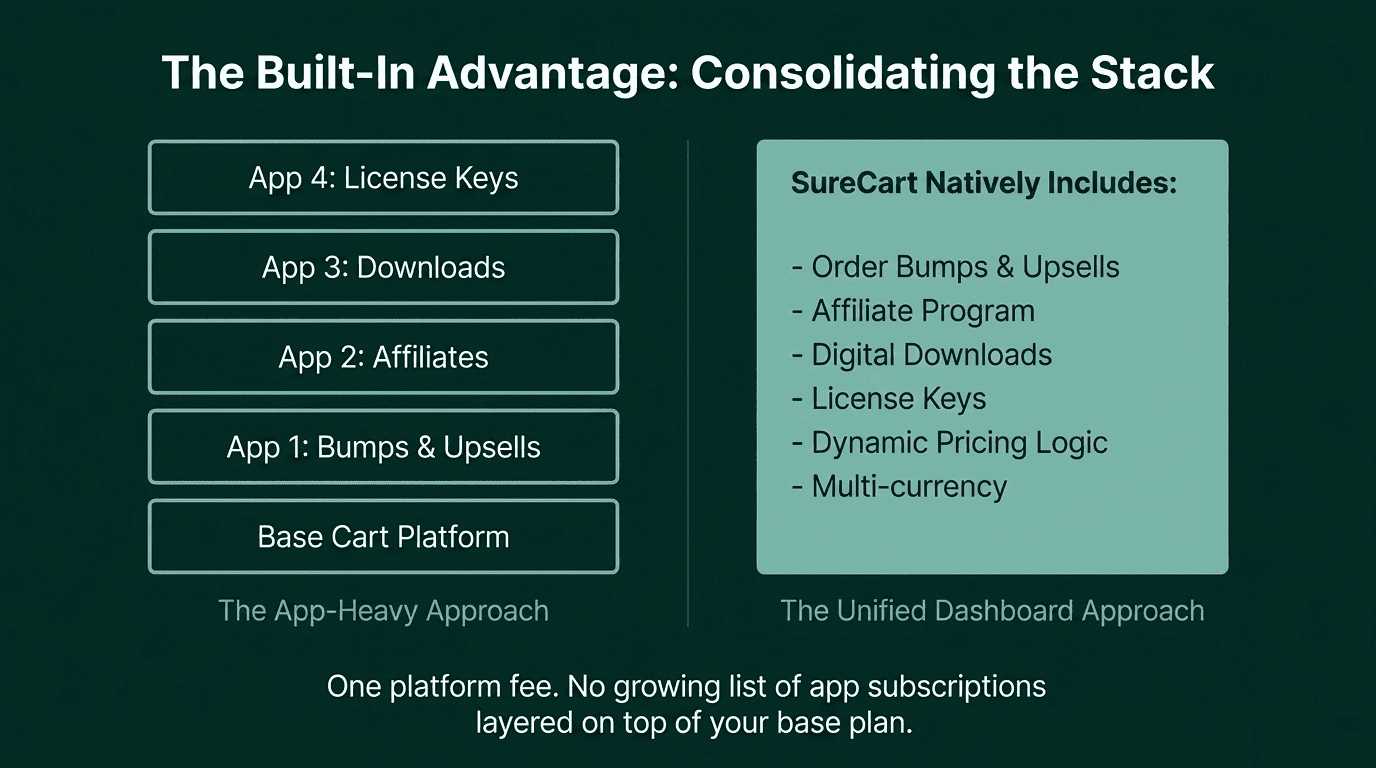
What SureCart includes on its free Launch plan, with no add-ons required:
- Abandoned cart recovery
- Order bumps and upsells
- Affiliate platform
- Multi-currency support
- Digital product delivery with secure file download
- License key generation for software and plugin sellers
- Native subscriptions with full customer self-management
- Dynamic pricing rules (IF/THEN discount logic based on customer role, order value, or product type)
On Shopify, order bumps, upsells, affiliate management, and license keys all require separate paid apps, typically adding $10–100/month per app. On Squarespace, most of these features are not available at any plan tier. This means your ecommerce stack on WordPress + SureCart is one platform fee plus hosting; not a growing list of app subscriptions layered on top of your base plan. The total annual cost is predictable from day one.
The practical difference with WordPress comes down to one thing: hosting. On Wix or Shopify, hosting is bundled into your plan. With WordPress, you choose and pay for your hosting separately. That means picking a provider, doing a one-click WordPress install from their control panel, and occasionally keeping plugins updated.
In practice, most hosting providers offer one-click installation and handle updates automatically. The extra effort amounts to a few minutes during setup and occasional one-click updates afterward. It is a real difference, not an imaginary one. But it is a minor practical task, not a technical skill.
What you get in return is complete ownership. Your site, your products, your customer data, and your order history are yours. If you decide to change your theme, switch hosting providers, or restructure how your store works, you can do it on your terms.
Pro Tip: Starter Templates has a library of ecommerce designs built specifically for SureCart stores. Import one, connect SureCart, and a working store with a complete design can be live in an afternoon. See the integration at surecart.com/integrations/starter-templates.
Is WordPress + SureCart really as easy to start with as Shopify or Wix?
The actual setup steps, written out:
- Choose a hosting provider (SiteGround, Hostinger, or Cloudways are solid starting points). Most offer one-click WordPress installation from the control panel.
- Install the Astra theme from WordPress’s theme library. Free. Takes under a minute.
- Install Starter Templates, browse SureCart-compatible store designs, and import one. Around five minutes.
- Install SureCart from the WordPress plugin library, run the setup wizard, and connect your store. Around ten minutes.
- Connect your payment gateway (Stripe, PayPal, Mollie, or Razorpay) from the SureCart dashboard. Around five minutes.
Five steps, all from a dashboard, no code. The practical outcome is a store that truly belongs to you. You are not renting a storefront from a platform. You are building on infrastructure you own.
The Real Cost of Each Wix Alternative for Ecommerce
Every platform has a base plan fee. The add-ons column below shows where the real cost difference shows up: features you would pay extra for.
All prices are based on annual billing.
Platform | Beginner plan | Add-ons needed | Transaction fee | Annual cost |
|---|---|---|---|---|
Wix | Core | Order bumps and upsells, dynamic pricing rules, affiliate program, and license key generation | 4% per transaction | $348/year + transaction fees + paid add-ons |
Shopify | Basic | Order bumps and upsells, affiliate program, license key generation, dynamic pricing rules, subscriptions (free app available, limited functionality) | 2% per transaction with a third-party gateway | $348/year + transaction fees + paid add-ons |
Squarespace | Advanced Commerce | Order bumps and upsells, affiliate program, license key generation, and dynamic pricing rules | None | $588/year + transaction fees + paid add-ons |
WordPress + SureCart | SureCart Pro + best ecommerce hosting ($15/month) | None (all included) | None | ~$379/year (all-in) |
Four things worth knowing before reading this table:
Squarespace’s Advanced Commerce plan is the minimum for a complete ecommerce store. The lower Basic Commerce plan ($27/month) is missing abandoned cart recovery and native subscriptions.
Shopify’s additional 2% platform fee applies when you use a payment gateway other than Shopify Payments. Shopify Payments availability varies by country.
SureCart’s free Launch plan is also available with a 2.9% per-sale platform fee plus hosting (approximately $180/year). Total: roughly $180/year + 2.9% per sale: a practical entry point to validate your store before upgrading to Pro.
For a beginner store with low or moderate traffic, hosting can start as low as $5–10 per month. The $15/month figure in the table reflects a hosting plan suited for a store that is actively running and growing: one with ecommerce-optimized servers, better performance, and reliable uptime. Your starting cost may be lower.
Pro Tip: On SureCart’s free Launch plan, once the 2.9% per-sale fee adds up to $199 in a year, upgrading to Pro removes the fee and costs less overall. Check current plan details at surecart.com/pricing.
Build the Store That Fits What You Actually Sell
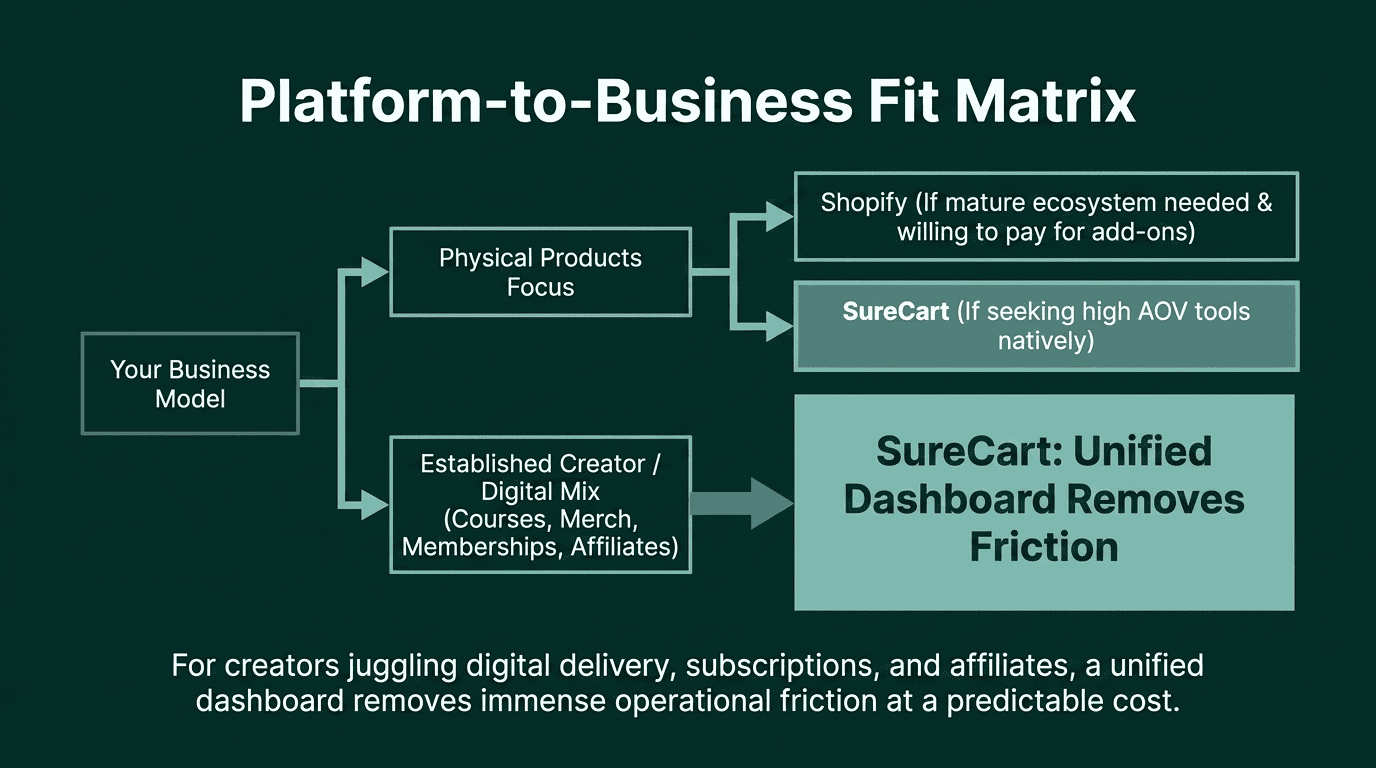
By this point, you have seen the platforms, the limitations, and what each one costs, with everything included. The cost table makes the numbers clear. What it does not answer is which platform fits your specific store. That depends on what you sell, how you plan to grow, and what you want to pay for the features you will eventually need.
If you primarily sell physical products
Physical product stores have real choices here, and the decision depends on how much the store expects to grow and what revenue tools it will need.
Shopify at $348/year covers the basics: inventory, shipping, and abandoned cart recovery. The ecosystem for physical sellers is mature, and the checkout is reliable. The limitation shows up when the store wants to increase the average order value. Order bumps, upsells, and an affiliate program all require paid apps on Shopify, each adding to the monthly cost. For a store planning to run promotions, recruit affiliates, or show relevant add-ons at checkout, those app costs close the gap quickly.
Squarespace Advanced Commerce at $588/year handles physical products but has no native order bumps, upsells, or affiliate program at any plan tier.
WordPress + SureCart Pro at roughly $379/year covers a physical product store completely: inventory, shipping, abandoned cart recovery, order bumps, upsells, and an affiliate platform, all from one dashboard, with no add-ons required. When a customer abandons their cart, SureCart sends the recovery email. When they check out, you can show a relevant add-on. When your audience grows, you can launch an affiliate program without installing anything. That full toolkit is included in the annual cost shown in the table.
If you are a creator with an established audience
This applies to anyone who already has an audience: a newsletter, a YouTube channel, a social following, or an engaged community, and wants to monetize it directly.
A typical creator store looks like this: a digital course or ebook, a monthly membership for exclusive content, branded physical merch, and the ability to let engaged followers earn by promoting the products as affiliates. That combination requires, on most platforms, stitching together multiple tools and paying for each one separately.
On Shopify, subscriptions need an app, digital delivery needs an app, and an affiliate program needs a paid app. On Squarespace Advanced Commerce, subscriptions work natively, but there is no affiliate management and no license key generation.
On WordPress + SureCart, this entire setup lives in one dashboard. Digital products are delivered securely after purchase. Subscription billing is managed automatically. Physical merch is tracked alongside everything else. An affiliate program can be activated without installing anything extra. If part of the offering is software or plugins, license key generation is also built in. For a creator whose income depends on this mix of product types, that unified setup at a predictable annual cost removes a significant layer of operational friction.
If you want to validate your store before paying for a platform subscription
SureCart’s free Launch plan changes the starting cost entirely. You pay for hosting and a 2.9% fee on each sale. There is no platform subscription until you are ready for one. Once the 2.9% fee on your annual sales exceeds $199, upgrading to Pro removes it and costs less overall. No other platform in this comparison offers that kind of entry point.
The right platform comes down to what your store needs today and what it will need six months from now. The cost table is a starting point. The add-ons column is the real story; it shows what you would pay later for features that most stores eventually use. When you factor those in, the comparison shifts.
If the ownership and cost argument fit what you are building, SureCart’s free Launch plan is a starting point with no subscription commitment required.