If you build WordPress plugins, themes, or any downloadable software, there’s a version of your business that runs on trust and a version that runs on systems. Most developers start with trust — a ZIP file, a PayPal button, and the assumption that customers are honest. That works, until it doesn’t.
The moment someone shares your plugin in a private Facebook group, or a client who stopped paying is still getting update notifications, or you need to figure out how many active installs you actually have, you realise trust isn’t a software licensing system. It’s a liability.
Knowing how to sell software licenses online properly means having infrastructure: unique keys per customer, rules about where those keys can be used, a single dashboard to manage everything, and a way for your plugin to verify access automatically. That’s not a luxury for big plugin businesses. It’s what separates a product from a hobby.
The good news is you don’t need to build any of that from scratch. SureCart is a WordPress-native e-commerce platform with licensing built directly into the product editor. The rest of this guide walks through exactly how it works, and how to go from zero to a fully licensed, automatically delivered software product.
What Software Licensing Actually Means in WordPress Terms
Plain language first. A software license is permission to use your product under specific conditions: how many sites, for how long, at what support tier. A license key is the proof of that permission — a unique code tied to one customer, one purchase.
Without licensing, you’re selling a file. Anyone can copy a file. With licensing, each customer gets:
- Their own key — visible in your dashboard, tied to their order.
- Rules attached to that key — one site, five sites, unlimited, annual, lifetime.
- An activation history — which sites the key is running on, when it was activated.
That’s the difference between “I think about 200 people are using this” and “I can see every license, every site, and revoke any of them in two clicks.”
The End-to-End Licensing Flow
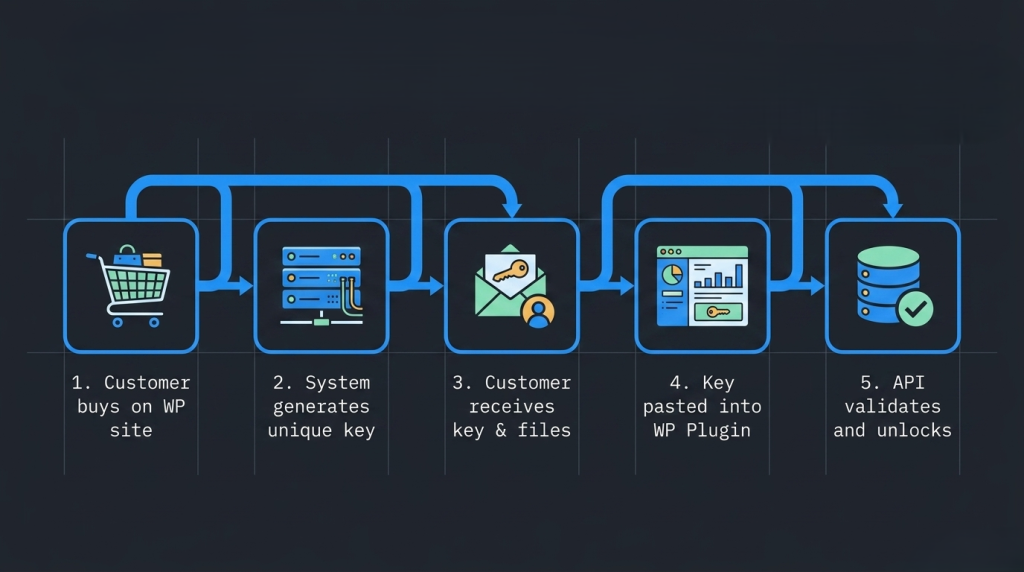
Before touching any settings, it helps to see the full picture. Here’s what a complete software licensing system looks like when SureCart is running it:
- You create a product and enable licensing. In the product editor, a Licensing panel lets you toggle on key generation, set your activation rules, and attach the plugin ZIP as your current release.
- A customer checks out on your WordPress site. SureCart handles payment via Stripe, PayPal, or your preferred gateway.
- A unique license key is generated automatically. It’s created at the moment of purchase and tied to that order and customer, with no manual step from you.
- The customer receives everything in their purchase confirmation email. The key appears directly in the receipt alongside the download link. No separate email to configure.
- The customer can also access it anytime in their account. SureCart’s customer dashboard includes a dedicated Licenses area, keys, downloads, and status, all in one place.
- Your plugin asks for the key inside WordPress. The customer pastes it into your plugin’s settings page. Your plugin checks it against SureCart’s licensing system: is it valid, and how many activations are left?
- Pro features unlock for valid keys. If everything checks out, your plugin unlocks and optionally re-checks periodically to stay in sync.
SureCart is acting as your license server throughout this. You’re not running a separate application or managing a custom database; the same platform that processed the payment is the one answering “is this license valid?”
Key Licensing Concepts You’ll See in SureCart
A few terms appear throughout the product editor. Here’s what they mean before you encounter them.
Activation limit: How many unique sites can use one license key simultaneously? Set 1 for a single-site license, 5 for an agency pack, or leave it blank for unlimited. In SureCart, this default lives at the product level but can be overridden per price — so one product can have a $39 price with a 1-site limit and a $99 price with a 5-site limit.
License server: The backend that stores all license records and answers API questions: is this key valid, who owns it, how many activations have been used? SureCart is your license server. You don’t build one, host one, or maintain one.
Current Release: The specific ZIP file that represents the latest version of your plugin or theme. SureCart serves this file when a customer downloads after purchase, or when your plugin checks for updates. You set it by choosing from the files you’ve already uploaded to the product’s Downloads section.
Activation: Each time someone installs your plugin on a site and connects it with a license key, that creates an activation record in SureCart — storing the site’s identity and counting toward the activation limit.
Choosing the Right Software Licensing Solution for WordPress
When evaluating software licensing solutions for a WordPress business, you’re really choosing the system that will sit behind your product for years. The checklist that matters:
- Automatic key generation — every purchase produces a unique key with no manual step.
- Built-in email delivery — the key reaches the customer without building a separate notification flow.
- Activation controls — you can cap how many sites can use one key, per product or per price.
- A central management screen — one place to find, view, and act on any license.
- A validation layer — a way for your plugin to check key validity automatically.
- Same platform as your checkout — fewer systems stitched together means fewer things that can break.
All-in-one platforms vs. add-on license managers
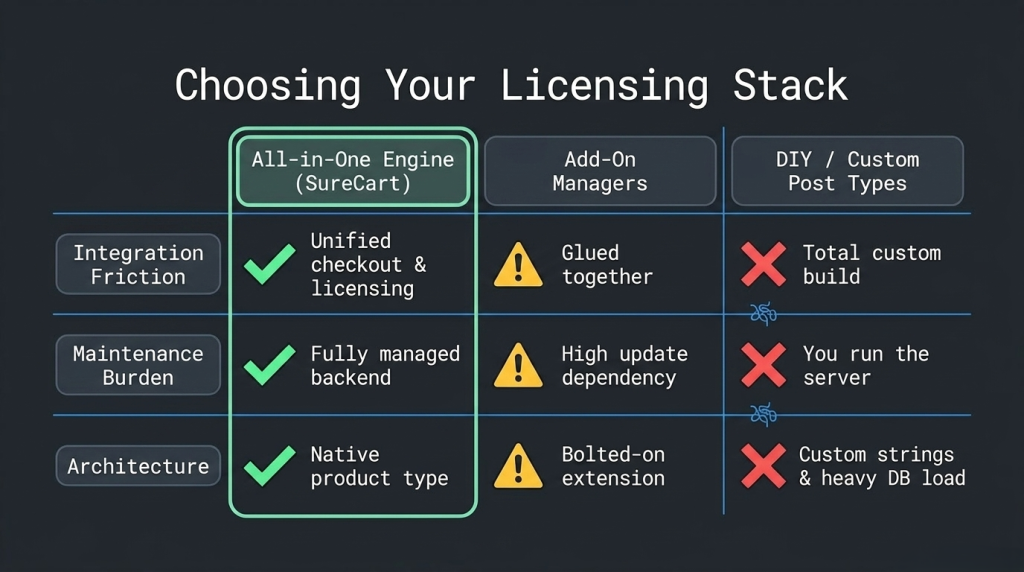
All-in-one platforms like SureCart handle your product catalogue, checkout, payment integrations, subscriptions, and licensing in a single stack. Customer data is unified, there’s one dashboard, and licensing is a first-class feature built into the product editor — not bolted on from outside.
Add-on license managers plug into WooCommerce and specialise in key generation. They work, but you’re responsible for wiring them to your cart, keeping both systems in sync, and debugging the seams between them when something breaks.
For a plugin or theme business launching today, an all-in-one software licensing solution where payments and keys live in the same system is simply less to manage — and less that can go wrong.
Step-by-Step: How to Sell Software Licenses Online with SureCart
Concrete example: “Slideshow Pro,” a premium gallery plugin. Goals: a 1-site license at $39/year, a 5-site license at $99/year, automatic key generation, and the plugin only unlocking pro features for valid keys.
Step 1: Install SureCart and connect your account
Install the free SureCart plugin from the WordPress plugin directory. When prompted, connect it to your SureCart account (create one if needed). The setup wizard walks through connecting a payment gateway — Stripe, PayPal, or others — so you’re ready to accept real payments.
SureCart’s architecture keeps your WordPress install lean. The plugin handles your front-end checkout pages and customer account area; the heavier work — payment processing, license records, customer data – runs in SureCart’s managed backend.
Step 2: Create your product
Go to SureCart → Products → Add New. Enter the product name — “Slideshow Pro” — and click Create.
You’re now in the product editor. This is where everything lives: pricing, downloads, and licensing settings. There’s no “product type” to select; all products start the same way; you turn capabilities on or off depending on what you’re selling.
Step 3: Enable licensing and set your activation rules
Scroll down to the Licensing panel in the product editor. (This panel appears when your SureCart plan includes the Licensing feature — it’s available on paid plans.)
Toggle on “Enable license creation.” This tells SureCart to generate a unique key for every purchase of this product.
Two fields now appear:
Activation Limit — for your $39 single-site price, set this to 1. Leave it blank for unlimited. For “Slideshow Pro,” you don’t need two separate products for different tiers. Instead, set the limit at the price level:
- Add a price at $39/year → set activation limit to 1
- Add a price at $99/year → set activation limit to 5
Each price overrides the product-level default. One product, multiple plans, each with its own activation cap.
Current Release — this dropdown shows any ZIP files you’ve uploaded under the product’s Downloads section. Upload your plugin ZIP there first, then come back and select it as the Current Release. This is the file customers download after purchase and what SureCart serves when your plugin checks for updates.
Step 4: Build the checkout on your WordPress site
SureCart provides Gutenberg blocks for embedding checkout into any page. For Slideshow Pro, place a buy button or a full checkout form directly on your sales page. Customers complete the purchase without leaving your domain.
If you want separate landing pages per plan — one for the 1-site license, one for the 5-site license — you can link each button directly to its specific price.
Step 5: Test the full flow end-to-end
Run through the complete journey yourself before any real customer does, using your payment gateway’s test mode:
- Place a test purchase.
- Check your email — the purchase confirmation should include your license key, displayed clearly in the receipt.
- Log into your customer account on your site. Under Licenses, both the key and the download link should be visible.
- In your WordPress admin, go to SureCart → Licenses. A record for the test purchase should be there — click into it to see the key, the customer it belongs to, and (once your plugin starts activating) a list of active installs.
That’s the complete loop confirmed before a single real customer touches it.
Wiring License Validation Into Your Plugin
This is the one part that requires a developer, but it’s less daunting than it sounds.
Inside your plugin, you add a license key field to your settings page. When a customer submits their key, your plugin sends it to SureCart’s licensing system to check its validity and activation status. SureCart responds, and your plugin either unlocks pro features or prompts the customer to check their key. That’s the entire logic. SureCart’s developer documentation covers the specific endpoints and parameters — you’re not building the licensing system, just teaching your plugin to ask one question and react to the answer.
Real-World Licensing Scenarios to Plan For
Renewals and auto-expiry
If you sell annual licenses, SureCart links license status to the subscription lifecycle automatically. When the subscription renews, the license stays active. When it lapses, failed payment or cancellation, the license is flagged as revoked, and your plugin’s next check picks that up.
You can also set “Expire access” at the price level — a toggle that automatically deactivates licenses (and any connected integrations) after a set number of days. Useful for trials, fixed-term licenses, or access that should naturally end without relying on a subscription.
Multi-plan upgrades
Because activation limits live at the price level, upgrading a customer from the 1-site plan to the 5-site plan updates their existing license record — same key, higher limit. They don’t need a new key, and you don’t need to manually adjust anything.
Refunds and revocations
When you need to cut off access for refund, chargeback, or terms violation — go to SureCart → Licenses, find the license, and deactivate it. The next time the customer’s install checks in, it gets a revoked response, and your plugin handles it accordingly. No database edits, no custom scripts.
Why This Scales Better Than Building It Yourself
You can duct-tape together license key generation with custom post types, random strings, and manual emails. Some developers do. But maintaining that means running your own license server, documenting your own API, debugging activation failures without proper tooling, and answering every “my license isn’t working” support ticket blind.
Using SureCart means:
- Payments, licenses, and customer records are one system, not three systems pretending to talk to each other.
- Your plugin talks to a maintained, documented API.
- SureCart → Licenses is your support dashboard — find any customer, view their activation history, revoke when needed.
- Your engineering time goes toward your plugin’s features, not the infrastructure underneath it.
The goal is to build software people love, not to also build the plumbing that delivers it.
For established software vendors, growth often involves improving existing products rather than building new ones from scratch. Application modernization services help organizations refactor legacy code, migrate monolithic applications to modern architectures, upgrade outdated technology stacks, and improve performance, security, and maintainability. This enables teams to introduce new capabilities – such as licensing, subscription management, and API integrations—without disrupting existing customers or slowing product innovation.
Frequently Asked Questions
What does it actually mean to sell software licenses online instead of just a ZIP file? When you sell a license, each customer gets a unique key tied to their purchase. That key has rules — how many sites it can run on, for how long — and an activation history. You can see every key in your dashboard, track where it’s used, and revoke it if needed. Selling a file gives you none of that control.
Does SureCart generate license keys automatically, or do I create them manually? Automatically. The moment a purchase is completed for a product with licensing enabled, SureCart generates a unique key and attaches it to that order. No manual step from you.
Can I sell different license tiers (1 site, 5 sites, unlimited) with one product in SureCart? Yes. Set the activation limit per price rather than just at the product level. One product, multiple prices, each with its own activation cap. Clean to manage and easy to expand.
Do customers receive their license key by email? Yes — the key is included in the standard purchase confirmation email automatically whenever a licensed product is purchased. Customers can also view their licenses and download links at any time from their account dashboard on your site.
What is a software licensing system, and do I really need one? A software licensing system is the infrastructure that generates, stores, delivers, and validates license keys. You need one the moment you care about controlling who uses your software, which is usually the moment you get your first support ticket from someone who got the plugin from a friend instead of buying it.
What happens to the license if a customer cancels their subscription? SureCart ties license status to the subscription lifecycle. When a subscription is cancelled or a payment fails, the license is flagged as revoked. Your plugin’s next validation check reflects that automatically.
Do I need to build or host my own license server? No. SureCart is your license server. It stores all license records, tracks activations, and handles validation. You just need your plugin to communicate with it — the developer documentation covers how.
Is the Licensing feature available on all SureCart plans? Licensing is available on SureCart’s paid plans. If the Licensing panel doesn’t appear in your product editor, check that your account plan includes it.
Can I revoke a license after a refund or if someone violates my terms? Yes. Go to SureCart → Licenses, find the license by customer or key, and deactivate it. The next validation request from their install returns a revoked status.
Start Selling Software Licenses the Right Way
The duct-tape approach works until the first shared key, the first failed renewal, or the first time you need to answer “how many sites is this plugin actually running on?” and you can’t.
A proper software licensing solution — where key generation, delivery, activation tracking, and validation all live in one system — is something you should set up before you need it, not after the first support ticket that breaks your afternoon.
SureCart gives you that system inside WordPress. One toggle enables licensing on any product. One screen manages every license. And your plugin has a clean, documented way to check keys automatically, without you maintaining the infrastructure behind it.
Install SureCart for free, connect your account, and your first licensed product can be live today.