Picture a customer landing on a skincare store and comparing a serum, moisturizer, and exfoliant. Each product raises another question: Do I need this? Does it work with what I already chose? What should I buy first?
Now picture the same store selling a “Brighter Skin Night Routine” kit. Instead of evaluating each item separately, the customer makes one clear choice: do I want this routine?
A good bundle organizes complementary products around a customer goal. That clarity can make the offer easier to buy and increase the amount spent in a single order.
This guide explains the research behind bundling, how to plan and price a bundle, what real brands have reported, and how to set up and sell Product bundles on WordPress.
A product bundle is a set of two or more products sold together as a single item, at its own price, so the customer makes one purchase decision instead of several.
Why product bundles work: the research behind the tactic
Bundling isn’t a growth hack. It’s a pricing and psychology strategy with decades of research behind it, and two findings in particular explain why it works.
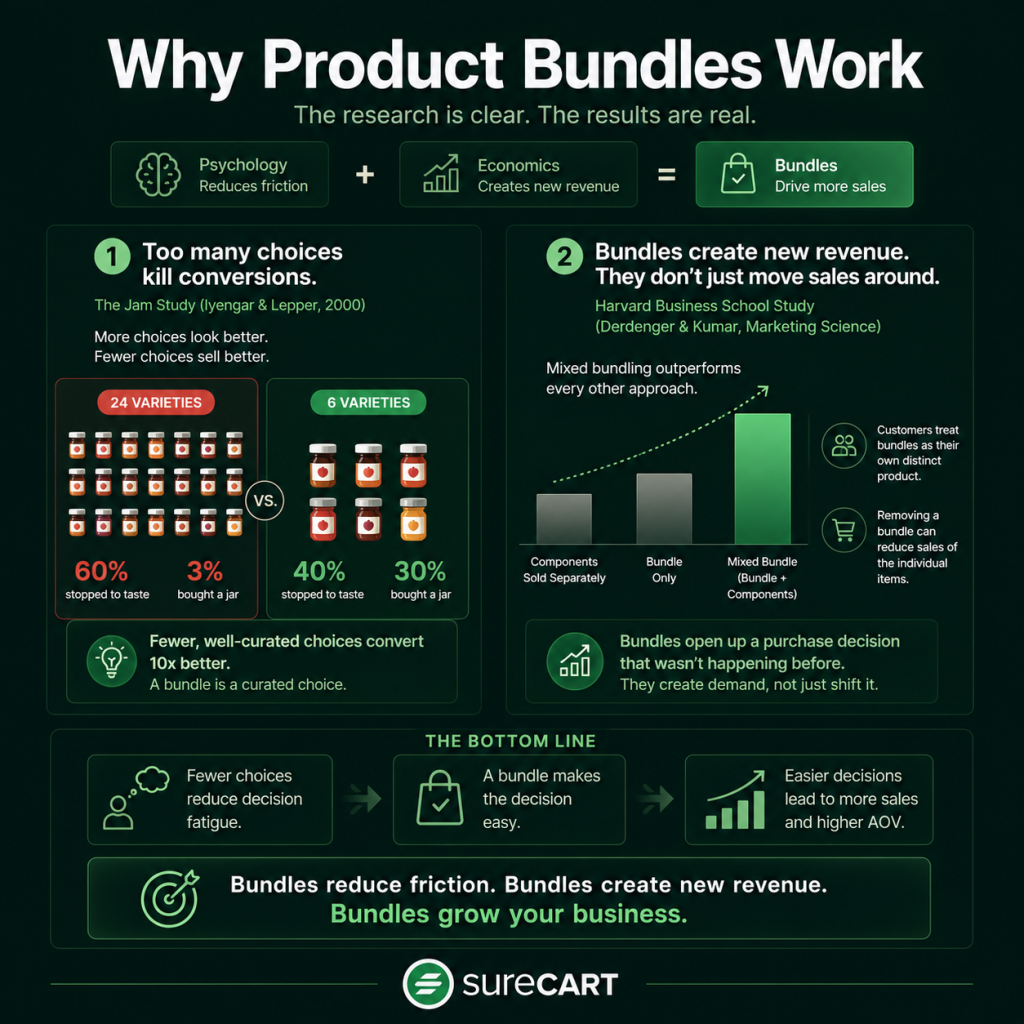
Too many choices lower the odds someone buys anything at all. In a landmark 2000 study published in the Journal of Personality and Social Psychology, researchers Sheena Iyengar (Columbia) and Mark Lepper (Stanford) set up jam-tasting tables at an upscale grocery store. When shoppers saw 24 jam varieties, 60% stopped to taste, but only 3% went on to buy.
When the display was cut down to 6 varieties, only 40% stopped to taste, but 30% of them bought a jar, ten times the purchase rate. The takeaway that matters for bundling: fewer, well-curated choices convert better than a wall of options. A bundle is a curated choice. It replaces “which five of these twelve things do I actually need” with “do I want this one thing,” and that’s an easier yes.
Bundling doesn’t just move existing sales around; it creates new revenue. A study by Harvard Business School’s Timothy Derdenger and Vineet Kumar, published in Marketing Science, modeled real purchase data from the handheld gaming market and found that mixed bundling (letting customers buy the bundle or the individual items separately) consistently outperformed both pure bundling (bundle-only) and selling components separately, on both hardware and software revenue.
Their research also found something less obvious: bundles get treated by customers as their own distinct product, not just a wrapper around the parts, and pulling a bundle away can actually reduce sales of the individual items it contained. In plain terms, a good bundle isn’t cannibalizing your existing sales. It’s opening up a purchase decision that wasn’t happening before.
Together, these two findings are the actual case for bundling: it reduces the friction of choosing, and it creates a new, distinct reason to buy that doesn’t just steal from your existing product sales.
How to plan a product bundle that sells?
A bundle isn’t “grab three things and slap a discount on it.” The best product bundling strategies follow a specific planning sequence.
Start from what customers already buy together, not what you want to move. Look at your order history for items that already show up in the same cart. If you don’t have that data yet because you’re just starting out, start from function instead: what does someone need to fully use the thing they’re buying? A template needs a guide on how to use it. A skincare serum needs a moisturizer to layer over the serum. That pairing logic is the entire bundle; everything else is packaging.
Pick a bundle type on purpose. There isn’t one kind of bundle; there are several, and they solve different problems:
- Pure bundling: items sold only as the set, never separately. Use this when you want to remove decision-making entirely.
- Mixed bundling: items available both bundled and individually, at a better combined price. Use this by default, since Derdenger and Kumar’s research above found it performs best in most cases.
- Cross-sell bundling: pairing a core product with a complementary one a customer wouldn’t have thought to add. Use this to introduce a smaller product line.
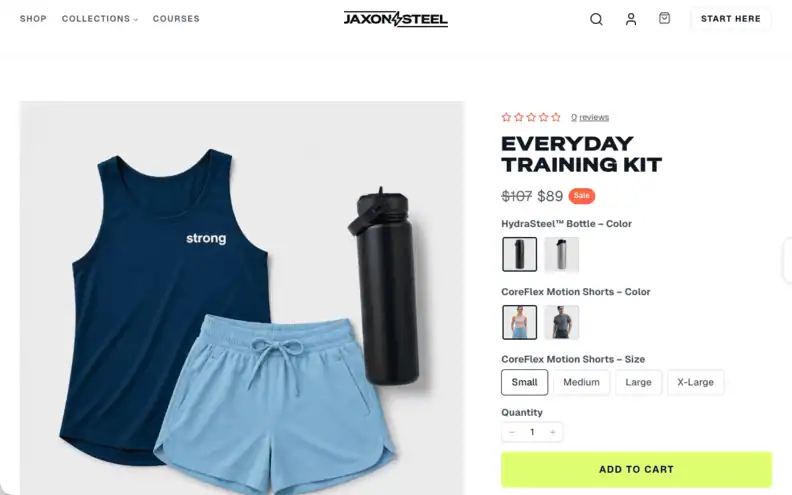
Price the bundle on purpose, not just “10% off.” A bundle price is a business decision, not a math problem. Decide first whether the bundle exists to increase order value (price it close to full value, since the win is more items per cart), move slow inventory (discount harder), or introduce a new product line (price it near cost to get it into hands). Set the number, then check it still clears your margin. If you are offering a saving, use anchor pricing to make it visible: show the combined individual price struck through next to the bundle price.
Name it by outcome, not by contents. “Template + Guide + Consulting Call” describes what’s inside. “Second Brain Starter Kit” describes what the customer gets out of it. The second one sells better, because it answers “why would I want this” instead of just “what is this.”
Product bundle examples for ecommerce: real brands, real numbers
These ecommerce product bundle examples come from companies that have published their results—not projected or estimated numbers, but reported outcomes.
| Brand | What they bundled | Reported result | Source |
| HiSmile (teeth whitening) | A multi-flavor toothpaste bundle, letting new customers try flavors before committing to one | Over 80% of orders are now bundled products; average cart size increased 4x | Shopify case study |
| Lvly (flower and gift delivery) | Expanded from a handful of gift sets to 150+ curated bundled products | 6% year-over-year increase in average order value | Shopify case study |
| rhode skin (skincare) | Skincare “kit” bundles built around its core products | Monthly revenue from bundled kits grew from $948,000 to $2.53 million (2.7x) between January and July 2025 | Particl AOV report |
| Blue Apron (meal kits) | Weekly recipe-and-ingredient bundle sold as a subscription | Early proof of the model: average order value of $58 and average revenue per customer of $245 in Q3 2017 | McKinsey, citing Blue Apron investor filings |
These Shopify stories expose the gap SureCart now closes: HiSmile moved from WooCommerce, while LVLY called its WooCommerce site a “house of cards” that could display only 30 bundle SKUs. For brands like these, scaling bundles meant leaving WordPress; SureCart now brings native product bundling to WordPress.
Worth being honest about the other side too: bundling isn’t automatically profitable just because you launched one. Retail analytics firm Revionics found that 65% of retail promotions, bundles included, fail to actually lift sales enough to justify the discount.
The brands above worked because the bundle solved a real decision-making problem for the customer (which flavor, which skincare step, what to cook this week), not because bundling itself is magic. Bundle the wrong things together and you’re just discounting for no reason.
How to apply bundling to your WordPress store
Put simply: a bundle should answer a question your customer already has. If you’re not sure what that question is, you’re not ready to launch a bundle yet, you’re ready to look at your order data for a week first.
Once you know the pairing, keep the offer to one clear price, one clear name, and one clear reason to buy, and resist the urge to bundle everything you sell into one giant kit. The research above is consistent on this point: curation beats volume. A tightly built two or three item bundle will consistently outsell a sprawling ten-item one, because it’s easier to say yes to.
Starting a commerce business from scratch? Here’s the short version.
If you’re building an online store on WordPress for the first time, bundling comes later. Get these in order first:
- Pick one product to sell first, not a full catalog. A single, well-defined offer is easier to validate than ten unproven ones.
- Set up a store and checkout on a platform that doesn’t need five separate plugins for basics like tax, coupons, and secure checkout.
- Get paid before you get fancy, meaning a working payment processor and a clean, trustworthy checkout page, before you touch email marketing or upsells.
- Launch, then watch what customers actually buy together. That real data, not guesswork, is what a good future bundle gets built from.
Start Selling for Free with SureCart, all features unlocked and no plugin management overload.
How this works on SureCart: Product Bundles?
We built Product Bundles as a native feature, not an add-on, so setting one up doesn’t require a separate plugin or a separate subscription. Here’s exactly how it works, based on our own documentation:
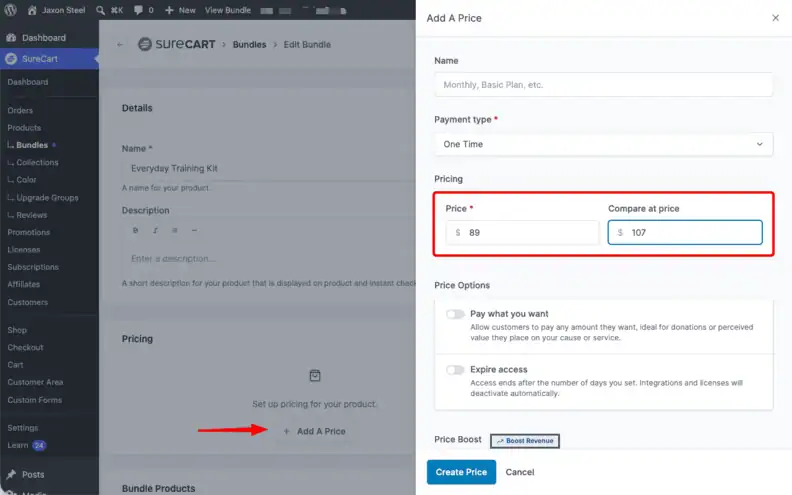
- A bundle groups two or more of your existing published products and sells them as a single purchasable item, at a price you set independently. The bundle price is not automatically calculated from the parts, so you’re free to price it however your strategy calls for.
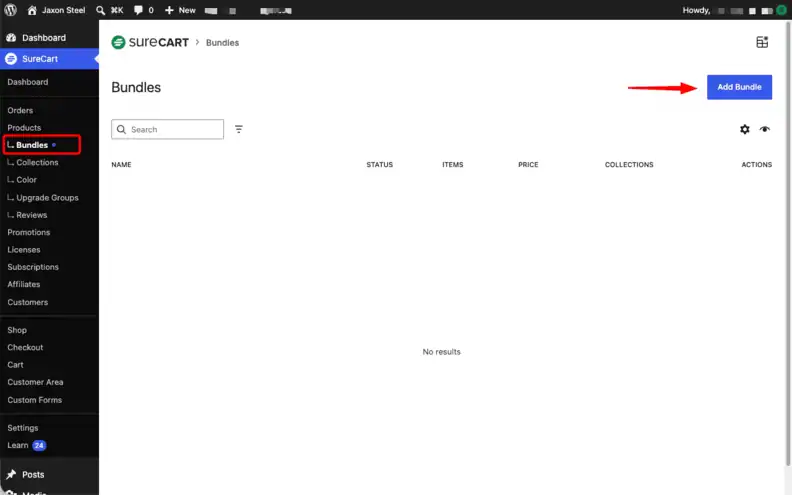
- You can add a Compare at price, a struck-through reference price, to show the saving, which is the anchor pricing tactic mentioned above.
- Included products show up in the cart and checkout summary, and if any of them have variants (like size or color), the customer selects those directly on the bundle’s product page.
- Shipping and tax are handled automatically from the products inside the bundle, including mixed-rate bundles.
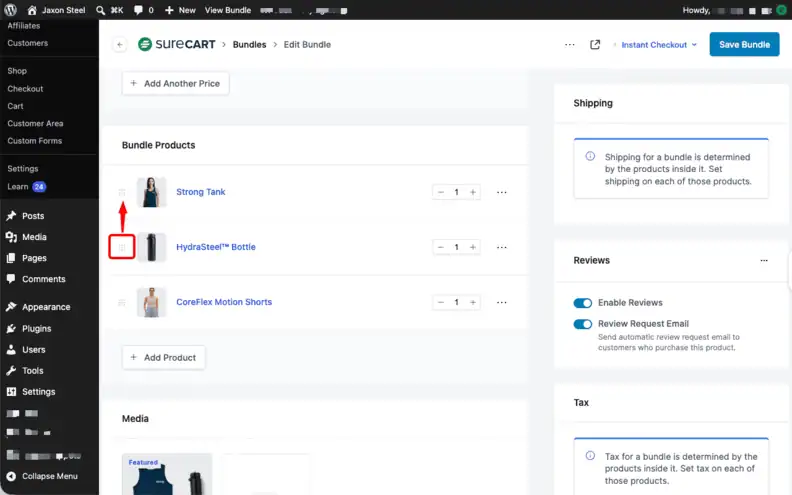
- Setup itself is four steps: go to SureCart → Products → Bundles, click Add Bundle, name it and set your pricing, then add the products that make up the bundle and publish.
That is also how we recommend positioning the feature: as an offer-creation tool that can lift average order value and reduce decision fatigue, rather than simply a way to clear inventory. Read the Product Bundles setup guide. For an optional add-on at checkout instead of a fixed package, use order bumps.
Ready to bundle your products? Start selling with SureCart for free and build your first Product Bundle.