You’ve got a product to sell, a domain name in mind, and roughly one afternoon to figure out which platform you’re building on. WordPress or Wix. Everyone has an opinion, and somehow all of them cancel each other out.
The WordPress people say Wix is a toy for hobbyists. The Wix people say WordPress will eat your weekend alive. Neither camp is entirely wrong — and neither is giving you the full picture.
This guide focuses specifically on eCommerce. Not portfolios, not blogs, not restaurant menus — selling things online, accepting payments, handling subscriptions, and building a store that can actually grow. That’s where the two platforms diverge in ways that matter, and that’s exactly what we’re going to work through here.
The short version: Wix is genuinely good for certain types of stores, and you’d be making a mistake to dismiss it. WordPress is better for stores that need room to grow. The right choice depends on where your business is going, not just where it is today.
What are WordPress and Wix — and how are they different?
Before comparing features, it helps to understand what these two things actually are — because they’re not two versions of the same thing. They’re fundamentally different approaches to building a web presence, and that difference shapes everything downstream.
Wix: A Fully Hosted, All-in-One Website Builder
Wix is a fully hosted, all-in-one website builder. Everything lives inside Wix’s system: your hosting, your design tools, your store, your payments. You don’t install anything, you don’t manage servers, and you don’t make infrastructure decisions. You pick a template, fill it in, and publish. The experience is consistent because Wix controls every layer of it.
WordPress: Open-Source CMS Built for Flexibility
WordPress — specifically WordPress.org, the self-hosted version — is open-source software. Open-source means the software is free, maintained by a global community of developers, and installable on virtually any web host. Out of the box, WordPress is a CMS, or content management system — a tool that lets you manage website content without writing code. To sell things on WordPress, you add an eCommerce plugin on top. The most common one is WooCommerce, but it isn’t the only one, and this distinction matters later in the guide.
A quick note: this guide covers self-hosted WordPress from WordPress.org. WordPress.com — the hosted version — is a different product with different rules. When people say “WordPress is complicated,” they usually mean WordPress.org. That’s the one with real eCommerce power, and the one we’re talking about throughout.
Why the platform type matters for your online store
Wix bundling everything into one package means less setup but less control. WordPress giving you a blank foundation means more flexibility but more decisions upfront. Neither is objectively better — they’re optimized for different goals, and what you’re optimizing for should drive which one you choose.
The numbers give useful context: WordPress powers 43.4% of all websites on the internet as of 2025, and WooCommerce powers approximately one-third of all online stores globally. Wix holds about 3.7% of the total web but has been growing steadily among small business sites. Scale alone doesn’t determine what’s right for you, but it does tell you where the ecosystem weight and long-term support sit.
WordPress vs Wix: Head-to-Head Comparison
Ease of Use: Which Platform is Easier to Set Up for eCommerce?
Where Wix Has a Genuine Advantage
Let’s be honest: Wix wins on ease of setup, and it’s not especially close. That’s not a knock on WordPress — it’s just true, and pretending otherwise would be doing you a disservice.
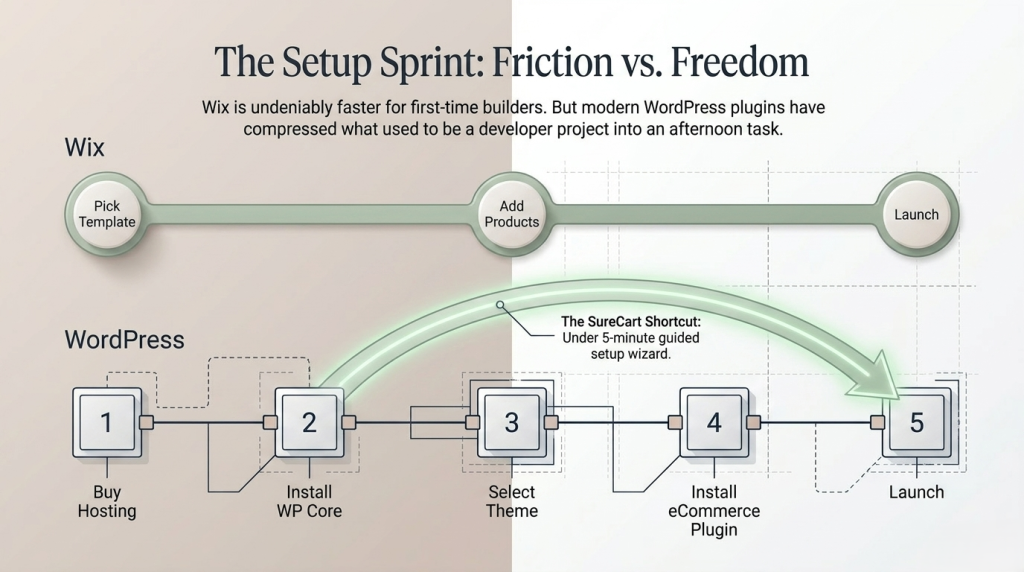
On Wix, you pick a template, upload your products, connect a payment method, and you’re live. No hosting decisions, no plugins to configure, no compatibility issues to troubleshoot. Their AI website builder can take a few text prompts and generate a functional storefront even faster. For someone who has never built a website before and wants to be selling within a day or two, Wix makes that realistic.
How Modern WordPress Has Changed the Equation
WordPress requires more upfront decisions. You need to choose a web host (the company that stores your website files on a server), install WordPress, select a theme, install an eCommerce plugin, and make sure the pieces work together. That’s more steps by any measure.
But here’s what most comparisons miss: modern WordPress has changed considerably. Tools like SureCart are specifically built to remove the traditional complexity. SureCart installs in under five minutes from the WordPress plugin directory, has a guided setup wizard, and gets a functional checkout live without requiring you to understand the underlying infrastructure. You’re not looking at a developer project — you’re looking at an afternoon.
The honest summary: if you’ve never built a website before and want to launch quickly with minimal friction, Wix has a real advantage in the setup phase. If you’re willing to invest a bit more time upfront for years of greater control, WordPress delivers more. And the gap in setup difficulty, while real, is smaller than the internet’s reputation for it would suggest.
Verdict: If you want to be live by tonight, Wix. If you’re willing to spend an afternoon on setup for a platform that won’t limit you later, WordPress.
Pricing: What WordPress and Wix Actually Cost for an Online Store
What Wix Actually Costs
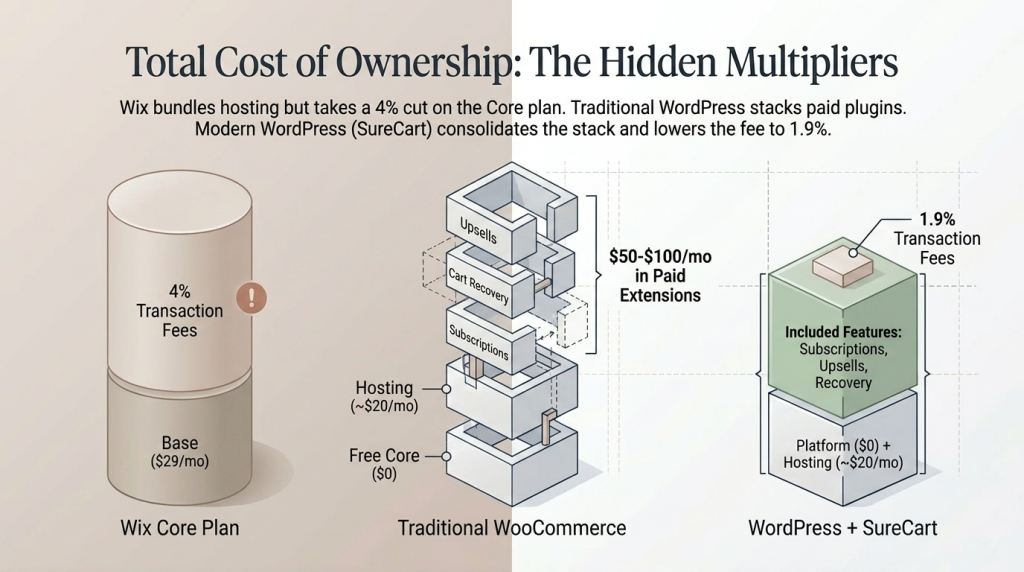
You cannot accept payments on Wix’s free plan, or on the Light plan ($17/month). eCommerce requires an upgrade, starting with the Core plan at $29/month billed annually. That’s the entry point for listing products, connecting a payment gateway, and running a functional store.
Here’s the plan ladder for eCommerce on Wix, as of 2025:
|
Wix Plan |
Monthly Cost (Annual Billing) |
Key eCommerce Capabilities |
|---|---|---|
|
Core |
$29/month |
Basic store, payments, subscriptions, 4% Wix transaction fees |
|
Business |
$36–$39/month |
Advanced shipping, automated tax, product reviews, more storage, 2% fees |
|
Business Elite |
$159/month |
Unlimited storage, advanced developer tools, priority support |
The catch: As you add apps from the Wix App Market, costs can climb — some useful eCommerce apps carry their own monthly fees on top.
What WordPress Actually Costs
WordPress software itself is free. What you pay for:
- Web hosting: $15–$25/month for a quality managed WordPress host (SiteGround, Cloudways, Kinsta)
- Domain name: approximately $12–$15 per year
- eCommerce plugin: the real variable
WooCommerce is free to install. But to build a competitive store with subscriptions, abandoned cart recovery, checkout optimization, and affiliate marketing, you typically need multiple paid extensions. That stack can reach $50–$100/month — and those costs often exceed what a SureCart paid plan would cost, while SureCart includes all of those features built in from the start with no transaction fees on paid plans.
Here’s a realistic monthly comparison for a full-fledged store with any product type:
|
Cost Factor |
Wix Core Plan |
WordPress + SureCart |
|---|---|---|
|
Platform or Plugin |
$29/month |
Free (SureCart Free plan) |
|
Hosting |
Included |
~$15–$25/month |
|
Subscriptions |
Included |
Included in SureCart |
|
Abandoned Cart Recovery |
Included |
Included in SureCart |
|
Order Bumps and Upsells |
None/Limited |
Included in SureCart |
|
Transaction Fees |
4% | 2.9% |
|
Approx. Monthly Total |
$29/month + 4% on sales | ~$15–$25/month + 2.9% on sales |
Verdict: Wix pricing is predictable and bundled. WordPress pricing is flexible. For stores that need more than basic selling tools, WordPress tends to give you more capability per dollar — especially when the eCommerce plugin includes advanced features rather than charging for each one separately.
eCommerce Features: Where the Real Differences Show Up
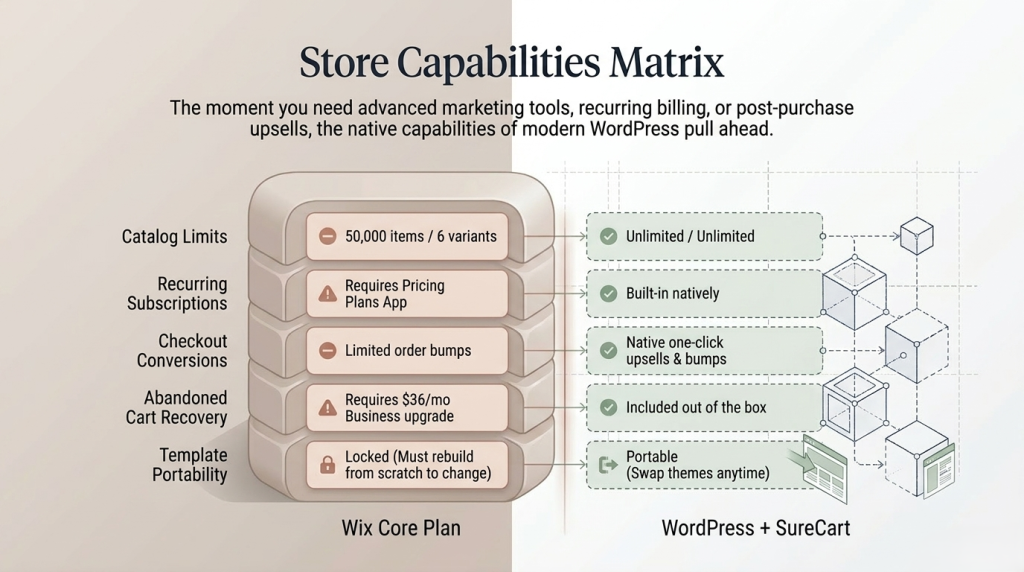
This is the most important section of this comparison — and the one that matters most if your store is a business, not a side project. Let’s look at both platforms from the perspective of someone six months into running a real store.
What Wix eCommerce Does Well
Wix’s eCommerce tools are genuinely solid for small to mid-size catalogs. You can list up to 50,000 products, and each product supports up to 6 options (like size, color, or material) with up to 1,000 variants per product. For most stores, that’s more than enough headroom.
The built-in feature set covers the fundamentals well:
- Physical products, digital downloads, and subscriptions (via the Wix Pricing Plans app) are all supported
- Dropshipping integrations with Modalyst, Spocket, and Printful are built in
- Abandoned cart recovery and discount tools are available
- Multi-channel selling connects your store to Instagram, Facebook, and TikTok
- The Wix App Market adds around 250 paid and free apps for extended functionality
- Everything integrates without compatibility issues because Wix controls the whole stack
For the right store, this is genuinely compelling. You focus on your products and customers; Wix handles the rest.
Where Wix eCommerce Falls Short
Once you push past the basics, Wix’s closed ecosystem starts creating friction that’s worth understanding before you commit.
You cannot switch templates once your site is built. If your brand evolves and you want a new design direction, you’re rebuilding from scratch. Your content doesn’t travel cleanly to a new template. For a growing store, this is a meaningful constraint.
Multi-currency checkout is not supported. You can display prices in different currencies, but the actual checkout processes only in your base currency. If you’re selling internationally at any real volume, this is a hard limitation.
Advanced SEO customization is restricted. Wix covers the basics — meta titles, descriptions, Google Search Console integration — but granular technical control over robots.txt, advanced schema markup, and deep URL structure management is either limited or requires workarounds. For a store relying on search traffic to grow, this is a ceiling you’ll eventually hit.
The closed ecosystem is both the strength and the constraint. If Wix doesn’t offer a feature or an app for it, you simply cannot have it. That predictability is valuable — but it also means your store’s ceiling is set by Wix’s roadmap, not yours.
What WordPress Brings to eCommerce
On WordPress, there is no hard ceiling. No product limit, no variant cap, no restriction on what features you can add. If a feature exists as a plugin — and with 60,000+ plugins available, most things do — you can have it.
SEO control is complete. Plugins like Rank Math offer content optimization scoring, custom schema markup, rank tracking, internal link suggestions, and full sitemap control. You can edit your robots.txt file directly. You control your URL structure entirely. For any store where organic search is a meaningful acquisition channel, this depth is difficult to replicate on a hosted builder.
Design flexibility is unrestricted. You can switch themes anytime without losing your products or customer data. Your store can look completely different in a week without rebuilding from scratch.
You own all your data. If you ever want to change hosts, switch plugins, or migrate to a different setup, everything comes with you.
On the eCommerce feature side, modern plugins have closed the setup complexity gap significantly. SureCart includes subscriptions, order bumps (small add-on offers shown at checkout that increase average order value without friction), one-click upsells, abandoned cart recovery, an affiliate platform, product licensing for software and digital products, coupon management, and real-time tax calculations with EU VAT compliance — all from a single plugin, without stacking multiple separate tools. SureCart’s checkout and commerce logic also runs on its own cloud infrastructure rather than your server, which means performance stays consistent as your store grows.
The Honest Trade-Off
The flip side of unlimited flexibility is that someone has to make the decisions. Hosting, plugin selection, updates, security — these are real responsibilities on WordPress. SureCart’s managed infrastructure reduces a significant portion of that burden. But it doesn’t eliminate the responsibility of owning a self-hosted WordPress site entirely. That’s not a dealbreaker for most store owners — it’s just worth knowing going in.
|
Feature |
Wix |
WordPress with SureCart |
|---|---|---|
|
Ease of Setup |
Very easy |
Easy with modern tools |
|
Product Limit |
50,000 |
Unlimited |
|
Subscriptions |
Yes, via app |
Yes, built in |
|
Abandoned Cart Recovery |
Business plan required |
Included |
|
Order Bumps and Upsells |
Limited |
Included |
|
Template Switching |
No |
Yes |
|
Multi-Currency Checkout |
No |
Yes |
|
SEO Control |
Basic |
Advanced |
|
Data Ownership |
Limited |
Full ownership |
|
Plugin and App Ecosystem |
250+ apps |
60,000+ plugins |
Verdict: For a simple, fixed catalog with modest growth plans: Wix covers the bases. For stores that will grow, sell subscriptions, or need advanced marketing and conversion tools: WordPress wins clearly.
SEO: Which platform helps you find on search engines?
For any store that relies on search traffic rather than paid ads or social media, this section matters considerably.
Wix SEO: Adequate for Small Stores
Wix’s SEO has improved substantially in recent years. It now includes a guided SEO setup tool, editable meta titles and descriptions, Google Search Console integration, and automatic structured data for products — the code that tells Google what your product is, what it costs, and what customers have said about it, so it can surface that information in search results more prominently.
For a small local business or a focused store where search traffic is a bonus rather than a strategy, Wix’s SEO tools are workable. The limitation shows up when you’re competing for real search terms. Wix gives you less control over technical SEO elements: advanced schema customization, robots.txt management, and the kind of deep optimization that dedicated WordPress SEO plugins enable. There’s also a historical reputation — improving but not yet fully resolved — for Wix sites performing inconsistently on Core Web Vitals.
Core Web Vitals are Google’s measurements of page speed and user experience that factor into search rankings. A fast, stable page that loads predictably tends to rank better than a slow one. WordPress gives you full control over the factors that influence these scores.
WordPress SEO: Built for Serious Search Competition
On WordPress, SEO control is essentially complete. Plugins like Rank Math offer content optimization scoring, keyword rank tracking, internal link suggestions, advanced schema generation, and indexing issue scanning. You control every technical SEO element directly.
For any store in a competitive niche where organic search is a primary acquisition channel, this depth is the difference between a platform you’ll fight against and one that works with you.
Verdict: For basic on-page SEO with a small store, Wix is sufficient. For competitive niches where organic search is a real growth channel, WordPress is the stronger long-term investment.
Data Ownership: What happens to your store if you want to leave?
Most people building their first online store don’t think about this — which is exactly why it’s worth covering now rather than after you’ve built 18 months of customer history on the wrong platform.
What Wix Data Ownership Actually Means
Wix is a closed system. Your store lives on Wix’s servers. If you ever want to leave — because you’ve outgrown Wix’s features, or pricing changes, or you simply need more control — you cannot export your store in a format that transfers cleanly to another platform. Your product listings, customer data, order history, and SEO equity don’t travel in a portable format.
Think about what that means practically: imagine building a customer list of 2,000 buyers over 18 months on Wix, then discovering you need a feature Wix simply doesn’t offer. Moving means re-uploading your entire product catalog, manually recreating your customer records, and potentially losing the organic search rankings you’ve worked to build. On Wix, a platform switch isn’t an inconvenience — it’s a reconstruction project.
What WordPress Data Ownership Actually Means
WordPress is the opposite. Because it’s open-source software and your store data lives in a database you control, you can migrate hosts, change themes, or switch eCommerce plugins without losing your products, customers, or order history. The data is yours in a real and portable sense.
SureCart is worth addressing specifically here, because some readers wonder whether a “managed” platform means less ownership. It doesn’t. You own 100% of your data and can access it anytime via API or webhooks. Your store runs on SureCart’s infrastructure for performance, but your data is never locked in.
Verdict: If you ever plan to grow beyond Wix’s walls, you’ll pay a real cost for the locked-in approach. With WordPress, your data is always yours and your options always stay open.
Which platform should you choose for your online store?
Choose Wix for eCommerce If…
Wix deserves a fair hearing. There are real scenarios where it’s the better tool, and choosing WordPress when Wix would serve you perfectly well just means more complexity for no gain.
Wix is genuinely the right choice when:
- You’re selling a small, relatively fixed catalog — under 100 products — with no plans to scale aggressively
- Your primary sales come through social media, direct links, or word of mouth rather than search engine traffic
- You’ve never built a website before and want to launch in a single afternoon with no technical friction whatsoever
- Your business is primarily local — a studio, a photography business, a market stall — and your website supports sales rather than driving them
- You run a service business where appointment booking and scheduling matter more than a deep product catalog: yoga studios, consultants, coaches, tutors
- You genuinely want a platform where hosting, security, software updates, and performance are handled entirely for you — and you accept the trade-offs of a closed system in exchange for that peace of mind
For these use cases, Wix delivers real value. The eCommerce tools work, the experience is clean, and you’ll live quickly.
Choose WordPress for eCommerce If…
WordPress is the better choice when:
- You plan to grow your catalog, your customer base, or your revenue significantly — and need a platform that grows with you rather than against you
- SEO and content marketing are part of your growth strategy — you’re building a blog alongside your store, or competing for search traffic in a real niche
- You’re selling digital products, subscriptions, courses, or memberships — where recurring billing, access management, and automated dunning matter
- You want to own your data and retain the freedom to switch hosts, themes, or plugins without losing your store
- You need advanced checkout features: order bumps, one-click upsells, affiliate programs, or flexible coupon logic
- You’re building a store that a developer might customize further down the line
- You’re an agency building stores for clients and need a platform you can replicate and manage across multiple sites efficiently
For WordPress stores in this category — especially digital products, subscriptions, and services — it’s worth looking at SureCart before defaulting to WooCommerce. It handles subscriptions, order bumps, abandoned cart recovery, licensing, and real-time tax out of the box, without buying a separate plugin for each feature. It powers over 100,000 active WordPress installations and is built by the same team behind Astra, one of the most widely-installed WordPress themes. The free plan gives you full core functionality to start — no credit card needed.
Take a look at what SureCart includes out of the box before committing to any particular plugin stack. And if you’re weighing it against WooCommerce specifically, the SureCart vs WooCommerce comparison breaks down where each one is stronger.